

What this core is
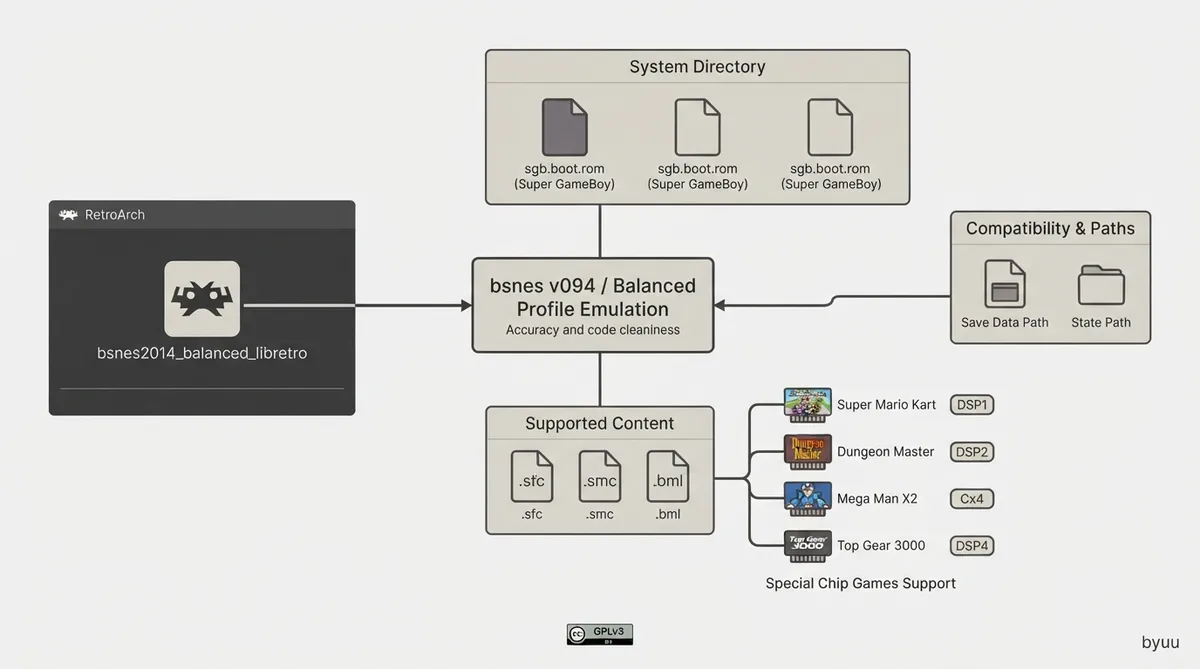
bsnes 2014 Balanced is the bsnes v094 core whose library file is named bsnes2014_balanced_libretro. The current bsnes is a separate core with its own documentation page. bsnes is a Super Nintendo emulator that began development on 2004-10-14; it emphasizes accuracy and clean code and does not use speed or compatibility hacks, so minimum system requirements are higher than with other emulators. bsnes ships in three profiles (accuracy, balanced and performance) that differ slightly in PPU (graphics) emulation, and this core is the Balanced build.
The core is authored by byuu and licensed under GPLv3.
Prerequisites
- - A RetroArch installation with the bsnes 2014 Balanced core available (core file name bsnes2014_balanced_libretro).
- - SNES content in a supported format. The core loads .sfc, .smc and .bml files.
- - Any firmware files you intend to use, placed in the frontend's system directory; the documentation states required or optional firmware goes there.
- - For Super GameBoy use: sgb.boot.rom in the system directory, a Game Boy ROM and a Super GameBoy ROM, both unzipped. This path is documented as Windows only.
Supported content extensions and databases
Content that can be loaded by the core uses the file extensions .sfc, .smc and .bml. The associated RetroArch databases are Nintendo - Super Nintendo Entertainment System, Nintendo - Super Nintendo Entertainment System Hacks, and Nintendo - Sufami Turbo.
Firmware files
Required or optional firmware files go in the frontend's system directory. The documentation notes that this core uses split ROMs for special-chip games, and lists notable games per chip: Super Mario Kart and Pilotwings (DSP1/DSP1B), Dungeon Master (DSP2), SD Gundam GX (DSP3), Top Gear 3000 (DSP4), and Mega Man X2 and Mega Man X3 (Cx4).
The documented firmware file names include dsp1.data.rom, dsp1.program.rom, dsp1b.data.rom, dsp1b.program.rom, dsp2.data.rom, dsp2.program.rom, dsp3.data.rom, dsp3.program.rom, dsp4.data.rom, dsp4.program.rom, cx4.data.rom, st010.data.rom, st010.program.rom, st011.data.rom, st011.program.rom, st018.data.rom, st018.program.rom and sgb.boot.rom.
Feature support
The documentation lists the following features as supported: Restart, Screenshots, Saves, States, Rewind, Netplay, Memory Monitoring (achievements), RetroArch Cheats, Controls, Remapping, Subsystem, Softpatching, and Crop Overscan.
The documentation lists the following as not supported: Core Options, Native Cheats, Rumble, Sensors, Camera, Location, Disk Control, Username, and Language. Multi-Mouse is listed with a dash rather than a check or cross.
Save, state and timing details
The core's internal core name is 'bsnes'. Battery saves are written to the frontend's Save directory as 'content-name'.srm, and states are written to the frontend's State directory as 'content-name'.state#.
The core reports an FPS of 60.0988118623 for NTSC games and 50.0069789082 for PAL games, a sample rate of 32040.5 Hz, and an aspect ratio of 4/3.
Super GameBoy via the Subsystem API
- 1. Using RetroArch's GUI, load the Game Boy ROM through 'Load Super GameBoy' in RetroArch's Main Menu.
- 2. Load the Super GameBoy ROM through 'Load Super GameBoy' in RetroArch's Menu Menu.
- 3. Start the content by selecting 'Start GameBoy' in RetroArch's Menu Menu.
retroarch -L {path to bsnes core} {path to Super GameBoy ROM} --subsystem sgb {path to GameBoy rom}For Super GameBoy support you need sgb.boot.rom in RetroArch's System directory, a Game Boy ROM and a Super GameBoy ROM. The Game Boy and Super GameBoy ROMs have to be unzipped. Super GameBoy is supported via the Subsystem API, which can be reached either through the GUI route above or by launching RetroArch from the command line with the subsystem argument.
MSU-1
The documentation describes MSU-1 support in this core as complex and can be used by loading a correct .bml file. It points to the Snes9x core for simplified and easily accessible MSU-1 support, and to standalone higan documentation for loading MSU-1 games.
Controllers and device types
User 1 device types are None (disables input), SNES Joypad (the default) and SNES Mouse. User 2 device types are None (disables input), SNES Joypad (the default), SNES Mouse, Multitap, SuperScope, Justifier and Justifiers.
Multitap support allows for up to five players in multitap games and is enabled by switching to the Multitap device type for User 2. The Justifiers option plugs in two Justifiers for two-player Justifier games.
Documented compatibility issue
The documentation's compatibility table lists one known issue: in A.S.P. Air Strike Patrol, black lines show up during gameplay and the shadow below the aircraft is missing.
Reference table · Scroll horizontally to see all columns.
| Filename | Description | md5sum |
|---|---|---|
| dsp1.data.rom | DSP1 co-processor firmware | 3d81b45fa0c2aa8b852dfb1ece7c0971 |
| dsp1.program.rom | DSP1 co-processor firmware | ae209fbe789fbf11a48aea5ab1197321 |
| dsp1b.data.rom | DSP1B co-processor firmware | 1e3f568634a7d8284020dddc0ae905bc |
| dsp1b.program.rom | DSP1B co-processor firmware | d10f446888e097cbf500f3f663cf4f6d |
| dsp2.data.rom | DSP2 co-processor firmware | e9417e29223b139c3c4b635a2a3b8744 |
| dsp2.program.rom | DSP2 co-processor firmware | aa6e5922a3ed5ded54f24247c11143c5 |
| dsp3.data.rom | DSP3 co-processor firmware | 0a81210c0a940b997dd9843281008ee6 |
| dsp3.program.rom | DSP3 co-processor firmware | d99ca4562818d49cee1f242705bba6f8 |
| dsp4.data.rom | DSP4 co-processor firmware | ee4990879eb68e3cbca239c5bc20303d |
| dsp4.program.rom | DSP4 co-processor firmware | a151023b948b90ffc23a5b594bb6fef2 |
| cx4.data.rom | CX4 co-processor firmware | 037ac4296b6b6a5c47c440188d3c72e3 |
| st010.data.rom | ST010 co-processor firmware | 254d70762b6f59f99c27c395aba7d07d |
| st010.program.rom | ST010 co-processor firmware | 1d70019179a59a566a0bb5d3f2845544 |
| st011.data.rom | ST011 co-processor firmware | 10bd3f4aa949737ab9836512c35bcc29 |
| st011.program.rom | ST011 co-processor firmware | 95222ebf1c0c2990bcf25db43743f032 |
| st018.data.rom | ST018 co-processor firmware | 49c898b60d0f15e90d0ba780dd12f366 |
| st018.program.rom | ST018 co-processor firmware | dda40ccd57390c96e49d30a041f9a9e7 |
| sgb.boot.rom | Super Game Boy BIOS |
Reference table · Scroll horizontally to see all columns.
| User 1 - 5 Remap descriptor | RetroPad input |
|---|---|
| B | B |
| Y | Y |
| Select | Select |
| Start | Start |
| D-Pad Up | D-Pad Up |
| D-Pad Down | D-Pad Down |
| D-Pad Left | D-Pad Left |
| D-Pad Right | D-Pad Right |
| A | A |
| X | X |
| L | L1 |
| R | R1 |
Reference table · Scroll horizontally to see all columns.
| RetroLightgun input | SuperScope | Justifier(s) |
|---|---|---|
| Gun Crosshair | SuperScope Crosshair | Justifier Crosshair |
| Gun Trigger | SuperScope Trigger | Justifier Trigger |
| Gun Aux A | SuperScope Cursor | |
| Gun Aux B | SuperScope Turbo | |
| Gun Start | SuperScope Pause | Justifier Start |
Sources & references
Content responsibility: FrameTinker editorial desk. Source authors and software maintainers are credited separately below; this is not a claim of hands-on testing.
Published .
RetroArch: bsnes2014 balanced — official gaming software documentation https://raw.githubusercontent.com/libretro/docs/master/docs/library/bsnes2014_balanced.mdRetrieved Oct 12, 2026Something doesn’t match your setup?
Suggest a correction