

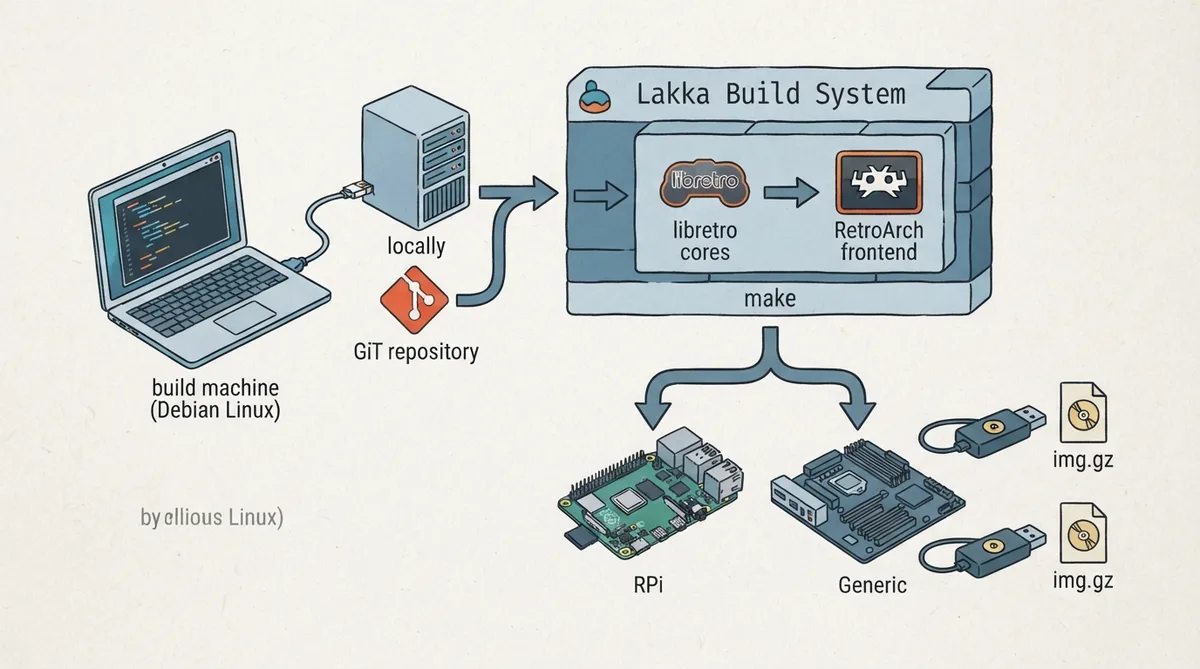
Lakka is the official Linux distribution of RetroArch and the libretro ecosystem. Each game system is implemented as a libretro core, while the frontend RetroArch handles inputs and display. This separation provides modularity and centralized configuration, turning a small computer into a full retrogaming console. The official build documentation is aimed at developers who want to customize their build or contribute to Lakka.
Prerequisites
- Linux environment (the documentation notes builds are usually done on Debian or Crux).
- Base development packages: on Debian, the relevant package is build-essential.
- A local HTTP server if you plan to do packaging.
- At least 10 GB of free space on the build machine.
- Git installed to clone the repository.
Building Lakka for the first time
First, clone the Lakka repository:
git clone https://github.com/libretro/Lakka-LibreELECLakka is organized by projects. The Generic project targets PCs, while other projects such as RPi target very specific hardware like the Raspberry Pi. You can list the full set of projects with:
ls -l Lakka-LibreELEC/projectsAfter cloning, change into the Lakka-LibreELEC directory and run make with the appropriate PROJECT and ARCH variables for your target hardware. The documentation lists the following example commands:
cd Lakka-LibreELEC
DISTRO=Lakka PROJECT=RPi DEVICE=RPi ARCH=arm make image         # for the Raspberry Pi
DISTRO=Lakka PROJECT=RPi DEVICE=RPi2 ARCH=arm make image        # for the Raspberry Pi2/ Pi3
DISTRO=Lakka PROJECT=RPi DEVICE=RPi4 ARCH=arm make image        # for the Raspberry Pi4 (arm 32bit)
DISTRO=Lakka PROJECT=RPi DEVICE=RPi4 ARCH=aarch64 make image    # for the Raspberry Pi4 (arm 64bit)
DISTRO=Lakka PROJECT=NXP DEVICE=imx6 ARCH=arm make image        # for the Hummingboard and Cubox-i
DISTRO=Lakka PROJECT=Generic ARCH=x86_64 make image  # for 64 bits PCs
DISTRO=Lakka PROJECT=Generic ARCH=i386 make image    # for 32 bits PCs
Building Lakka the first time takes a lot of time. If the build fails, make sure you have at least 10 GB of free space, identify which package is missing, install it, and run make again.
Build output
The build result is located in the Lakka-LibreELEC/target directory. You can list its contents with:
ls -l targetThe .kernel and .system files can be used to upgrade an existing Lakka system. The .img.gz is the final image that can be flashed to an SD card or a USB pen drive. The documentation points to the tutorial at http://www.lakka.tv/get for instructions on flashing Lakka to a drive.
Upgrading an existing Lakka build
If some time has passed and you want to rebuild from newer sources, update the sources, remove the target directory, and rebuild with make image. The documentation shows these steps:
cd Lakka-LibreELEC
git pull
rm -rf target
DISTRO=Lakka PROJECT=RPi DEVICE=RPi ARCH=arm make image
Rebuilding a specific package
If you just want to rebuild a particular package, for example a package you are trying to port to Lakka, you can remove it and rebuild it using scripts/clean and scripts/build. The documentation shows this example:
DISTRO=Lakka PROJECT=RPi DEVICE=RPi ARCH=arm scripts/clean yourpackage
DISTRO=Lakka PROJECT=RPi DEVICE=RPi ARCH=arm scripts/build yourpackage
To rebuild everything from scratch, remove the build* folders.
Conclusion
Lakka is still under heavy development. In its current state, the project allows you to play most games on most platforms. More information can be found in the Lakka documents and the official forum.
Reference table · Scroll horizontally to see all columns.
| Requirement | Details |
|---|---|
| Operating system | Linux (Debian or Crux typically used per documentation) |
| Development packages | build-essential on Debian |
| Packaging | Local HTTP server needed if you plan to do packaging |
| Free disk space | At least 10 GB |
| Git | Required to clone the repository |
Reference table · Scroll horizontally to see all columns.
| Target hardware | Command |
|---|---|
| Raspberry Pi | DISTRO=Lakka PROJECT=RPi DEVICE=RPi ARCH=arm make image |
| Raspberry Pi2 / Pi3 | DISTRO=Lakka PROJECT=RPi DEVICE=RPi2 ARCH=arm make image |
| Raspberry Pi4 (arm 32bit) | DISTRO=Lakka PROJECT=RPi DEVICE=RPi4 ARCH=arm make image |
| Raspberry Pi4 (arm 64bit) | DISTRO=Lakka PROJECT=RPi DEVICE=RPi4 ARCH=aarch64 make image |
| Hummingboard and Cubox-i | DISTRO=Lakka PROJECT=NXP DEVICE=imx6 ARCH=arm make image |
| 64-bit PCs | DISTRO=Lakka PROJECT=Generic ARCH=x86_64 make image |
| 32-bit PCs | DISTRO=Lakka PROJECT=Generic ARCH=i386 make image |
Reference table · Scroll horizontally to see all columns.
| File | Purpose |
|---|---|
| .kernel and .system | Used to upgrade an existing Lakka system |
| .img.gz | Final image that can be flashed to an SD card or USB pen drive |
Sources & references
Published .
RetroArch: building lakka — official gaming software documentation https://raw.githubusercontent.com/libretro/docs/master/docs/guides/building-lakka.mdRetrieved Oct 8, 2026Something doesn’t match your setup?
Suggest a correction