

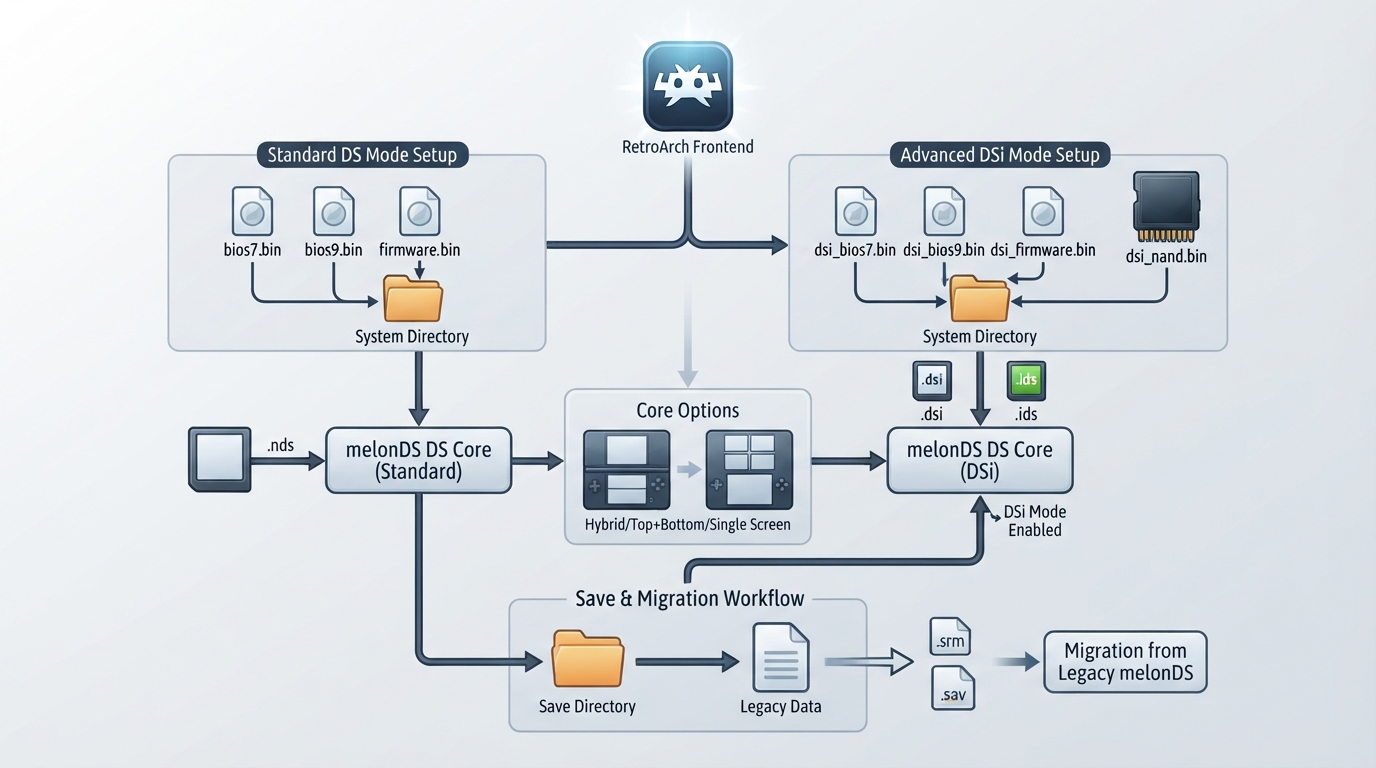
This guide summarizes the official libretro documentation for the melonDS DS core, a Nintendo DS emulator with DSi support, ported to libretro by Jesse Talavera and licensed under GPLv3. It describes the newer melonDS core, which the documentation states is based on a newer version of the original emulator and has more features than the older melonDS core.
Supported Content Files
Content loadable by the melonDS DS core uses one of three file extensions. Content is associated with the Nintendo DS and Nintendo DSi database entries used by RetroArch.
- .nds
- .dsi
- .ids
BIOS and Firmware Files
Firmware files go in the frontend's system directory. For standard DS operation, bios7.bin, bios9.bin, and firmware.bin are listed as optional. For DSi mode, dsi_bios7.bin, dsi_bios9.bin, dsi_firmware.bin, and dsi_nand.bin are listed as required. The documentation gives MD5 checksums for bios7.bin and bios9.bin; firmware and NAND checksums vary.
Setting Up the Core
- Place any DS or DSi BIOS, firmware, and NAND files you intend to use in the frontend's system directory.
- Load content with a .nds, .dsi, or .ids extension through RetroArch.
- For DSi titles, no external NAND preparation is required: when you select a DSiWare game, the game and its previously exported save data are temporarily installed to the configured NAND image, then the save data is exported to the frontend's save directory and the DSiWare is uninstalled at the end of the session.
- Configure screen layouts in the core options, then cycle layouts with the Next Screen Layout button.
- Save your game normally before migrating data from the legacy melonDS core.
Save and System Directories
The core reads and writes cartridge battery saves, Homebrew SD card images and indexes, DSi SD card images and indexes, and DSiWare public, private, and icon save data in the frontend's save directory. The frontend's system directory holds DSiWare title ID files under melonDS DS/tmd/ and, when the built-in BIOS is used, DS Wi-Fi settings. Savestates are stored in the frontend's state directory.
Supported Frontend Features
The core respects a range of frontend-level features, including restart, screenshots, saves, states, rewind, netplay, core options, memory monitoring for achievements, RetroArch cheats, native cheats, controls, remapping, rumble, and sensors. States and rewind are noted as not available in DSi mode. Netplay is documented as LAN only. Features listed as unsupported include multi-mouse, camera, location, crop overscan, and LEDs.
Timing and Rendering
The core reports a frame rate of 59.898307800293 FPS and a sample rate of 32768 Hz. Base and maximum width, height, and aspect ratio depend on the screen layout and configured renderer.
Subsystems for Slot-2 GBA Content
Subsystems let you insert a GBA ROM into the emulated Slot-2. The gba subsystem pairs an NDS ROM in Slot-1 with a GBA ROM in Slot-2 and optional save data; gbanosav does the same with no GBA save data. GBA save data must be loaded explicitly. Subsystems are not used for DSi mode, and additional BIOS images are not required for this purpose. The documentation states that GBA ROMs and save data load only for Slot-2 connectivity and that GBA games cannot actually be played this way.
Emulated Wi-Fi
The core supports emulating Nintendo WFC services on all platforms, with several preconfigured servers selectable in the core options and Kaeru WFC as the default. An alternative server's DNS address can be set from within the emulated console's Wi-Fi settings menu. Wi-Fi emulation is described as unrelated to LAN-based netplay.
LAN Netplay and MAC Address Modes
The DS local Wi-Fi multiplayer is a mesh network using specialized hardware with extreme latency requirements. Per the documentation, it works only on an actual low-latency wired LAN connection between the computers; it does not work through the Internet, and VPNs or tunnels such as Hamachi do not work either. Wireless LAN connections are not recommended because Wi-Fi adds too much latency and connections drop frequently.
The MAC address mode core option, in the Network category, controls how the emulated console obtains a MAC address. Set from firmware, the default, uses the firmware file's MAC address or the default 00-09-BF-11-22-33 when no firmware file is present; this can cause issues in LAN multiplayer with more than two players when the same firmware or default is used on multiple devices. Derive from libretro username generates a MAC address from the frontend username, starting with 00-08-BF, and is useful when syncing save files across devices so the emulated console keeps the same address; this can cause issues in LAN multiplayer if more than one player uses the same username. The username is set in RetroArch under Settings, User, Username.
- Before starting a session, each player sets a username in RetroArch under Settings, User, Username.
- Set the MAC address mode to Derive from libretro username.
- Start a multiplayer session from the Netplay menu, either before loading a game or during play.
- One player hosts; the others join using the Refresh Netplay LAN List option.
- In game, look for a local multiplayer option referencing players nearby, such as the top floor of Pokémon centers or the Multiplayer option in Mario Kart DS.
- All players must be on the same real local network, such as the same house or apartment; a wired connection is recommended for better results.
Screen Layouts
The core supports a variety of screen layouts, including sideways rotation. A sequence of layouts is configured in the core options and cycled with the Next Screen Layout button. The documentation notes this works best with per-game core option overrides.
Controllers
The only user 1 device type is Nintendo DS, a joypad type and the default; a None option also exists but is not recommended. Mapped inputs include B, Y, Select, Start, the D-pad directions, A, X, L, R, Microphone, Next Screen Layout, Move Virtual Cursor, Close Lid, and Touch Virtual Cursor. The documentation states future device types may be added for peripherals with additional inputs.
Migrating from the Legacy melonDS Core
melonDS DS is intended to replace the legacy melonDS core. Save data format is unchanged, but the internal saving method changed. Savestates from the legacy core cannot be migrated because the savestate format changed upstream. System files are detected automatically in the system directory, though the core prefers files in a melonDS DS subdirectory.
- In the RetroArch save directory, rename the melonDS folder to melonDS DS if it exists.
- Rename save files from .sav to .srm.
- Rename $RETROARCH_ROOT/config/melonDS to $RETROARCH_ROOT/config/melonDS DS.
- Rename $RETROARCH_ROOT/config/remaps/melonDS to $RETROARCH_ROOT/config/remaps/melonDS DS.
- Rename any files named melonDS.opt inside those directories to melonDS DS.opt.
- Rename $RETROARCH_ROOT/cheats/melonDS to $RETROARCH_ROOT/cheats/melonDS DS.
- Save your game normally before migrating, since legacy savestates cannot be carried over.
Known Limitations
- Game Boy Advance ROMs load for Slot-2 connectivity only and cannot be played as GBA games in this core.
- Subsystems are not used in DSi mode.
- States and rewind are not available in DSi mode.
- LAN multiplayer does not work over the Internet, VPNs, or tunnels, and wireless LAN connections are not recommended due to latency.
- The camera, location, multi-mouse, crop overscan, and LEDs features are unsupported.
Reference table · Scroll horizontally to see all columns.
| Filename | Description | MD5 checksum |
|---|---|---|
| bios7.bin | NDS ARM7 BIOS – optional | df692a80a5b1bc90728bc3dfc76cd948 |
| bios9.bin | NDS ARM9 BIOS – optional | a392174eb3e572fed6447e956bde4b25 |
| firmware.bin | NDS firmware – optional | Varies |
| dsi_bios7.bin | DSi ARM7 BIOS – required in DSi mode | — |
| dsi_bios9.bin | DSi ARM9 BIOS – required in DSi mode | — |
| dsi_firmware.bin | DSi firmware – required in DSi mode | Varies |
| dsi_nand.bin | DSi NAND – required in DSi mode | Varies |
Reference table · Scroll horizontally to see all columns.
| Feature | Supported |
|---|---|
| Restart | Yes |
| Screenshots | Yes |
| Saves | Yes |
| States | Yes (not in DSi mode) |
| Rewind | Yes (not in DSi mode) |
| Netplay | Yes (LAN only) |
| Core options | Yes |
| Memory monitoring (achievements) | Yes |
| RetroArch cheats | Yes |
| Native cheats | Yes |
| Controls | Yes |
| Remapping | Yes |
| Multi-mouse | No |
| Rumble | Yes |
| Sensors | Yes |
| Camera | No |
| Location | No |
| Subsystem | Yes |
| Softpatching | Yes |
| Disk control | No |
| Username | Yes |
| Language | Yes |
| Crop overscan | No |
| LEDs | No |
Reference table · Scroll horizontally to see all columns.
| File | Description | Location |
|---|---|---|
| *.srm | Cartridge battery save | Save directory |
| dldi_sd_card.bin | Homebrew SD card image | Save directory |
| dldi_sd_card.bin.idx | Homebrew SD card file index | Save directory |
| dsi_sd_card.bin | DSi SD card image | Save directory |
| dsi_sd_card.bin.idx | DSi SD card file index | Save directory |
| *.public.sav | DSiWare public save data | Save directory |
| *.private.sav | DSiWare private save data | Save directory |
| *.banner.sav | DSiWare icon save data | Save directory |
| melonDS DS/tmd/*.tmd | DSiWare title ID file | System directory |
| wfcsettings.bin | DS Wi-Fi settings (built-in BIOS only) | System directory |
| *.state# | State | State directory |
Sources & references
Content responsibility: FrameTinker editorial desk. Source authors and software maintainers are credited separately below; this is not a claim of hands-on testing.
Published .
RetroArch: melonds ds — official gaming software documentation https://raw.githubusercontent.com/libretro/docs/master/docs/library/melonds_ds.mdRetrieved Oct 13, 2026Something doesn’t match your setup?
Suggest a correction