

The official RetroArch documentation includes a page on making custom themes, describing what is needed to customize the core RetroArch theme. The material below summarizes that page.
Skills and tools the guide assumes
Contributing a theme through the official project assumes a GitHub account and a basic understanding of how to fork a project and contribute via pull requests. The GitHub project that hosts the theme is the retroarch-assets repository.
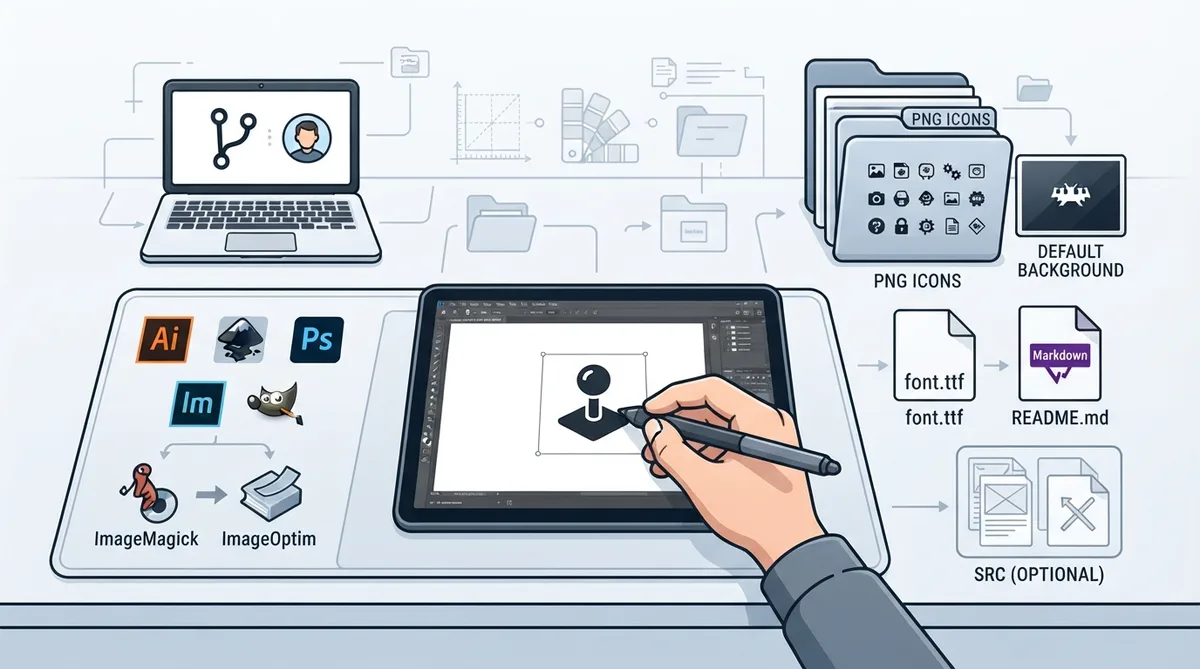
- The documentation lists the following categories of tools:
- - Applications for creating source icons. Any photo editing application can be used, such as Photoshop or GIMP, but a vector-based application such as Illustrator or Inkscape is preferred. The preferred source format is SVG.
- - Conversion applications, which can come in handy. ImageMagick can be used to batch convert source files to PNG format, and running PNG files through ImageOptim can help reduce icon file size without reducing quality.
- - Attention to detail, patience and time. The guide advises being prepared to create and revise as you learn, and suggests modifying an existing theme and testing the new design.
Required theme components
- The documentation identifies three required components:
- - A truetype font renamed to "font.ttf." The typeface must have an open license; Google Fonts is listed as a place to choose from. Contributors who can make their own font may contribute it under an open license.
- - A text file in GitHub Markdown format titled README.md. It provides basic info on the theme itself, along with specifications and guidelines to help others contribute, and must include attribution and license info for the included truetype font.
- - A PNG folder containing a complete set of icons and a default background image.
Optional theme component
Source files are optional. A SRC file can contain SVG or other source files. If you choose not to include your source files, the guide asks that you host them elsewhere and indicate this in the README.
Creating and revising the icons accounts for the majority of the time and effort in making a theme. The default Monochrome set includes just over 200 icons, and that number continues to grow as more cores and features are added.
Icon design guidance
- Recommended practices from the documentation:
- - Set icons to a 256x256 pixel canvas and center them on a 64x64 grid, snapping points and line elements to the grid wherever possible. Libretro icons are scaled down, and elements that do not line up with the grid tend to render oddly.
- - Give icons room to breathe. A 248x248 or 240x240 maximum icon size is highly recommended, or icons can be kept inside a 256x256 circular "blueprint" so that the top and bottom of icons do not touch when scrolling through a list.
- - Create and stick to a color palette of 64 colors or less. An unlimited palette is possible, but a smaller palette helps icons look more uniform and consistent as a theme.
- - Keep icon details in harmony with one another: simplify icons that carry too many design details to match the others, and add balance to icons that are lacking in detail.
Workflow implied by the guide
- Ordered as described across the documentation:
- 1. Create a GitHub account and become familiar with forking a project and contributing via pull requests.
- 2. Create source icons in an editor, favoring a vector-based application and the SVG source format.
- 3. Convert source files to PNG, for example by batch converting with ImageMagick, and optionally reduce file size with ImageOptim.
- 4. Assemble the required components: a font renamed to "font.ttf" under an open license, a README.md in GitHub Markdown with attribution and license info for the font, and a PNG folder with a complete icon set and default background image.
- 5. Optionally include a SRC file with SVG or other source files, or host source files elsewhere and note this in the README.
- 6. Test the design, revising as needed, before contributing it to the retroarch-assets repository.
What the documentation does not cover
The page describes required files, icon design conventions and the contribution context, but it does not spell out a step-by-step pull request procedure, does not provide detailed ImageOptim usage instructions, and does not confirm results on any specific system. Treat the guidance as source material rather than verified instructions.
Reference table · Scroll horizontally to see all columns.
| Component | Requirement |
|---|---|
| Font | Truetype font renamed to "font.ttf"; open license required |
| README | README.md in GitHub Markdown; theme info, specifications, and font attribution and license |
| PNG folder | Complete set of icons plus a default background image |
| SRC file | Optional; SVG or other source files, or host elsewhere and note in README |
Reference table · Scroll horizontally to see all columns.
| Guideline | Value |
|---|---|
| Canvas size | 256x256 pixels |
| Grid | 64x64, centered; snap points and lines |
| Recommended maximum icon size | 248x248 or 240x240 pixels |
| Alternative limit | 256x256 circular blueprint |
| Palette size | 64 colors or less |
| Default icon count | Just over 200 |
Sources & references
Published .
RetroArch: themes — official gaming software documentation https://raw.githubusercontent.com/libretro/docs/master/docs/guides/themes.mdRetrieved Oct 8, 2026Something doesn’t match your setup?
Suggest a correction