

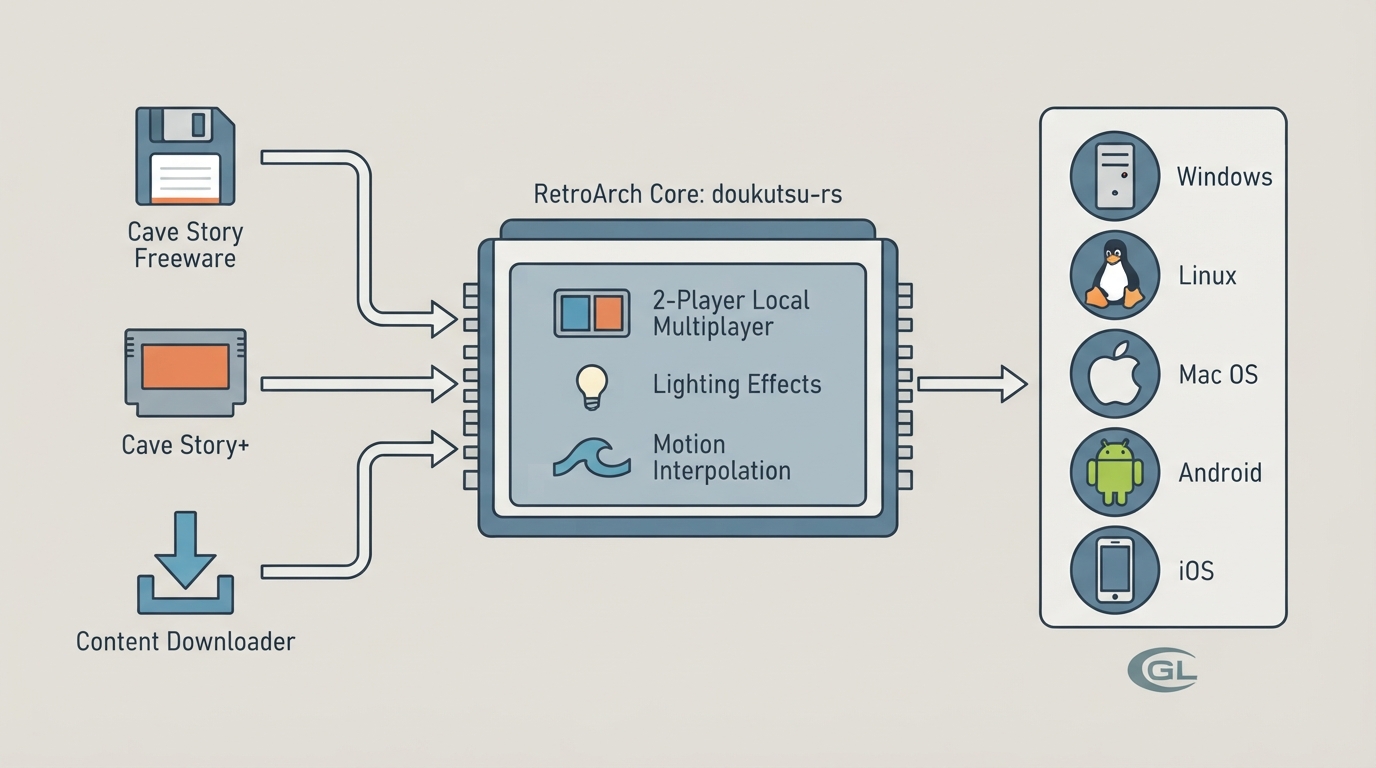
This article summarizes the official libretro documentation for the doukutsu-rs (d-rs) core, a re-implementation of the Cave Story engine intended as a drop-in replacement for all official and most fan ports, including CS Freeware, Cave Story+, Cave Story Switch, Cave Story Wiiware, CSE2, and NXEngine-Evo. The engine also adds features such as 2-player local multiplayer, lighting effects, and smooth motion interpolation.
Requirements and supported platforms
The core currently requires at least OpenGL 2 or OpenGLES 2 to run. On macOS systems it requires at least OpenGL 3 support. The documentation lists Windows, Linux, Mac OS, Android, and iOS as supported platforms.
Before you start: game data
The d-rs core does not ship with Cave Story data. To run it you either supply your own data files or use the Content Downloader for the Freeware version only. The documentation points to the upstream repository readme for details on extracting files from a specific Cave Story installation.
Loading Cave Story Freeware
- 1. Open RetroArch's main menu and select "Online Updater", then "Content Downloader".
- 2. In the list, select the folder labeled Cave Story, then select the file Cave Story (En).zip. The file is downloaded and extracted to RetroArch's Downloads directory.
- 3. Return to the main menu, select "Load Content", navigate to Downloads/Cave Story (En)/ and select Doukutsu.exe.
- 4. If you are asked which core to run, choose "Cave Story (drs)".
The documentation states that the game should begin playing after these steps.
Loading Cave Story+
The process is largely the same as for Freeware, but you must supply your own data files.
- 1. Place your Cave Story+ installation somewhere you can navigate to it from RetroArch.
- 2. Navigate to the CS+ folder and select the CaveStory+.exe file.
- 3. If you are asked which core to run, choose "Cave Story (drs)".
The documentation states that the game should begin playing after these steps.
Loading Cave Story+ Switch or Wiiware editions
These versions do not bundle an executable with the data folder. D-rs can load them, but it needs to know where the data folder is, which requires creating a dummy executable next to the data folder.
- 1. Place your CS-Switch or CS-Wiiware installation somewhere you can navigate to it from RetroArch.
- 2. In the folder that contains the data folder (next to it, not inside it), create an empty file with the .exe extension. The name does not matter; the documentation uses Target.exe as an example.
- 3. Navigate to the containing folder and select the target file you just created.
- 4. If you are asked which core to run, choose "Cave Story (drs)".
The documentation states that the game should begin playing after these steps.
How the target file works
With the exception of Freeware Cave Story, d-rs mainly uses the target file as a reference to locate the data folder, since at the time of writing RetroArch cannot load a folder directly through the graphical interface. When loading Freeware for the first time, the core opens the file to dump its internal assets into the data directory; after that the executable is only needed as a starting target for the core. For CS+, Wiiware, or NXEngine, an empty target file placed in the same directory as the data folder with one of these extensions will load the game: .so, .dll, or .exe.
Files and folders d-rs modifies
- ~/data — only with Freeware; populated with Cave Story's internal assets such as music and credit images the first time the game is launched.
- ~/user — if this folder already exists (for example, when continuing a game started on another port of d-rs), d-rs uses this directory instead of RetroArch/saves/d-rs.
- RetroArch/saves/d-rs — game saves, internal settings, and operation logs are stored here.
Geometry and timing
D-rs separates in-game time from screen refresh rate. The game can be set to run at 50 TPS (mimicking Freeware Cave Story) or 60 FPS (mimicking Cave Story+). Screen drawing varies with hardware capability but is typically around 60 FPS. Depending on the core options, the game's screen ratio can be changed.
Core options
- Internal upscaling factor — the size of the "screen" the core thinks it is drawing to; larger resolutions provide smoother visuals. For CS+ a minimum scale of x2 is needed to retain all image detail. Values: 2x (CS+, default), 1x (freeware, fastest), 3x (smoother motion), 4x (smoothest motion).
- Screen Ratio — the shape of the "screen" the core thinks it is drawing to. Original Cave Story is 4:3, but d-rs supports widescreen. Values: 4:3 (original), 16:9 (switch), 16:10, 21:9.
- Debug Outlines — draws onscreen markers showing where entities are and what they are colliding with. Values: Disabled, Enabled.
- Show FPS — shows in-game TPS and FPS. Values: Disabled, Enabled.
- Show Debug GUI — shows the IMGUI debug menu; the documentation notes it has no real use at the moment because mouse input is disabled. Values: Disabled, Enabled.
- GOD Mode (Invincibility) — the player cannot take damage. Values: Disabled, Enabled.
- Infinite Booster — gives the player the jetpack without a fuel limit. Values: Disabled, Enabled.
- Noclip — allows the player to float through the map without tile or NPC collision. Values: Disabled, Enabled.
- More Rust — turns Sue into the d-rs mascot. Values: Disabled, Enabled.
Controls and rumble
The core supports two device types in the controls menu: Retropad on Port 1 for player 1 controls and Retropad on Port 2 for player 2 controls, with Retropad as the default for each port. These controls can be reassigned both in the RetroArch frontend and in the core itself. If the frontend supports rumble and is paired with a capable controller, d-rs provides vibration feedback during screen shakes and other in-game events; rumble can also be disabled in the core's settings menu.
The documentation maps RetroPad inputs to the following actions: B shoots, A jumps, Y opens the inventory or fast-forwards cutscenes, Start pauses, X shows or hides the map, the D-pad up aims up, D-pad down interacts or aims down, D-pad left and right move left and right, L1 selects the previous weapon, R1 selects the next weapon, R2 strafes, and L3 acts as the d-pad equivalent for movement. These buttons can be rebound in the frontend as well as within the core.
Frontend feature support
According to the documentation's feature table, the core supports Restart, Core Options, Native Cheats, Controls, Remapping, Rumble, and Slow-mo. It does not support Saves, States, Rewind, Netplay, Memory Monitoring for achievements, RetroArch Cheats, Multi-Mouse, Sensors, Camera, Location, Subsystem, Softpatching, Disk Control, Username, Language, Crop Overscan, LEDs, or Fast Forward.
The core's info file source is published in the libretro-super repository, and the documentation lists the upstream repository, the official d-rs website, the libretro port repositories, and the d-rs Discord server as further references. NXEngine is listed as a related core.
Reference table · Scroll horizontally to see all columns.
| Feature | Supported |
|---|---|
| Restart | Yes |
| Saves | No |
| States | No |
| Rewind | No |
| Netplay | No |
| Core Options | Yes |
| Memory Monitoring (achievements) | No |
| RetroArch Cheats | No |
| Native Cheats | Yes |
| Controls | Yes |
| Remapping | Yes |
| Multi-Mouse | No |
| Rumble | Yes |
| Sensors | No |
| Camera | No |
| Location | No |
| Subsystem | No |
| Softpatching | No |
| Disk Control | No |
| Username | No |
| Language | No |
| Crop Overscan | No |
| LEDs | No |
| Fast Forward | No |
| Slow-mo | Yes |
Reference table · Scroll horizontally to see all columns.
| RetroPad Input | Action |
|---|---|
| B | Shoot |
| A | Jump |
| Y | Inventory / Cutscene Fast Forward |
| Start | Pause |
| X | Show / Hide Map |
| D-pad Up | Aim up |
| D-pad Down | Interact / Aim down |
| D-pad Left | Move Left |
| D-pad Right | Move Right |
| L1 | Previous Weapon |
| R1 | Next Weapon |
| R2 | Strafe |
| L3 | Move (d-pad equivalent) |
Sources & references
Content responsibility: FrameTinker editorial desk. Source authors and software maintainers are credited separately below; this is not a claim of hands-on testing.
Published .
RetroArch: doukutsu rs — official gaming software documentation https://raw.githubusercontent.com/libretro/docs/master/docs/library/doukutsu-rs.mdRetrieved Oct 12, 2026Something doesn’t match your setup?
Suggest a correction