

This guide summarizes the official RetroArch latency documentation. It is a source summary, not a hands-on tested procedure, so treat each setting as documented behavior rather than a verified result on your own hardware.
What the official documentation reports
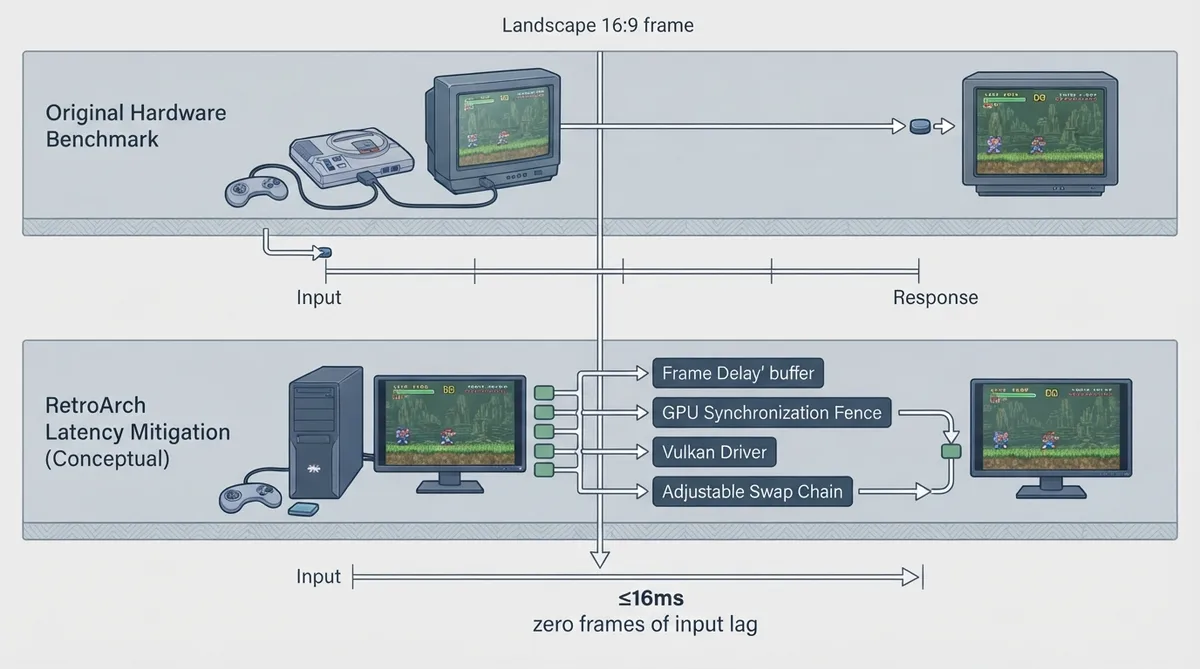
According to the official documentation, RetroArch is capable of next-frame responsive time, meaning there should be nearly no perceivable difference in input latency compared with real hardware, FPGA/clone, or original hardware.
The documentation states that independent researchers demonstrated a next-frame response time of 16 ms or less (≤16 ms), which it describes as zero frames of input lag achievable and indistinguishable from real hardware.
The documentation also states that these results challenge widely held beliefs that emulation always carries an implicit 3 to 5 frames of input lag and that there is nothing one can do to avoid this.
Configurable latency mitigation tools
The documentation describes several settings intended to combat latency. The exact menu path or version where each setting appears is not specified in the source, so confirm location within your RetroArch build.
- Frame Delay
- Synchronization Fences (GPU Hard Sync)
- Video drivers for newer graphics APIs such as Vulkan, which the documentation says can drive latency down further
- Maximum amount of configurable swap chains
- Choice of audio drivers, which the documentation says can affect overall perceived latency
- Adjustable audio buffering for lower or higher audio latency
- Adjustable audio resampler quality
- Several video context drivers
- Configurable swap interval
Swap chains
The maximum amount of configurable swap chains can be set from 1 to 3, depending on your video driver, GPU, and the video context driver used by RetroArch. Vulkan supports this feature natively, but video drivers might not implement setting lower max swapchains.
Audio drivers
On Windows, you can choose between WASAPI (available since Windows 7), XAudio (available since Windows XP), and DirectSound.
On Linux, depending on the build, you can choose between ALSA, PulseAudio, OSS, and audio servers like JACK.
Video context drivers and compositing
The documentation notes that on Linux, video driver contexts such as DRM/KMS allow granular swapchain control and can also let RetroArch boot without an active X Server running, assuming your video driver supports this. Wayland is supported on Linux, but whether you can use it depends on your video driver.
Window compositing can be turned off for better latency results, but the documentation states this is only possible on Windows 7 because Microsoft disallows it on Windows 8 and later.
The swap interval is configurable as well.
Limitations and unverified details
- The source does not specify version numbers, exact menu paths, or build requirements for individual settings.
- Independent hands-on verification of these latency claims has not been performed for this guide.
- The documentation references a forum discussion of an input lag investigation; the underlying video analysis details are not documented in the source.
Reference table · Scroll horizontally to see all columns.
| Platform | Option | Documented detail |
|---|---|---|
| Windows | WASAPI | Available since Windows 7 |
| Windows | XAudio | Available since Windows XP |
| Windows | DirectSound | Listed as a selectable audio driver |
| Linux | ALSA | Available depending on the build |
| Linux | PulseAudio | Available depending on the build |
| Linux | OSS | Available depending on the build |
| Linux | JACK | Listed as an audio server option |
Reference table · Scroll horizontally to see all columns.
| Setting | Documented range | Notes |
|---|---|---|
| Maximum configurable swap chains | 1 to 3 | Depends on video driver, GPU, and video context driver |
| Vulkan swapchain support | Native | Video drivers might not implement setting lower max swapchains |
| Swap interval | Configurable | Documented but no value range given in source |
 View full image
 Sources & references
Published .
RetroArch: latency — official gaming software documentation https://raw.githubusercontent.com/libretro/docs/master/docs/guides/latency.mdRetrieved Oct 8, 2026Something doesn’t match your setup?
Suggest a correction