

The official RetroArch documentation includes a compatibility page for Nintendo Entertainment System titles. That page is organized by emulator core and records games that have known issues under each core, along with a short description of the problem. This article summarizes what the page documents and explains how to read the entries.
What the compatibility page covers
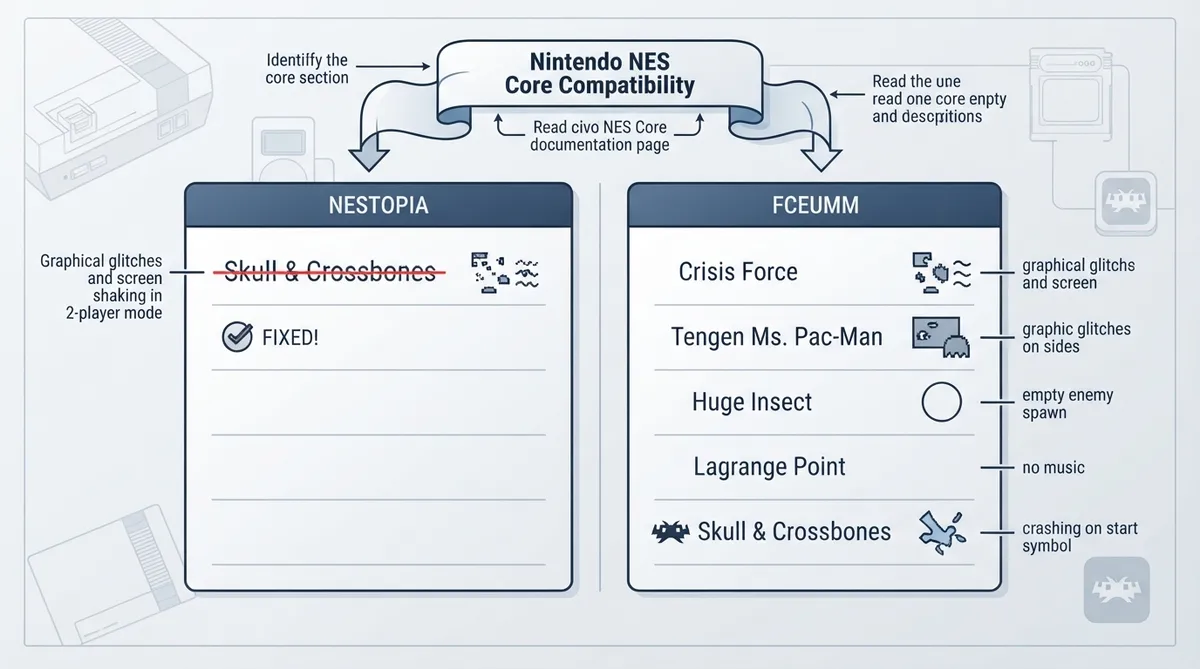
The page is titled "Nintendo NES Core Compatibility" and is split into sections by core, with Nestopia and FCEUmm appearing as its two documented cores. Each section lists affected games in a table with an "Issue" column describing the recorded problem.
How to read the entries
- 1. Identify which core section an entry appears under; the page groups issues by core rather than by game.
- 2. Read the Issue column literally. Entries describe symptoms such as graphical glitches, crashes, missing audio, or no enemies spawning.
- 3. Check for strikethrough formatting. A struck-through entry with "Fixed!" indicates a documented issue that has been resolved.
- 4. Treat a listed game as having a documented issue only under the core named in that section.
Nestopia section
The Nestopia section on the page lists Skull & Crossbones with graphical glitches and screen shaking when in 2-player mode. That entry is struck through and marked "Fixed!", meaning the documentation records it as previously affected and now resolved.
FCEUmm section
The FCEUmm section collects the page's other documented cases. Crisis Force is listed with graphical glitches, and the Tengen version of Ms. Pac-Man is listed with graphical glitches on the sides of the screen. Huge Insect is listed with no enemies spawning, Lagrange Point is listed with no music, and Skull & Crossbones is listed with crashing on start.
Documented technical causes
Later entries on the page add short technical explanations. Burai Fighter softlocks when entering a level, marked as a confirmed issue and described as MMC3 incompatible. Family Circuit '91 crashes on start and is described as an unsupported Mapper 210 case. Huge Insect's missing enemies are marked as a confirmed Mapper 3 issue with unemulated bus conflict handling. Skull & Crossbones is described as crashing on start due to an unsupported mapper.
Using this page when selecting a core
- 1. Look up the core you intend to use on the compatibility page.
- 2. Scan that core's section for the title you plan to run.
- 3. If your title is listed, read the recorded issue so you know what behavior has been documented.
- 4. If your title is not listed, the page does not record a known issue for it; absence from the table is not a guarantee of compatibility.
- 5. Re-check the page, since entries can change status, as the Skull & Crossbones Nestopia entry did when it was marked Fixed.
The page documents issues only and does not provide configuration settings, per-game workarounds, or download links. It should be read as a record of known problems under specific cores rather than as a guarantee that any title will run correctly.
Reference table · Scroll horizontally to see all columns.
| Core | Game | Documented issue | Status noted |
|---|---|---|---|
| Nestopia | Skull & Crossbones | Graphical glitches and screen shaking in 2-player mode | Fixed |
| FCEUmm | Crisis Force | Graphical glitches | Listed |
| FCEUmm | Huge Insect | No enemies spawn | Listed |
| FCEUmm | Lagrange Point | No music | Listed |
| FCEUmm | Ms. Pac-Man (Tengen version) | Graphical glitches on the sides of the screen | Listed |
| FCEUmm | Skull & Crossbones | Crashes on start | Listed |
| FCEUmm | Burai Fighter | Softlocks when entering a level; confirmed MMC3 incompatible | Confirmed issue |
| FCEUmm | Family Circuit '91 | Crashes on start; unsupported Mapper 210 | Listed |
| FCEUmm | Huge Insect | No enemies spawn; Mapper 3 confirmed issue, unemulated bus conflict handling | Confirmed issue |
| FCEUmm | Skull & Crossbones | Crashes on start; unsupported mapper | Listed |
Sources & references
Content responsibility: FrameTinker editorial desk. Source authors and software maintainers are credited separately below; this is not a claim of hands-on testing.
Published .
RetroArch: nes — official gaming software documentation https://raw.githubusercontent.com/libretro/docs/master/docs/library/compatibility/nes.mdRetrieved Oct 17, 2026Something doesn’t match your setup?
Suggest a correction