

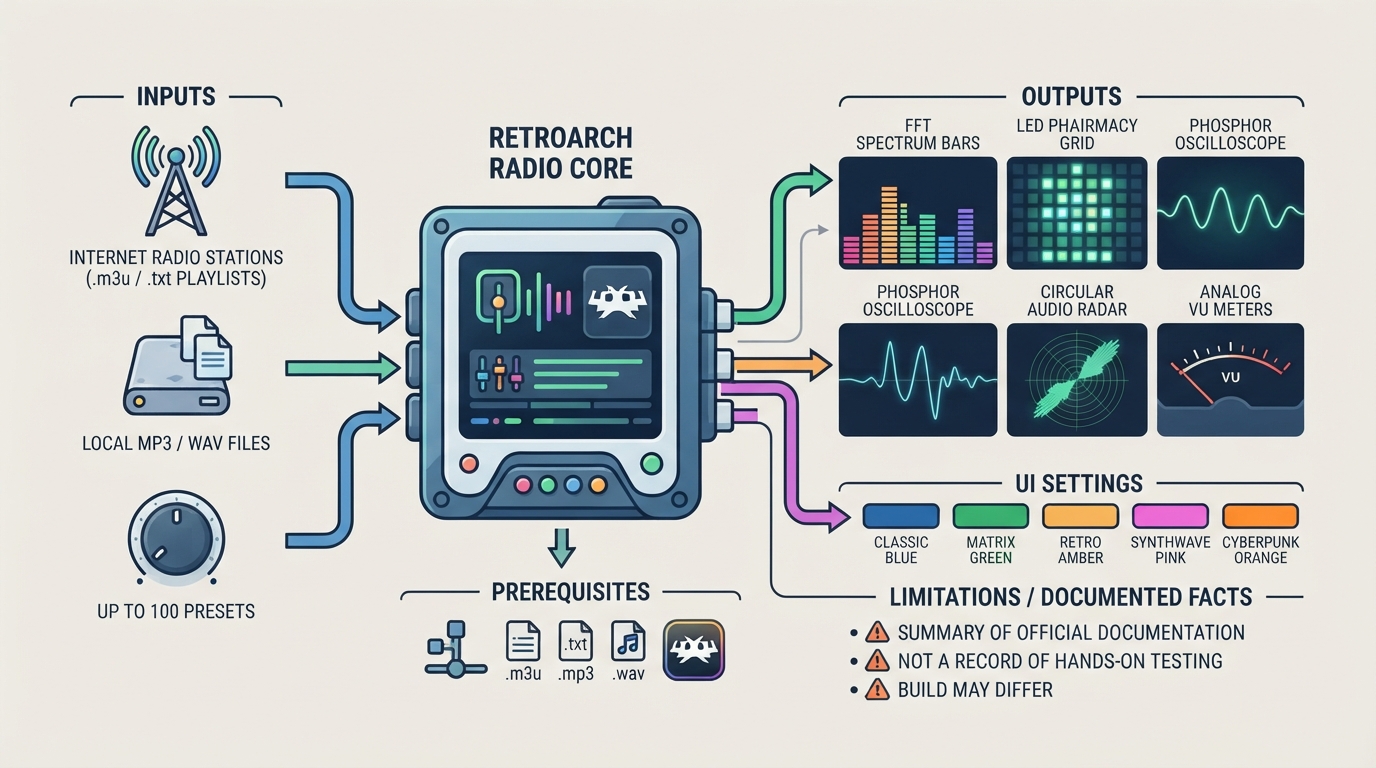
The Radio core for RetroArch streams internet radio stations over a network connection and plays local MP3 and WAV files. According to the official core documentation, stations are read from an .m3u or .txt playlist, and up to 100 presets can be selected from the core options. The core can also be started without any content at all.
While audio plays, the core can draw visualizers such as a spectrum analyser, oscilloscope, and VU meters. The content below is a summary of the official documentation, not a record of hands-on testing.
Prerequisites
Before using the core, the documentation notes the following requirements. For streaming internet radio you need a working network connection. You also need file support for the .m3u, .txt, .mp3, and .wav extensions, and a RetroArch frontend that includes the Radio core.
Getting Audio Playing
- 1. Confirm you have a working network connection if you intend to stream stations.
- 2. Have your stations available as an .m3u or .txt playlist, or have local MP3/WAV files ready.
- 3. Load the playlist or file in RetroArch with the Radio core, or start the core with no content and select a preset from the core options.
- 4. Adjust the playback and display settings from the core options while audio plays.
Documented Core Options
The official documentation lists the following core options. Exact menu spelling is preserved below; the available values are those listed in the source.
Setting | Documented values Active Preset | Up to 100 presets Visualizer Mode | FFT Spectrum Bars, LED Pharmacy Grid, Phosphor Oscilloscope, Circular Audio Radar, Analog VU Meters Auto-Hide UI | Never, 10 seconds, 30 seconds, 1 minute, 5 minutes UI Color Theme | Classic Blue, Matrix Green, Retro Amber, Synthwave Pink, Cyberpunk Orange
The documentation also lists a Volume Level option. The source text used in this guide does not allow the full set of volume values to be confirmed, so treat that option's range as unverified here.
Documented Limitations and Cost
- Streaming depends on a working network connection.
- Stations must be provided as an .m3u or .txt playlist; local playback is limited to MP3 and WAV files.
- Preset selection is capped at 100 presets in the core options.
- The core can be launched without content, so a loaded playlist is optional.
The core's documentation credits its authors as fpscan and gadsby. The core is distributed under a license, and the source documentation states the license for the core.
Sources & references
Content responsibility: FrameTinker editorial desk. Source authors and software maintainers are credited separately below; this is not a claim of hands-on testing.
Published .
RetroArch: radio — official gaming software documentation https://raw.githubusercontent.com/libretro/docs/master/docs/library/radio.mdRetrieved Oct 13, 2026Something doesn’t match your setup?
Suggest a correction