

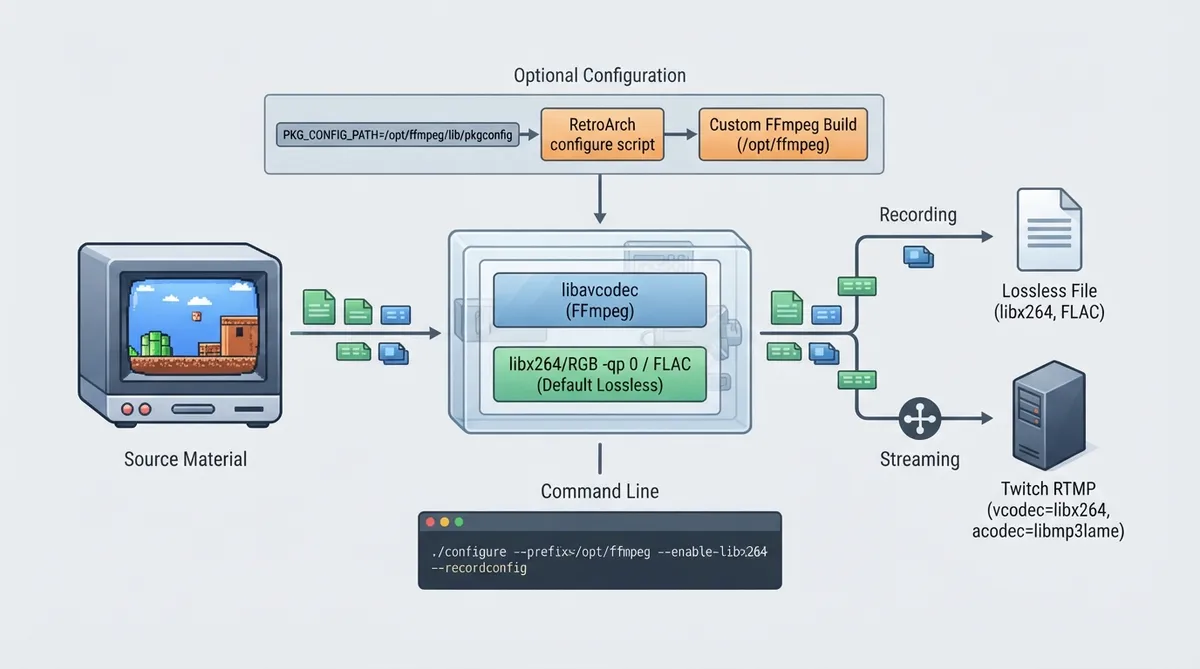
RetroArch can record gaming footage in real time using libavcodec (FFmpeg). The official documentation states that both lossless and lossy coding are supported, and that most encoding options for libavcodec can be configured through a separate config file. This guide summarizes that documentation so you can understand the required FFmpeg setup, the default lossless behavior, the optional recordconfig coding parameters, and the documented live streaming path.
Prerequisites and FFmpeg version considerations
RetroArch requires a very recent version of FFmpeg to work correctly. According to the documentation, if you are on Linux or OSX, your distribution's FFmpeg build is likely out of date, and the recommended path is to build FFmpeg from Git. Windows users are treated differently: the redist includes recent enough libav* binaries.
Step 1: Install a custom FFmpeg build on Linux or OSX
The documentation provides a recommended command sequence for building FFmpeg from Git and installing it into a custom prefix. The example assumes you will install the custom FFmpeg build into /opt/ffmpeg. The configure line shown enables libx264, GPL components, and libmp3lame, with a placeholder for additional features you may want.
./configure --prefix=/opt/ffmpeg --enable-libx264 --enable-gpl --enable-libmp3lame <enable stuff you fancy here>
make
sudo make install
Step 2: Point RetroArch's configure script at the custom FFmpeg build
After installing FFmpeg into /opt/ffmpeg, the documentation shows configuring RetroArch with PKG_CONFIG_PATH set to /opt/ffmpeg/lib/pkgconfig. The documentation says the configure script should pick up the FFmpeg libraries in /opt/ffmpeg/lib, and advises checking config.mk to make sure. After a successful compile, the documentation advises making sure the RetroArch binary picks up the correct FFmpeg libraries by adding /opt/ffmpeg/lib to LD_LIBRARY_PATH, or the equivalent on OSX.
PKG_CONFIG_PATH=/opt/ffmpeg/lib/pkgconfig ./configureDefault behavior: lossless coding
When no encoding config is provided, the documentation states that lossless coding is used by default. This means libx264/RGB with -qp 0 (lossless), and the audio codec used is FLAC. The documentation notes that libx264/RGB ensures very nice bitrates even when lossless and very fast encoding.
Optional: lossy and flexible coding with --recordconfig
By adding the --recordconfig <config> parameter, the documentation states that you have more control over encoding. The recognized config options include video and audio codec selection, muxer format, thread count, frame drop ratio, pixel format, scale factor, sample rate, audio global quality, audio bit rate, and generic codec-specific video and audio options.
Recognized coding config options
- vcodec: same as -vcodec
- acodec: same as -acodec
- format: muxer format to use, for example mkv, flv or mp4; normally inferred, but must be set when using extensionless formats like RTMP (streaming)
- threads: threads to use when encoding video; the documentation suggests setting this to the number of CPU threads minus one
- frame_drop_ratio: only encodes every <ratio> frames
- pix_fmt: same as -pix_fmt; no default is assumed, must be set
- scale_factor: scales input by <factor>; noted as useful when encoding in chroma subsampled formats like yuv420p
- sample_rate: audio output sampling rate
- audio_global_quality: global quality for audio (VBR); maps to codec->global_quality in the API; higher is better according to the documentation, with 75 noted as seeming to be a fair value
- audio_bit_rate: audio bit rate (CBR) in bit/s, for example 192000 for 192 kb/s
- video_{option}: sets generic video option {option} to <value>; codec specific and mostly useful for libx264
- audio_{option}: sets generic audio option {option} to <value>; codec specific
Live streaming to RTMP services
RetroArch can live stream to RTMP services like Twitch. The documentation describes creating a config tailored for Twitch using libx264 video, libmp3lame audio, yuv420p pixel format, a scale factor of 2, 3 threads, CRF 25, the superfast preset, the animation tune, audio global quality 75, a sample rate of 44100, and the flv format. It then shows streaming to Twitch with the retroarch --record command pointing at the Twitch RTMP application URL with a placeholder for your Twitch ID, using the twitch.cfg record config.
vcodec = libx264
acodec = libmp3lame
pix_fmt = yuv420p
scale_factor = 2
threads = 3
video_crf = 25
video_preset = superfast
video_tune = animation
audio_global_quality = 75
sample_rate = 44100
format = flvretroarch --record rtmp://live.twitch.tv/app/$YOUR_TWITCH_ID --recordconfig twitch.cfgReference table · Scroll horizontally to see all columns.
| Option | Purpose | Notes from the documentation |
|---|---|---|
| vcodec | Video codec | Same as -vcodec |
| acodec | Audio codec | Same as -acodec |
| format | Muxer format | For example mkv, flv or mp4; normally inferred, but must be set for extensionless formats like RTMP |
| threads | Encoding threads for video | Documentation suggests setting to the number of CPU threads minus one |
| frame_drop_ratio | Frame dropping | Only encodes every <ratio> frames |
| pix_fmt | Pixel format | Same as -pix_fmt; no default is assumed, must be set |
| scale_factor | Input scaling | Useful when encoding in chroma subsampled formats like yuv420p |
| sample_rate | Audio sampling rate | Audio output sampling rate |
| audio_global_quality | Audio VBR quality | Maps to codec->global_quality in the API; higher is better, with 75 noted as seemingly fair |
| audio_bit_rate | Audio CBR bit rate | In bit/s, for example 192000 for 192 kb/s |
| video_{option} | Generic video option | Codec specific, mostly useful for libx264 |
| audio_{option} | Generic audio option | Codec specific |
 View full image
 Sources & references
Published .
RetroArch: recording and streaming — official gaming software documentation https://raw.githubusercontent.com/libretro/docs/master/docs/guides/recording-and-streaming.mdRetrieved Oct 8, 2026Something doesn’t match your setup?
Suggest a correction