

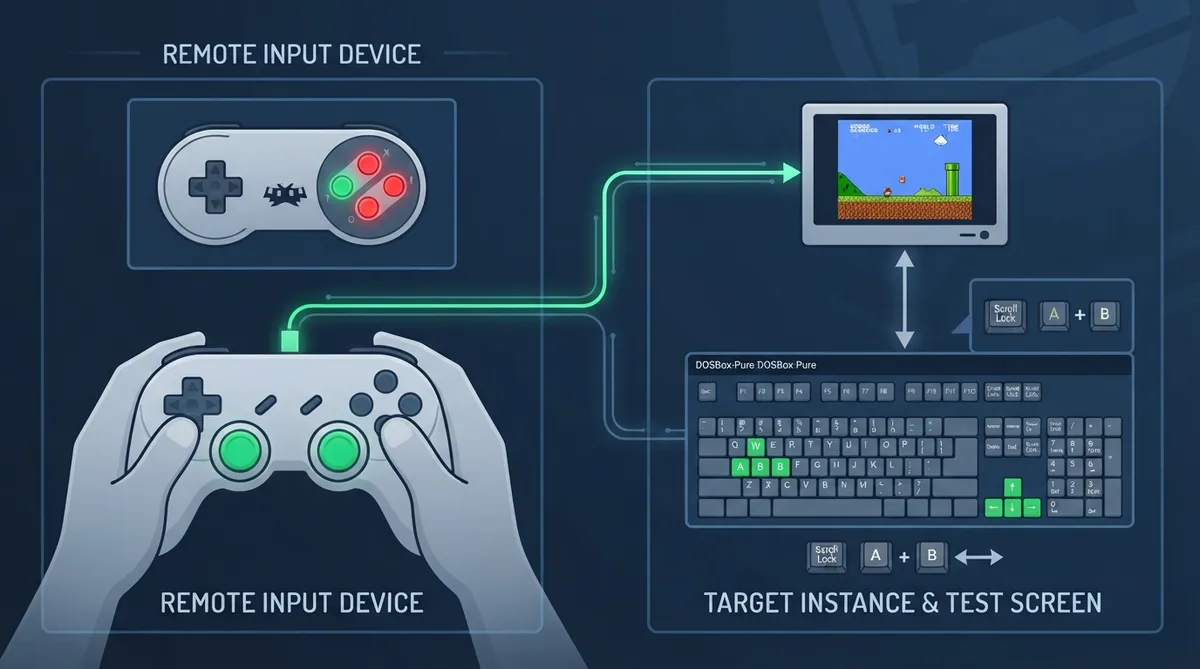
Remote RetroPad is a core built into RetroArch with two documented purposes: controlling another instance of RetroArch over the network, and testing input methods such as retropad and keyboard. This guide summarizes the official documentation for setup, options and limitations.
What Remote RetroPad does
The core serves as a remote control for another RetroArch instance over the network, and also works as an input testing tool. It is present in all RetroArch builds that have networking enabled.
Loading the core
- From RetroArch's main menu screen, select 'Load Core', then choose 'Remote RetroPad'.
After loading, the screen should display a RetroPad, and its buttons react to controller activity. Digital inputs are highlighted in one shade of red, while analog inputs are highlighted gradually. Any input activated at least once turns green.
Switching to the keyboard test screen
To switch to the keyboard test screen, pass keyboard focus to the core (the default hotkey is Scroll Lock), then press keyboard keys A and B simultaneously. The screen includes a standard 102-key PC keyboard plus extra blocks for all RETROK_ values present in the code, and was adapted from the DOSBox-Pure onscreen keyboard with permission.
Enabling remote control on the target instance
To allow a RetroArch instance to be controlled by Remote RetroPad, enable "Network retropad" under Settings / Network, then enable the remote control for the desired user(s).
Documented core options
- - Port: selectable from 55400 to 55420 in increments of 1, default 55400. This is the UDP port for the connection on the target machine; one port is for one user only, so to control user 2 for example, add one to the base port.
- - IP address part 1: 0 to 255 in increments of 1, default 0. This is the first octet of the target machine's IP address.
- - IP address part 2: 0 to 255 in increments of 1, default 0.
Reported core specifications
The documentation lists the core-provided FPS as 60.0, the resolution as 320x240, the sample rate as 30000.0 Hz, and the aspect ratio as 4.0 / 3.0.
Documented feature support and limitations
The official feature table marks Screenshots, Core Options and Controls as supported. It marks features including Restart, Saves, States, Rewind, Netplay, Remapping, Rumble, Sensors, Disk Control and Softpatching as unsupported. Refer to the table below for the documented entries.
Reference table · Scroll horizontally to see all columns.
| Feature | Supported |
|---|---|
| Restart | No |
| Screenshots | Yes |
| Saves | No |
| States | No |
| Rewind | No |
| Netplay | No |
| Core Options | Yes |
| Memory Monitoring (achievements) | No |
| RetroArch Cheats | No |
| Native Cheats | No |
| Controls | Yes |
| Remapping | No |
| Multi-Mouse | No |
| Rumble | No |
| Sensors | No |
| Camera | No |
| Location | No |
| Subsystem | No |
| Softpatching | No |
| Disk Control | No |
| Username | No |
| Language | No |
| Crop Overscan | No |
| LEDs | No |
Sources & references
Content responsibility: FrameTinker editorial desk. Source authors and software maintainers are credited separately below; this is not a claim of hands-on testing.
Published .
RetroArch: remote retropad — official gaming software documentation https://raw.githubusercontent.com/libretro/docs/master/docs/library/remote_retropad.mdRetrieved Oct 27, 2026Something doesn’t match your setup?
Suggest a correction