

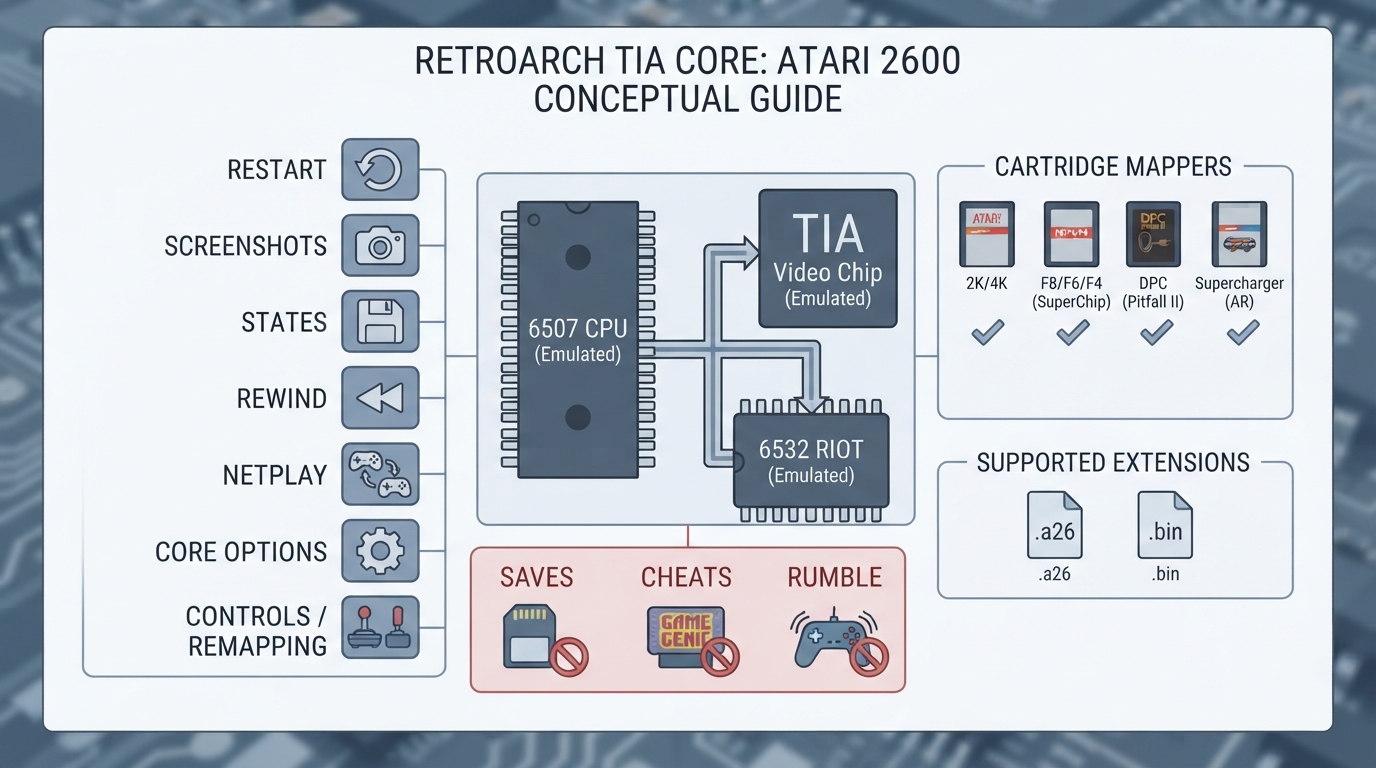
This guide summarizes the official libretro documentation page for the Tia core, an Atari 2600 emulator for RetroArch. It covers what the core emulates, the file types it accepts, its supported and unsupported features, its configurable core options, and the controller devices you can assign per port. All details come from that documentation page; the instructions and configuration steps below have not been independently tested for this article.
What the Tia core is
Tia is an Atari 2600 core written from scratch in C89, not a port of another emulator. It emulates the 6507 CPU, the TIA video chip, and the 6532 RIOT cycle-accurately. It detects NTSC or PAL from a game's scanline count. The core is authored by Eric Warmenhoven and is distributed under GPLv2+.
Prerequisites and expected outcomes
- A RetroArch installation with the Tia core available.
- Atari 2600 ROM files with the .a26 or .bin extension.
- The documentation states which cartridge mappers the core handles; ROMs using unsupported mappers will not run (see the limitations section).
Supported file extensions and cartridge mappers
- Supported ROM file extensions: .a26 and .bin.
- Supported cartridge mappers, per the documentation: 2K/4K, F8/F6/F4 with SuperChip RAM, 3F, E0, FE, FA, E7, F0, UA, DPC (Pitfall II), and the Supercharger (AR).
- Not supported: DPC+, CDF/CDFJ, and BUS cartridges.
Feature support
The documentation's feature table marks several capabilities as supported and others as not supported. Supported items include Restart, Screenshots, States, Rewind, Netplay, Core Options, Memory Monitoring (achievements), Controls, Remapping, and Sensor. Items listed as not supported include Saves, RetroArch Cheats, Native Cheats, Multi-Mouse, Rumble, Sensors, Camera, Location, Subsystem, Softpatching, Disk Control, Username, Language, Crop Overscan, and LEDs.
Core options
The Tia core exposes a set of configurable options. The documentation lists them with their available values as follows: Region (Auto, NTSC, PAL, PAL60, SECAM); Palette (Standard, z26); Left Difficulty initial (A, B); Right Difficulty initial (A, B); TV Type initial (Color, Black & White); Power-on RAM (Hardware-like, Zeroed); Audio DC blocking / high-pass (On, Off); Crop horizontal overscan (Off, On); Crop vertical overscan in rows (0 through 24 in steps of 2); Paddle sensitivity (1 through 10, with 5 as default); and Paddle deadzone percentage (0% off, 5%, 10%, 15%, 20%, 25%, 30%).
Controller types per port
Each port can be configured as a Joystick, Paddles (two per port, using the analog stick), Driving (the Indy 500 controller), or Keypad (the 12-key controller). These are set under Controls > Port N Controls > Device Type. The difficulty and TV-type options only set the switches' starting positions; the buttons below them toggle those switches while a game runs.
Configuring the core (source-based steps)
- In RetroArch, load a supported Atari 2600 ROM with a .a26 or .bin extension using the Tia core. If the game uses a mapper that the documentation lists as unsupported (DPC+, CDF/CDFJ, BUS), it will not run.
- Open the core options to set Region (Auto, NTSC, PAL, PAL60, SECAM) and Palette (Standard, z26) as needed. The core can auto-detect NTSC or PAL from scanline count, so Auto may be suitable in many cases.
- Set initial switch states via the Left Difficulty, Right Difficulty, and TV Type options if you want them to start in a particular position. The documentation notes these only set starting positions; in-game buttons can toggle the switches while a game runs.
- Adjust audio behavior with the Audio DC blocking (high-pass) option.
- Adjust display cropping with Crop horizontal overscan and Crop vertical overscan (rows, 0 through 24 in increments of 2).
- If using Paddles, tune Paddle sensitivity (1 to 10, default 5) and Paddle deadzone (0% off, 5% to 30%).
- Assign the correct device per port under Controls > Port N Controls > Device Type: Joystick, Paddles, Driving, or Keypad.
- Use supported features such as Restart, Screenshots, States, Rewind, Netplay, and Remapping as your workflow requires.
Known limitations
Per the documentation, DPC+, CDF/CDFJ, and BUS cartridges are not supported yet. Several standard RetroArch features are also listed as unsupported, including Saves, RetroArch Cheats, Native Cheats, Multi-Mouse, Rumble, Sensors, Camera, Location, Subsystem, Softpatching, Disk Control, Username, Language, Crop Overscan, and LEDs. The article's steps have not been independently tested here, so treat them as a documentation summary rather than a verified walkthrough.
Reference table · Scroll horizontally to see all columns.
| Option | Available values |
|---|---|
| Region | Auto, NTSC, PAL, PAL60, SECAM |
| Palette | Standard, z26 |
| Left Difficulty (initial) | A, B |
| Right Difficulty (initial) | A, B |
| TV Type (initial) | Color, Black & White |
| Power-on RAM | Hardware-like, Zeroed |
| Audio DC blocking (high-pass) | On, Off |
| Crop horizontal overscan | Off, On |
| Crop vertical overscan (rows) | 0, 2, 4, 6, 8, 10, 12, 14, 16, 18, 20, 22, 24 |
| Paddle sensitivity | 1, 2, 3, 4, 5 (default), 6, 7, 8, 9, 10 |
| Paddle deadzone (%) | 0% (off), 5%, 10%, 15%, 20%, 25%, 30% |
Reference table · Scroll horizontally to see all columns.
| Cartridge mappers | Status |
|---|---|
| 2K/4K | Supported |
| F8/F6/F4 with SuperChip RAM | Supported |
| 3F | Supported |
| E0 | Supported |
| FE | Supported |
| FA | Supported |
| E7 | Supported |
| F0 | Supported |
| UA | Supported |
| DPC (Pitfall II) | Supported |
| Supercharger (AR) | Supported |
| DPC+ | Not supported |
| CDF/CDFJ | Not supported |
| BUS | Not supported |
Sources & references
Content responsibility: FrameTinker editorial desk. Source authors and software maintainers are credited separately below; this is not a claim of hands-on testing.
Published .
RetroArch: tia — official gaming software documentation https://raw.githubusercontent.com/libretro/docs/master/docs/library/tia.mdRetrieved Oct 14, 2026Something doesn’t match your setup?
Suggest a correction