

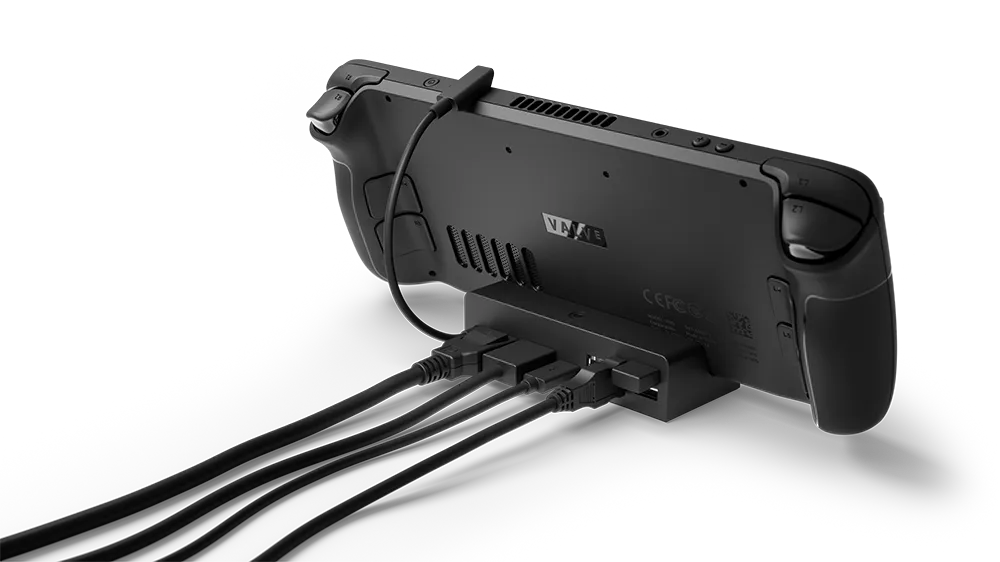
Valve's docking guidance applies to Steam Deck LCD and Steam Deck OLED unless otherwise noted. Steam Deck supports a variety of USB-C docks and hubs for connecting displays, controllers, and other peripherals.
Before connecting
- - Dock or hub: Valve says most USB-C-compliant models work with Steam Deck. Thunderbolt and DisplayLink docks may work, but are not officially supported.
- - Power: to power the Deck through the dock, the dock or hub must support USB-C Power Delivery (PD) passthrough.
- - DisplayPort-to-HDMI conversion: use an active cable or adapter. Valve does not support passive adapters for this conversion and warns that they may cause problems.
Prepare the dock
Start by connecting the equipment you want to use to the dock. Valve lists a monitor or TV, keyboard and mouse or controllers, an Ethernet cable, and a power source as common connections.
What to expect from the display
According to Valve's FAQ, the Deck's built-in screen goes black when an external display and cable are connected in Gaming Mode. That behavior is expected; it is not, by itself, evidence of a docking failure. The FAQ directs users to reboot into Desktop Mode to use both the built-in screen and an external display, or multiple displays.
Understanding a slow-charge warning
Some docks allocate part of the available power to attached peripherals. Valve notes that this can trigger a slow-charge warning on the Steam Deck, even when the dock supports PD passthrough.
How to fully reset the dock
- 1. Disconnect the Steam Deck from the dock.
- 2. Disconnect the dock's power supply and display cables so the Deck and dock are fully unplugged.
- 3. Reconnect the cables.
Removing only the dock's power supply is not a full reset: the connected Steam Deck can continue supplying power to the dock. Valve therefore says to disconnect both. This is a reset procedure, not a guarantee that a particular display or connection problem will be resolved.
Sources & references
Content responsibility: FrameTinker editorial desk. Source authors and software maintainers are credited separately below; this is not a claim of hands-on testing.
Published .
Docking the Steam Deck — official gaming software documentation https://help.steampowered.com/en/faqs/view/4C18-08B5-DEC9-3AF4Retrieved Nov 12, 2026Something doesn’t match your setup?
Suggest a correction