

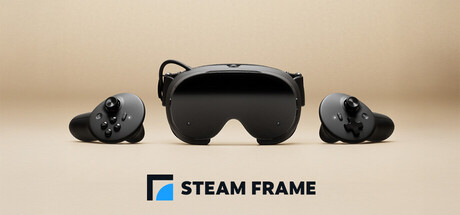
SteamOS 0.4 for Steam Frame has been released for all users, according to the official announcement. The update spans power management, VR streaming, the dashboard and general system behavior, audio, and accessibility.
Power and presence sensor
- Improved power efficiency and battery lifetime during both streaming and local gameplay, with gains of up to 12 percent. The announcement notes results vary depending on framerate and content.
- Added a user setting for Presence Sensor Sensitivity under VR Settings, then Startup / Shutdown, then Presence Sensor.
- A new "high sensitivity" option keeps displays on under a wider range of conditions, such as when using glasses spacers.
VR streaming changes
- Improved color clarity during VR streaming, addressing a headset chroma regression.
- VR streaming reliability improvements, including fixes for "Error 17." On the PC side, the announcement states you must also opt into SteamVR 2.18.2 or later to reduce "Error 17" connection issues. At the time of release, SteamVR 2.18.2 was available on the SteamVR beta branch.
- Fixed Steam Frame wireless adapter connectivity issues that affected users in some countries.
- Improved audio reliability while streaming.
- Fixed rare cases of other network interfaces disrupting the wireless dongle connection.
- Spectator view is now smoothed by default. It can be accessed on PC via Steam, then Settings, then Remote Play, or on any device that supports Steam Link to preview what the Steam Frame user is seeing in the headset.
- Fixed the keyboard not appearing while streaming.
General fixes
- Fixed an issue that prevented controller bindings from loading for certain games, including Google Earth VR and Thumper.
- Improved focus behavior when interacting with grab and resize handles.
- Improved focus handling and gamepad navigation in the dashboard.
- Fixed a case of dashboard panels flickering.
- Fixed "Return to Gaming mode" when starting up directly into Desktop mode.
- Added an option to disable spectator view smoothing under VR Settings, then Developer, in the headset.
- Fixed an issue where the dashboard would recenter unnecessarily for some users.
- Updated the embedded browser (CEF) with crash fixes and Linux H.264 detection fixes.
- Miscellaneous performance and stability improvements.
- Improved tooltip sort ordering.
Audio and accessibility
- Downmix and binaural rendering now have matching volume across all formats.
- Added an accessibility option to limit eye tracking to a single eye, under VR Settings, then General, then Track Dominant Eye Only. The announcement states this requires enabling "show advanced settings."
- Users can now specify their Dominant Eye in VR Settings. This controls which eye is used for spectator view, screenshots, and similar features.
What is not yet confirmed
The announcement does not state a specific release date for SteamOS 0.4, and the platform details beyond Steam Frame are not fully specified in the source. Independent verification of the reported power efficiency and streaming improvements has not been performed.
Reference table · Scroll horizontally to see all columns.
| Setting | Navigation path | Notes |
|---|---|---|
| Presence Sensor Sensitivity | VR Settings > Startup / Shutdown > Presence Sensor | New "high sensitivity" option keeps displays on under wider conditions, such as with glasses spacers. |
| Spectator view smoothing | VR Settings > Developer (in headset) | Enabled by default; an option to disable it was added. |
| Track Dominant Eye Only | VR Settings > General | Accessibility option; requires enabling "show advanced settings." |
| Dominant Eye | VR Settings | Controls which eye is used for spectator view, screenshots, and similar features. |
Evidence and publication details
Sources & references
Content responsibility: FrameTinker editorial desk. Source authors and software maintainers are credited separately below; this is not a claim of hands-on testing.
Published .
SteamOS 0.4 for Steam Frame https://steamstore-a.akamaihd.net/news/externalpost/steam_community_announcements/1846018067931649Retrieved Oct 12, 2026Something doesn’t match your setup?
Suggest a correction