

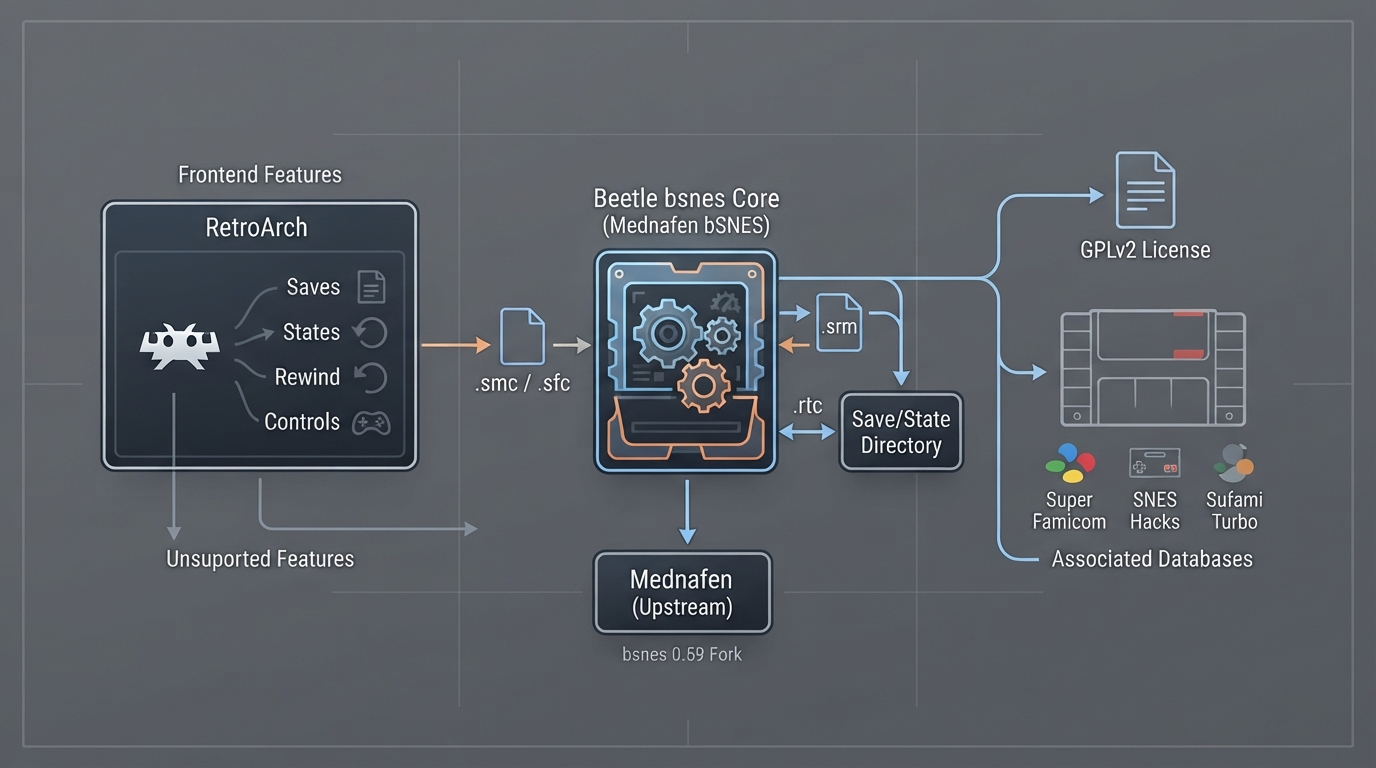
Beetle bsnes is the libretro port of Mednafen's bSNES core, which the official documentation describes as an old fork of bsnes 0.59. The same page notes that the core exists as a side effect of past Mednafen porting work and that its own documentation states there is no reason to use it now that other, more compatible and faster SNES cores exist. This article summarizes what the official page specifies so you can identify the core, load content, and know which frontend features it does and does not expose.
What Beetle bsnes is
Beetle bsnes is a standalone port of Mednafen bSNES to libretro, and that upstream code was itself an old fork of bsnes 0.59. The core was authored by byuu and the Mednafen Team, and is licensed under GPLv2. RetroArch reports the core's internal name as 'Mednafen bSNES'.
Before you start: prerequisites
- A RetroArch installation with the Beetle bsnes core available to load (the documentation treats the core as a libretro target and does not describe an installation procedure).
- SNES/Famicom content in one of the file extensions the core accepts.
- Access to RetroArch's save directory and state directory, which is where the core writes its files.
- A controller configured in RetroArch if you intend to use joypad input.
Content the core can load
Content that the Beetle bsnes core can load has these file extensions: .smc, .fig, .bs, .st and .sfc. If your ROM is packaged in another format, the documentation for this core does not list it as accepted.
The RetroArch databases associated with this core are Nintendo - Super Nintendo Entertainment System, Nintendo - Super Nintendo Entertainment System Hacks, and Nintendo - Sufami Turbo. These are the database entries the documentation links to for the core; they are used by RetroArch's database-driven features rather than by the core's own loader.
Loading content and where files land
- Place your SNES/Famicom content where RetroArch can see it, using one of the accepted extensions (.smc, .fig, .bs, .st, .sfc).
- Load the content in RetroArch and select the Beetle bsnes core when prompted; the core identifies itself internally as 'Mednafen bSNES'.
- Battery-backed cartridge saves are written to the frontend's save directory as 'content-name'.srm.
- Real-time clock saves are written to the frontend's save directory as 'content-name'.rtc.
- Save states are written to the frontend's state directory as 'content-name'.state#, where the trailing number distinguishes successive state slots.
Display, audio and timing values
The core reports a provided FPS of 60.10, a provided sample rate of 44100 Hz, and a provided aspect ratio of 4/3. These are the values the core supplies to the frontend; the documentation does not describe adjusting them.
Frontend features the core respects
The documentation lists the following frontend-level features as supported by Beetle bsnes: Restart, Screenshots, Saves, States, Rewind, Netplay, Controls and Crop Overscan. The following are listed as not supported: Core Options, Memory Monitoring (achievements), RetroArch Cheats, Native Cheats, Remapping, Multi-Mouse, Rumble, Sensors, Camera, Location, Subsystem, Softpatching, Disk Control, Username, Language and LEDs.
Controller setup
The core exposes device types for User 1 and User 2. The documented device types are None (which, as the page notes, does not disable input), RetroPad (joypad, the default for the specified user), and RetroPad w/Analog (joypad; the documentation states there is no reason to switch to this).
With the RetroPad device type selected, the documented RetroPad-to-core mapping is: B to B, Y to Y, Select to Select, Start to Start, D-Pad Up/Down/Left/Right to the corresponding D-Pad directions, A to A, X to X, L1 to L, and R1 to R.
Known limitations from the documentation
- The page's own summary states that the core is an old fork of bsnes 0.59 and that other SNES cores are documented as more compatible and faster.
- Core Options are not supported, so there are no documented core-level settings to adjust.
- Achievements/memory monitoring, RetroArch Cheats and Native Cheats are not supported.
- Softpatching and Subsystem are not supported.
- Rumble, Sensors, Camera, Location, Multi-Mouse and LEDs are not supported.
- Remapping is not supported, so the document does not describe a way to change the joypad layout for this core.
If something does not behave as described
The official page does not document troubleshooting outcomes for this core. If content will not load, first confirm the file uses one of the documented extensions, and if saves or states appear to be missing, confirm the frontend's save and state directories still match the ones in use when the files were created. Beyond those documented points, the source does not provide recovery steps and this article does not invent any.
Reference table · Scroll horizontally to see all columns.
| Item | Documented value |
|---|---|
| Accepted content extensions | .smc, .fig, .bs, .st, .sfc |
| Internal core name | Mednafen bSNES |
| Save directory files | 'content-name'.srm, 'content-name'.rtc |
| State directory files | 'content-name'.state# |
| Provided FPS | 60.10 |
| Provided sample rate | 44100 Hz |
| Provided aspect ratio | 4/3 |
| Authors | byuu, Mednafen Team |
| License | GPLv2 |
- Nintendo - Super Nintendo Entertainment System
- Nintendo - Super Nintendo Entertainment System Hacks
- Nintendo - Sufami Turbo
- Restart
- Screenshots
- Saves
- States
- Rewind
- Netplay
- Controls
- Crop Overscan
- Core Options
- Memory Monitoring (achievements)
- RetroArch Cheats
- Native Cheats
- Remapping
- Multi-Mouse
- Rumble
- Sensors
- Camera
- Location
- Subsystem
- Softpatching
- Disk Control
- Username
- Language
- LEDs
Reference table · Scroll horizontally to see all columns.
| RetroPad input | Beetle bsnes input |
|---|---|
| B | B |
| Y | Y |
| Select | Select |
| Start | Start |
| D-Pad Up | D-Pad Up |
| D-Pad Down | D-Pad Down |
| D-Pad Left | D-Pad Left |
| D-Pad Right | D-Pad Right |
| A | A |
| X | X |
| L1 | L |
| R1 | R |
Sources & references
Content responsibility: FrameTinker editorial desk. Source authors and software maintainers are credited separately below; this is not a claim of hands-on testing.
Published .
RetroArch: beetle bsnes — official gaming software documentation https://raw.githubusercontent.com/libretro/docs/master/docs/library/beetle_bsnes.mdRetrieved Oct 12, 2026Something doesn’t match your setup?
Suggest a correction