

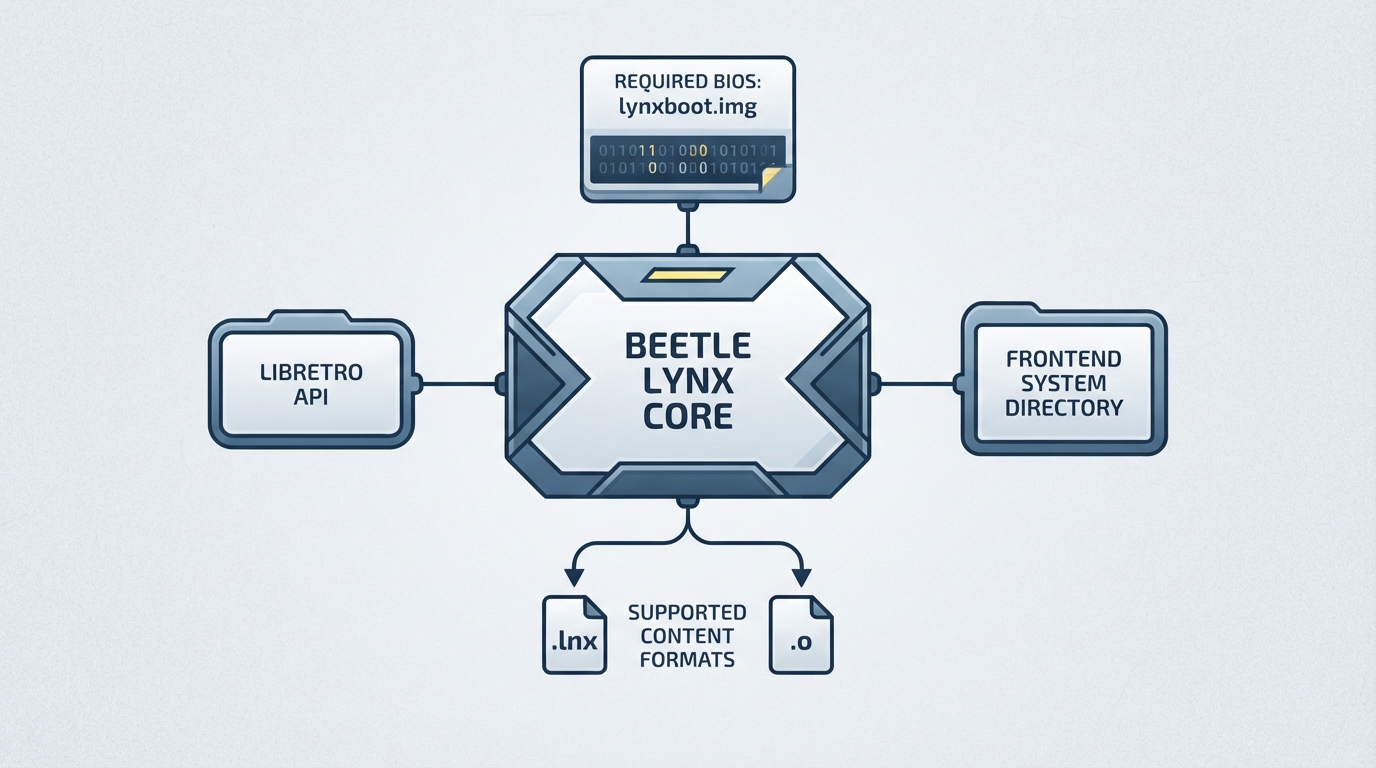
Beetle Lynx is an Atari Lynx emulator implemented as a libretro core, so it runs inside RetroArch or another libretro frontend. The documentation states it is a port of Mednafen Lynx, which is itself a fork of Handy.
Authors and licensing
Prerequisites
A Lynx boot image is required. The firmware file named lynxboot.img must be placed in the frontend's system directory, and the documented MD5 checksum for it is fcd403db69f54290b51035d82f835e7b.
Content formats you can load
- - .lnx
- - .o
Beyond the file extensions, the core accepts Lynx ROMs both with and without headers, and it also loads homebrew titles packaged with the .o extension.
Core directory and save locations
The core's directory name is 'Beetle Lynx'. Save states are written to and read from the frontend's State directory, using the pattern 'content-name'.state#.
Supported and unsupported frontend features
The core respects a defined set of frontend-level features. Supported items include Restart, Screenshots, States, Rewind, state-based Netplay, Core Options, Memory Monitoring for achievements, the Cheats menu, Controls, Remapping, Softpatching and Crop Overscan.
Features it does not support include Saves, Native Cheats, Multi-Mouse, Rumble, Sensors, Camera, Location, Subsystem, Disk Control, Username, Language and LEDs.
Geometry and timing
The core reports a provided frame rate of 75 FPS, a sample rate of 44100 Hz, and an aspect ratio of 80/51.
Core options
Three options can be adjusted from the core options menu. Auto-rotate Screen (lynx_rot_screen) accepts Auto, Manual, 0, 90, 180 or 270. Color Format (lynx_pix_format) accepts 16-Bit (RGB565) or 32-Bit (RGB8888) and requires a restart. Force 60Hz (lynx_force_60hz) accepts OFF or ON.
Auto-rotate virtually rotates the screen orientation and button mappings for known games. With Manual, screen rotation is changed by pressing the SELECT button; alternatively a fixed counter-clockwise rotation of 0, 90, 180 or 270 degrees can be chosen.
Force 60Hz is described as forcing 60Hz instead of the original 75Hz refresh rate, for smooth movement on 60Hz displays.
Controller mapping
For User 1, the available device types are None, RetroPad (the default) and RetroPad with Analog. RetroPad maps B to B, A to A, Start to Pause, the D-Pad directions to the same directions, L1 to Option 1 and R1 to Option 2.
- Option 1 + Pause flips the screen.
- Option 2 + Pause restarts the game.
Documented compatibility issue
The documentation lists one known issue: RoadBlasters shows graphics glitches, described as minor flickering and glitches after starting a race. This is the only title-specific entry in the source.
Reference table · Scroll horizontally to see all columns.
| Feature | Supported |
|---|---|
| Restart | Yes |
| Screenshots | Yes |
| Saves | No |
| States | Yes |
| Rewind | Yes |
| Netplay (state based) | Yes, not link-cable emulation |
| Core Options | Yes |
| Memory Monitoring (achievements) | Yes |
| Cheats (Cheats menu) | Yes |
| Native Cheats | No |
| Controls | Yes |
| Remapping | Yes |
| Multi-Mouse | No |
| Rumble | No |
| Sensors | No |
| Camera | No |
| Location | No |
| Subsystem | No |
| Softpatching | Yes |
| Disk Control | No |
| Username | No |
| Language | No |
| Crop Overscan | Yes |
| LEDs | No |
Reference table · Scroll horizontally to see all columns.
| Property | Value |
|---|---|
| Core directory name | Beetle Lynx |
| FPS | 75 |
| Sample rate | 44100 Hz |
| Aspect ratio | 80/51 |
| Save state location | Frontend's State directory |
| Save state filename | 'content-name'.state# |
Reference table · Scroll horizontally to see all columns.
| Option | Values | Notes |
|---|---|---|
| Auto-rotate Screen (lynx_rot_screen) | Auto, Manual, 0, 90, 180, 270 | Manual rotates via SELECT; fixed values are counter-clockwise |
| Color Format (lynx_pix_format) | 16-Bit (RGB565), 32-Bit (RGB8888) | Restart required |
| Force 60Hz (lynx_force_60hz) | OFF, ON | Forces 60Hz instead of the original 75Hz |
Reference table · Scroll horizontally to see all columns.
| Filename | Description | MD5 |
|---|---|---|
| lynxboot.img | Lynx Boot Image - Required | fcd403db69f54290b51035d82f835e7b |
Beetle Lynx is an Atari Lynx video game system emulator that can be used as a libretro core. Specifically it's a port of Mednafen Lynx which is a fork of Handy.RetroArch: beetle lynx — official gaming software documentation
Sources & references
Content responsibility: FrameTinker editorial desk. Source authors and software maintainers are credited separately below; this is not a claim of hands-on testing.
Published .
RetroArch: beetle lynx — official gaming software documentation https://raw.githubusercontent.com/libretro/docs/master/docs/library/beetle_lynx.mdRetrieved Oct 12, 2026Something doesn’t match your setup?
Suggest a correction