

What the core is
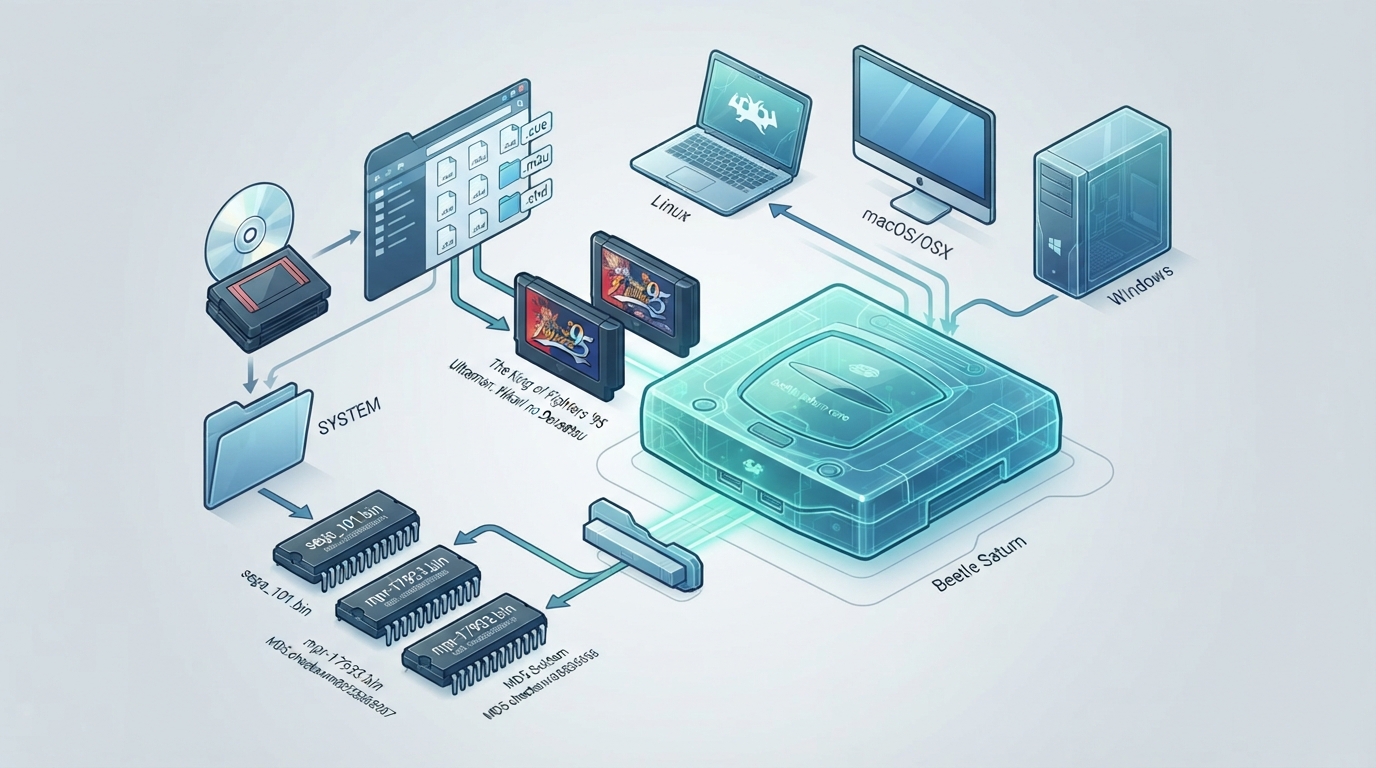
Beetle Saturn is a fork of Mednafen Saturn ported to the libretro API, authored by the Mednafen Team and licensed under GPLv2. The documentation states it currently runs on Linux, macOS (listed as OSX) and Windows.
Prerequisites
Content that can be loaded by the Beetle Saturn core uses these file extensions: .cue, .toc, .m3u, .ccd and .chd. RetroArch's associated database entry is Sega - Saturn.
Required or optional firmware files go in the frontend's system directory. The documentation lists the following files and their MD5 checksums.
- sega_101.bin — Saturn JP BIOS, required for JP games — 85ec9ca47d8f6807718151cbcca8b964
- mpr-17933.bin — Saturn US/EU BIOS, required for US/EU games — 3240872c70984b6cbfda1586cab68dbe
- mpr-18811-mx.ic1 — The King of Fighters '95 ROM cartridge, required for this game — 255113ba943c92a54facd25a10fd780c
- mpr-19367-mx.ic1 — Ultraman: Hikari no Kyojin Densetsu ROM cartridge, required for this game — 1cd19988d1d72a3e7caa0b73234c96b4
Loading a single-disc game
Beetle Saturn needs a cue sheet pointing to an image file. A cue file is a metadata file describing how the tracks of a CD or DVD are laid out. The documentation's example: if you have foo.bin, create a text file saved as foo.cue.
FILE "foo.bin" BINARY
 TRACK 01 MODE1/2352
  INDEX 01 00:00:00
After that, you can load the foo.cue file in RetroArch with the Beetle Saturn core. The documentation notes that certain Saturn games are multi-track, so their .cue files might be more complicated.
Multiple-disc games and the m3u index
For a multiple-disc game, you should have .cue files for each disc, for example foo (Disc 1).cue, foo (Disc 2).cue and foo (Disc 3).cue. To use the core's disk control feature for disk swapping, an index file (an m3u file) should be made: create a text file saved as foo.m3u and enter the game's .cue files on it.
foo (Disc 1).cue
foo (Disc 2).cue
foo (Disc 3).cue
After that, you can load the foo.m3u file in RetroArch with the Beetle Saturn core.
Swapping disks
- Open the tray (Disk Cycle Tray Status).
- Change the Disk Index to the disk you want to swap to.
- Close the tray (Disk Cycle Tray Status).
- Return to the game and wait a few seconds to let it take effect.
Core options
The core options menu exposes the following settings. Defaults are shown in parentheses. Options marked (restart) require the core to be closed for the new setting to apply on next launch. Options marked with specific ranges and increments are reproduced as documented.
- System Region (Auto Detect) — choose which region the system is from. Values: Auto Detect, Japan, North America, Europe, South Korea, Asia (NTSC), Asia (PAL), Brazil, Latin America.
- Cartridge (Auto Detect) — values: Auto Detect, None, Backup Memory, Extended RAM (1MB), Extended RAM (4MB), The King of Fighters '95, Ultraman: Hikari no Kyojin Densetsu. The documentation links to an external list of games that require a cartridge.
- 6Player Adaptor on Port 1 (disabled) — enable multitap on Saturn port 1.
- 6Player Adaptor on Port 2 (disabled) — enable multitap on Saturn port 2.
- Analog Stick Deadzone (15%) — configures the 3D Control Pad device type's analog deadzone. Values: 15%, 20%, 25%, 30%, 0%, 5%, 10%.
- Trigger Deadzone (15%) — configures the 3D Control Pad device type's trigger deadzone. Values: 15%, 20%, 25%, 30%, 0%, 5%, 10%.
- Mouse Sensitivity (100%) — configures the Mouse device type's sensitivity, 5% to 200% in increments of 5%.
- Gun Crosshair (Cross) — crosshair for the Stunner and Virtua Gun device types; Off disables the crosshair. Values: Cross, Dot, Off.
- CD Image Cache (restart) (disabled) — loads the complete image in memory at startup; can potentially decrease loading times at the cost of increased startup time. Requires a restart for a change to take effect.
- Mid-frame Input Synchronization (disabled) — can reduce input latency, but it will increase CPU requirements.
- Automatically set RTC on game load (enabled) — automatically sets the SMPC's emulated Real-Time Clock to the host system's current time and date upon game load.
- BIOS language (english) — also affects language used in some games (for example, the European release of Panzer Dragoon). Values: english, german, french, spanish, italian, japanese.
- Horizontal Overscan Mask (0) — 0 to 60 in increments of 2.
- Initial scanline (0) — 0 to 40 in increments of 1; adjusts the first displayed scanline in NTSC mode.
- Last scanline (239) — 210 to 239 in increments of 1; adjusts the last displayed scanline in NTSC mode.
- Initial scanline PAL (16) — 0 to 60 in increments of 1.
- Last scanline PAL (271) — 230 to 287 in increments of 1; adjusts the last displayed scanline in PAL mode.
- Enable Horizontal Blend(blur) (disabled) — enables a horizontal blend (blur) filter; has a more noticeable effect with the Saturn's higher horizontal resolution modes (640/704).
Device types
- None — input disabled.
- Control Pad — joypad (default).
- 3D Control Pad — analog.
- Arcade Racer — analog.
- Mission Stick — analog.
- Mouse — mouse.
- Stunner — lightgun.
- Twin-Stick — analog.
- Virtua Gun — lightgun.
- Dual Mission Sticks — analog, Panzer Dragoon Zwei only.
Save and state files
The core's library name is 'Beetle Saturn'. It saves and loads to and from the frontend's save directory using .bcr (external cartridge backup save), .bkr (internal save) and .smpc (SMPC's emulated Real-Time Clock save) files, and to and from the frontend's state directory using .state# files.
Frontend features respected by the core
The documentation's feature table marks Restart, Screenshots, Saves, States, Rewind, Netplay, Core Options, Memory Monitoring (achievements), Controls, Remapping and Multi-Mouse as supported, and marks RetroArch Cheats, Native Cheats, Rumble, Sensors, Camera, Location, Subsystem, Softpatching, Disk Control, Username, Language, Crop Overscan and LEDs as not supported.
Geometry and timing values
The documentation lists a core-provided FPS of 59.83 for NTSC games and 49.92 for PAL games, a sample rate of 44100 Hz, a base resolution of 320x240, maximum dimensions of 704x576 and a core-provided aspect ratio of 4/3.
Reference table · Scroll horizontally to see all columns.
| Filename | Description | MD5 checksum |
|---|---|---|
| sega_101.bin | Saturn JP BIOS - Required for JP games | 85ec9ca47d8f6807718151cbcca8b964 |
| mpr-17933.bin | Saturn US/EU BIOS - Required for US/EU games | 3240872c70984b6cbfda1586cab68dbe |
| mpr-18811-mx.ic1 | The King of Fighters '95 ROM Cartridge - Required for this game | 255113ba943c92a54facd25a10fd780c |
| mpr-19367-mx.ic1 | Ultraman: Hikari no Kyojin Densetsu ROM Cartridge - Required for this game | 1cd19988d1d72a3e7caa0b73234c96b4 |
Reference table · Scroll horizontally to see all columns.
| Option | Values | Default |
|---|---|---|
| System Region | Auto Detect | Japan | North America | Europe | South Korea | Asia (NTSC) | Asia (PAL) | Brazil | Latin America | Auto Detect |
| Cartridge | Auto Detect | None | Backup Memory | Extended RAM (1MB) | Extended RAM (4MB) | The King of Fighters '95 | Ultraman: Hikari no Kyojin Densetsu | Auto Detect |
| 6Player Adaptor on Port 1 | disabled | enabled | disabled |
| 6Player Adaptor on Port 2 | disabled | enabled | disabled |
| Analog Stick Deadzone | 15% | 20% | 25% | 30% | 0% | 5% | 10% | 15% |
| Trigger Deadzone | 15% | 20% | 25% | 30% | 0% | 5% | 10% | 15% |
| Mouse Sensitivity | 5% to 200% in increments of 5% | 100% |
| Gun Crosshair | Cross | Dot | Off | Cross |
| CD Image Cache (restart) | disabled | enabled | disabled |
| Mid-frame Input Synchronization | disabled | enabled | disabled |
| Automatically set RTC on game load | enabled | disabled | enabled |
| BIOS language | english | german | french | spanish | italian | japanese | english |
| Horizontal Overscan Mask | 0 to 60 in increments of 2 | 0 |
| Initial scanline | 0 to 40 in increments of 1 | 0 |
| Last scanline | 210 to 239 in increments of 1 | 239 |
| Initial scanline PAL | 0 to 60 in increments of 1 | 16 |
| Last scanline PAL | 230 to 287 in increments of 1 | 271 |
| Enable Horizontal Blend(blur) | disabled | enabled | disabled |
Reference table · Scroll horizontally to see all columns.
| Feature | Supported |
|---|---|
| Restart | Yes |
| Screenshots | Yes |
| Saves | Yes |
| States | Yes |
| Rewind | Yes |
| Netplay | Yes |
| Core Options | Yes |
| Memory Monitoring (achievements) | Yes |
| RetroArch Cheats | No |
| Native Cheats | No |
| Controls | Yes |
| Remapping | Yes |
| Multi-Mouse | Yes |
| Rumble | No |
| Sensors | No |
| Camera | No |
| Location | No |
| Subsystem | No |
| Softpatching | No |
| Disk Control | No |
| Username | No |
| Language | No |
| Crop Overscan | No |
| LEDs | No |
Sources & references
Content responsibility: FrameTinker editorial desk. Source authors and software maintainers are credited separately below; this is not a claim of hands-on testing.
Published .
RetroArch: beetle saturn — official gaming software documentation https://raw.githubusercontent.com/libretro/docs/master/docs/library/beetle_saturn.mdRetrieved Oct 12, 2026Something doesn’t match your setup?
Suggest a correction