

What the core is
Beetle SuperGrafx is a standalone port of Mednafen PCE Fast to libretro. The core is authored by the Mednafen Team and licensed under GPLv2.
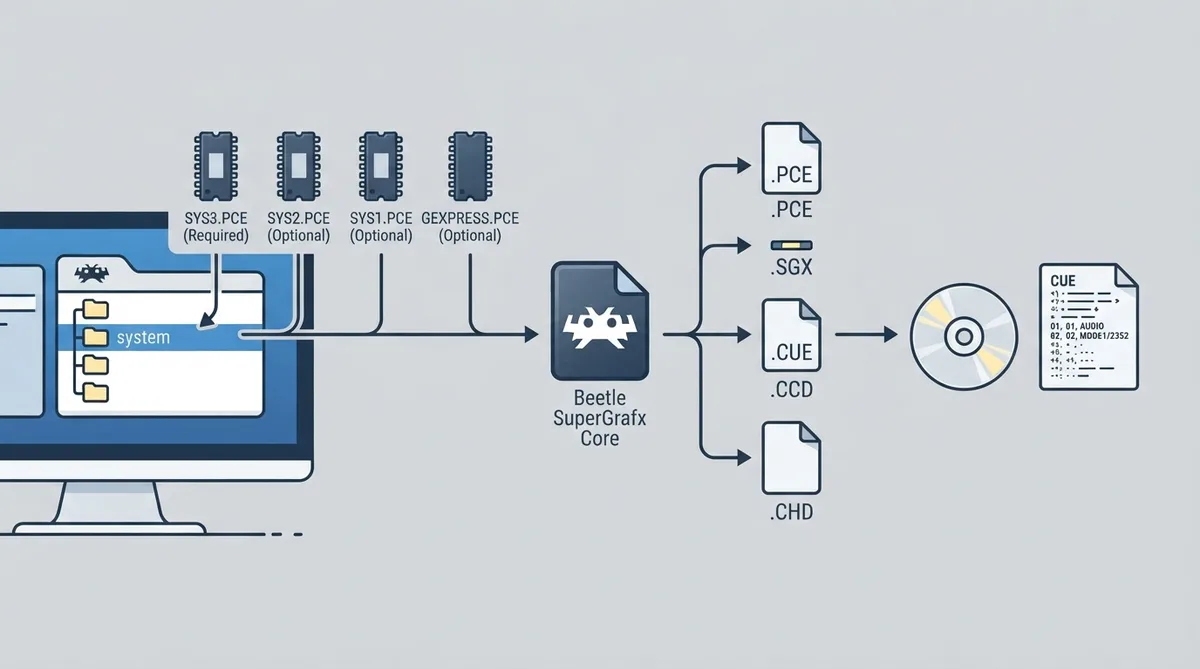
The core's library name is 'Beetle SuperGrafx'. Content types accepted by the core use the .pce, .sgx, .cue, .ccd and .chd file extensions. Associated RetroArch databases cover NEC PC Engine / TurboGrafx 16, NEC PC Engine CD / TurboGrafx-CD, and NEC PC Engine SuperGrafx.
Prerequisite: BIOS files
Required or optional firmware files go in RetroArch's system directory. Which PCE CD BIOS the core uses can be configured by the 'CD Bios' core option. Any CD-ROM System BIOS will work, but some of them are known to be incompatible with certain games.
- syscard3.pce — Super CD-ROM2 System V3.xx — Required — md5sum 38179df8f4ac870017db21ebcbf53114
- syscard2.pce — CD-ROM System V2.xx — Optional
- gexpress.pce — Game Express CD Card — Optional
- syscard1.pce — CD-ROM System V1.xx — Optional
Loading PC Engine CD content
To load PC Engine CD content, Beetle SuperGrafx needs a cue-sheet that points to an image file. A cue sheet (cue file) is a metadata file describing how the tracks of a CD or DVD are laid out. For example, given a file named foo.bin, you create a text file saved as foo.cue with the contents shown in the next block, then load the .cue file in RetroArch with the Beetle SuperGrafx core.
FILE "foo.bin" BINARY
 TRACK 01 MODE1/2352
INDEX 01 00:00:00Alternative: converting content to CHD
As an alternative to using cue sheets with .bin/.iso files, games can be converted to .chd (MAME Compressed Hunks of Data) to reduce file sizes and neaten up the game folder. Use the chdman tool found inside the latest MAME distribution, pointed at a .cue file.
chdman createcd --input foo.cue --output foo.chdCore options
The core options menu exposes the settings below. Options marked (Restart) require the core to be closed before the new setting is applied on the next launch. Default values are bolded in the official documentation; where a default is recorded it is noted here.
- CD Image Cache (Restart) [sgx_cdimagecache] — default disabled — loads the complete image in memory at startup; can potentially decrease loading times at the cost of increased startup time.
- CD Bios (Restart) [sgx_cdbios] — default System Card 3 — selects which PC Engine CD BIOS to use; options are System Card 3, Games Express, System Card 1, System Card 2.
- Force SuperGrafx Emulation (Restart) [sgx_forcesgx] — default disabled — helpful to run homebrew games or isolate games that will not run in SuperGrafx mode (such as Space Harrier). Savestates are not compatible with each mode; it is better to leave this at default (Off) unless needed. Known SuperGrafx games (such as Dai-Makaimura and Aldyns) automatically switch to SuperGrafx regardless of this option.
- No Sprite Limit [sgx_nospritelimit] — default disabled — removes the 16-sprites-per-scanline hardware limit.
- CPU Overclock Multiplier (Restart) [sgx_ocmultiplier] — default 1 — overclocks the emulated CPU. Values range from 1 to 10, then 20, 30, 40 and 50.
- Horizontal Overscan (352 Width Mode Only) [sgx_hoverscan] — default 352 — modify the horizontal overscan; range 300 to 352 in increments of 2.
- Initial scanline [sgx_initial_scanline] — default 3 — adjust the first display scanline; range 0 to 40 in increments of 1.
- Last scanline [sgx_last_scanline] — default 242 — adjust the last display scanline; range 208 to 242 in increments of 1.
- (CD) CDDA Volume % [sgx_cddavolume] — default 100 — modify CDDA volume; range 0 to 200 in increments of 10.
- (CD) ADPCM Volume % [sgx_adpcmvolume] — default 100 — modify ADPCM volume; range 0 to 200 in increments of 10.
- (CD) CD PSG Volume % [sgx_cdpsgvolume] — default 100 — modify CD PSG volume; range 0 to 200 in increments of 10.
- (CD) CD Speed [sgx_cdspeed] — default 1 — set the speed of the emulated CD drive; options are 1, 2, 4 and 8.
- Turbo Delay [sgx_turbo_delay] — default 3 — adjust turbo delay; options are 3 through 15 in increments of 1, plus 30, 60 and 2.
- Turbo ON/OFF Toggle [sgx_turbo_toggle] — default disabled — enables Turbo ON/OFF inputs.
- Alternate Turbo Hotkey [sgx_turbo_toggle_hotkey] — default disabled — enables Alternate Turbo ON/OFF inputs; you can avoid remapping Button III and IV when switching to 6-button gamepad mode with this.
- Disable Soft Reset (RUN+SELECT) [sgx_disable_softreset] — default disabled — pressing RUN and SELECT simultaneously on a PCE gamepad soft-resets the console as a default hardware behaviour; set this to enabled to turn the soft reset functionality off.
- Allow Opposing Directions [sgx_up_down_allowed] — default disabled — enabling this allows pressing, quickly alternating, or holding both left and right (or up and down in some games) at the same time; this may cause movement-based glitches in certain games, so it is best kept disabled.
- Mouse Sensitivity [sgx_mouse_sensitivity] — default 1.00 — configure the PCE Mouse device type's sensitivity; range 1.00 to 5.00 in increments of 0.25.
- Aspect Ratio [sgx_aspect_ratio] — default auto — select an auto (PAR) aspect ratio, a 6:5 aspect ratio (used to be default), or a 4:3 TV aspect ratio. When using games that constantly switch between 256 and 352 modes with auto aspect, it is best to set Horizontal width to 342 to minimize resizing and extra black lines.
Saves and states
The core saves and loads to RetroArch's save directory using the *.srm save file format, and to the state directory using the *.state# state file format.
Geometry and timing
The core reports a provided FPS of 59.82 and a sample rate of 44100 Hz. Base width is 512 and max width is 512; max height is 243. Base height depends on the 'Initial scanline' and 'Last scanline' core options, and the provided aspect ratio depends on the 'Aspect Ratio' core option.
Input and device types
Users 1 through 5 each support the following device types in the controls menu: None (input disabled), PCE Joypad (joypad, and the default), and PCE Mouse (mouse). Use the Mode Switch input to switch between button modes on the PCE Joypad.
When a PCE Mouse device type is selected, the RetroMouse cursor maps to the PCE Mouse cursor, Mouse 1 maps to the PCE Mouse Left Button, Mouse 2 maps to the PCE Mouse Right Button, and Mouse 3 maps to the PCE Mouse Start Button. RetroPad Select and Start map to joypad Select and Start respectively.
Supported and unsupported features
Frontend-level features listed as supported include Restart, Saves, States, Rewind, Netplay, Core Options, Memory Monitoring (achievements), RetroArch Cheats, Controls, Remapping and Multi-Mouse. Features listed as not supported include Native Cheats, Rumble, Sensors, Camera, Location, Subsystem, Softpatching, Disk Control, Username, Language, Crop Overscan and LEDs.
The official documentation lists external references for the Mednafen project, the libretro core info file and repository, and an issue tracker for reporting core problems.
Reference table · Scroll horizontally to see all columns.
| Filename | Description | md5sum |
|---|---|---|
| syscard3.pce | Super CD-ROM2 System V3.xx - Required | 38179df8f4ac870017db21ebcbf53114 |
| syscard2.pce | CD-ROM System V2.xx - Optional | |
| syscard1.pce | CD-ROM System V1.xx - Optional | |
| gexpress.pce | Game Express CD Card - Optional |
- .pce
- .sgx
- .cue
- .ccd
- .chd
Reference table · Scroll horizontally to see all columns.
| RetroPad input descriptor | PCE Joypad 2-button | PCE Joypad 6-button |
|---|---|---|
| II | II | II |
| III | II Turbo On/Off | III |
| Select | Select | Select |
| Run | Run | Run |
| D-Pad Up | D-Pad Up | D-Pad Up |
| D-Pad Down | D-Pad Down | D-Pad Down |
| D-Pad Left | D-Pad Left | D-Pad Left |
| D-Pad Right | D-Pad Right | D-Pad Right |
| I | I | I |
| IV | I Turbo On/Off | IV |
| V | V | |
| VI | VI | |
| Mode Switch | Mode Switch | Mode Switch |
| (extra input) | Alternate II Turbo On/Off | |
| (extra input) | Alternate I Turbo On/Off |
Sources & references
Content responsibility: FrameTinker editorial desk. Source authors and software maintainers are credited separately below; this is not a claim of hands-on testing.
Published .
RetroArch: beetle sgx — official gaming software documentation https://raw.githubusercontent.com/libretro/docs/master/docs/library/beetle_sgx.mdRetrieved Oct 12, 2026Something doesn’t match your setup?
Suggest a correction