

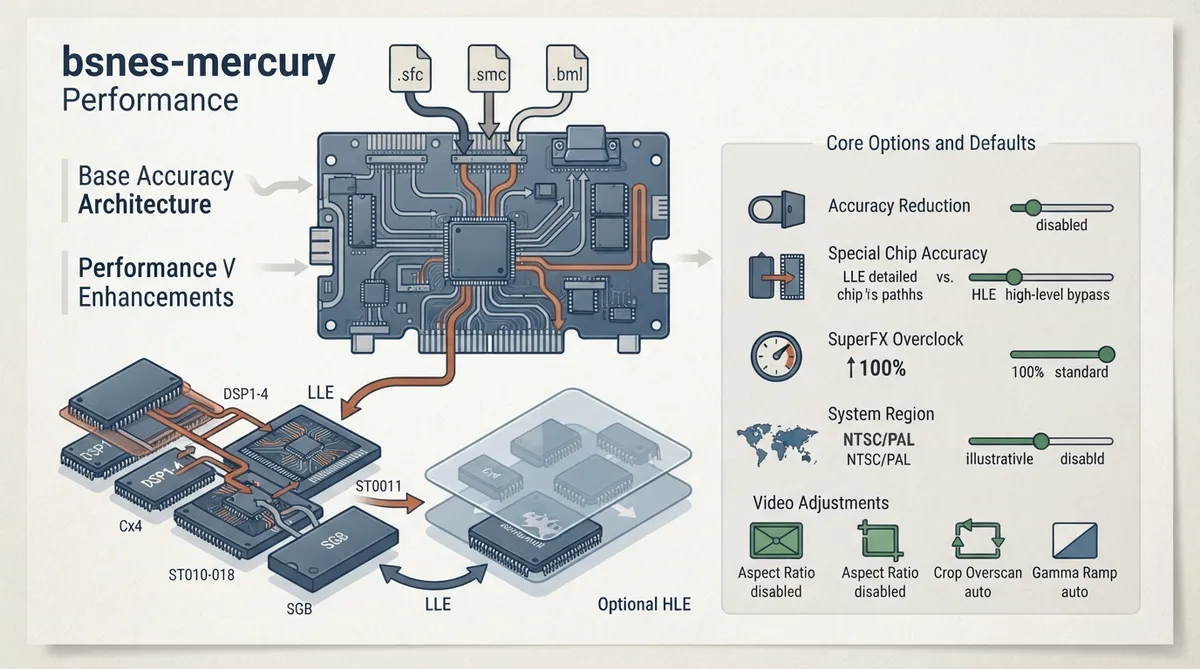
bsnes-mercury Performance is a RetroArch core for Super Nintendo and Famicom content. The core's internal name is 'bsnes-mercury', it is authored by byuu and Alcaro, and it is licensed under GPLv3. It is a fork of higan that aims to restore some removed features and improve performance, and it is compiled with the Performance profile. The documentation states that maximum accuracy remains uncompromising: anything that affects accuracy is optional and off by default.
Before You Start: Content and Firmware
- Supported content file extensions are .sfc, .smc, and .bml.
- Firmware (BIOS) files belong in the frontend's system directory.
- Optional co-processor and Super GameBoy firmware files are listed in the firmware table below.
Documented Improvements
The documented improvements over the base higan fork include an improved framerate, faster ROM loading, and optional HLE emulation of some special chips, which defaults to LLE. HLE reduces reliance on those chip firmware files, but was not developed for the ST-0011 and ST-0018 chips, so they remain LLE. SuperFX overclock is also available and is off by default; when enabled, the documentation states it makes SuperFX look quite a lot smoother.
Core Options and Defaults
The core exposes several options in the core options menu. Options marked (Restart) require closing the core so the change applies on the next launch. The 'Allow settings to reduce accuracy' option must be enabled for the accuracy-reducing options to take effect.
- Allow settings to reduce accuracy [bsnes_violate_accuracy] — default disabled; required for accuracy-reducing options to function.
- Special chip accuracy [bsnes_chip_hle] — default LLE; HLE is less accurate but less demanding; ST-0011 and ST-0018 cannot use HLE.
- SuperFX speed [bsnes_superfx_overclock] — default 100%; 100% is stock clockspeed, and higher values overclock the SuperFX chip.
- System region [bsnes_region] — default auto; ntsc or pal can also be selected.
- Preferred aspect ratio [bsnes_aspect_ratio] — default auto; RetroArch's aspect ratio must be set to Core provided.
- Crop overscan [bsnes_crop_overscan] — default disabled; crops potentially glitchy edge video output.
- Gamma ramp (requires restart) [bsnes_gamma_ramp] — default disabled; simulates the slightly different gamma correction used by the Super Famicom.
Feature Support
The documentation lists supported and unsupported frontend features in the feature table below. Notably, the core supports subsystems, which is how Super GameBoy content is launched, softpatching, and memory monitoring for achievements; it does not support native cheats, rumble, disk control, or LEDs.
Geometry and Timing
The core provides an FPS of 60.0988118623 for NTSC games and 50.0069789082 for PAL games, a sample rate of 32040.5 Hz, and an aspect ratio that depends on the 'Preferred aspect ratio' core option.
Super GameBoy Setup
Super GameBoy is supported via the Subsystem API. The Game Boy and Super GameBoy ROMs must both be unzipped, and sgb.boot.rom must be present in the frontend's system directory.
- Place sgb.boot.rom in RetroArch's system directory.
- Prepare a GameBoy ROM and a Super GameBoy ROM; both must be unzipped.
- Option A: use RetroArch's GUI — load the GameBoy ROM via 'Load Super GameBoy' in the Main Menu, then load the Super GameBoy ROM via 'Load Super GameBoy' in the Menu Menu, then select 'Start GameBoy' in the Menu Menu.
- Option B: launch via command line with the command shown below.
retroarch -L {path to bsnes core} {path to Super GameBoy ROM} --subsystem sgb {path to GameBoy rom}MSU-1
MSU-1 support can be used by loading a correct .bml file, which is one of the core's supported content extensions.
Documented Compatibility Issues
The documentation lists specific games with known issues in this core, including black screens, corrupted graphics, flickering, and missing visual elements. The full list is provided in the table below.
Reference table · Scroll horizontally to see all columns.
| Filename | Description |
|---|---|
| dsp1.data.rom | DSP1 co-processor firmware |
| dsp1.program.rom | DSP1 co-processor firmware |
| dsp1b.data.rom | DSP1B co-processor firmware |
| dsp1b.program.rom | DSP1B co-processor firmware |
| dsp2.data.rom | DSP2 co-processor firmware |
| dsp2.program.rom | DSP2 co-processor firmware |
| dsp3.data.rom | DSP3 co-processor firmware |
| dsp3.program.rom | DSP3 co-processor firmware |
| dsp4.data.rom | DSP4 co-processor firmware |
| dsp4.program.rom | DSP4 co-processor firmware |
| cx4.data.rom | CX4 co-processor firmware |
| st010.data.rom | ST010 co-processor firmware |
| st010.program.rom | ST010 co-processor firmware |
| st011.data.rom | ST011 co-processor firmware |
| st011.program.rom | ST011 co-processor firmware |
| st018.data.rom | ST018 co-processor firmware |
| st018.program.rom | ST018 co-processor firmware |
| sgb.boot.rom | Super Game Boy BIOS |
Reference table · Scroll horizontally to see all columns.
| Game | Documented Issue |
|---|---|
| A.S.P. Air Strike Patrol | Black lines show up during gameplay; the shadow below the aircraft is missing |
| Funaki Masakatsu Hybrid Wrestler – Tougi Denshou | Corrupted graphics on the Pancrase logo screen |
| Mecarobot Golf | The ground wobbles during gameplay |
| Mega Man X2 | Only displays a black screen |
| Mega Man X3 | Only displays a black screen |
| Mortal Kombat II | Various glitched graphics |
| NHL ’94 | Corrupted line on the NHL logo screen |
| Tetris Attack | Lots of flickering on the VS. CPU mode map screen |
Reference table · Scroll horizontally to see all columns.
| Feature | Supported |
|---|---|
| Restart | Yes |
| Screenshots | Yes |
| Saves | Yes |
| States | Yes |
| Rewind | Yes |
| Netplay | Yes |
| Core Options | Yes |
| Memory Monitoring (achievements) | Yes |
| RetroArch Cheats | Yes |
| Native Cheats | No |
| Controls | Yes |
| Remapping | Yes |
| Rumble | No |
| Sensors | No |
| Camera | No |
| Location | No |
| Subsystem | Yes |
| Softpatching | Yes |
| Disk Control | No |
| Username | No |
| Language | No |
| Crop Overscan | No |
| LEDs | No |
Sources & references
Content responsibility: FrameTinker editorial desk. Source authors and software maintainers are credited separately below; this is not a claim of hands-on testing.
Published .
RetroArch: bsnes mercury performance — official gaming software documentation https://raw.githubusercontent.com/libretro/docs/master/docs/library/bsnes_mercury_performance.mdRetrieved Oct 12, 2026Something doesn’t match your setup?
Suggest a correction