

Cannonball is an OutRun game engine recreation written by Chris White in 2014 and ported to the libretro API. In RetroArch it runs as a core, and it ships with its own enhancements, core options and input mapping. This guide walks through the documented setup flow, the settings you can change, and the features the core does and does not respect.
Prerequisites
Before the core will start, you need two things in place: the Cannonball data files, and a set of OutRun Revision B ROMs. This guide does not provide ROMs; you are responsible for obtaining them lawfully and placing them where the documentation specifies.
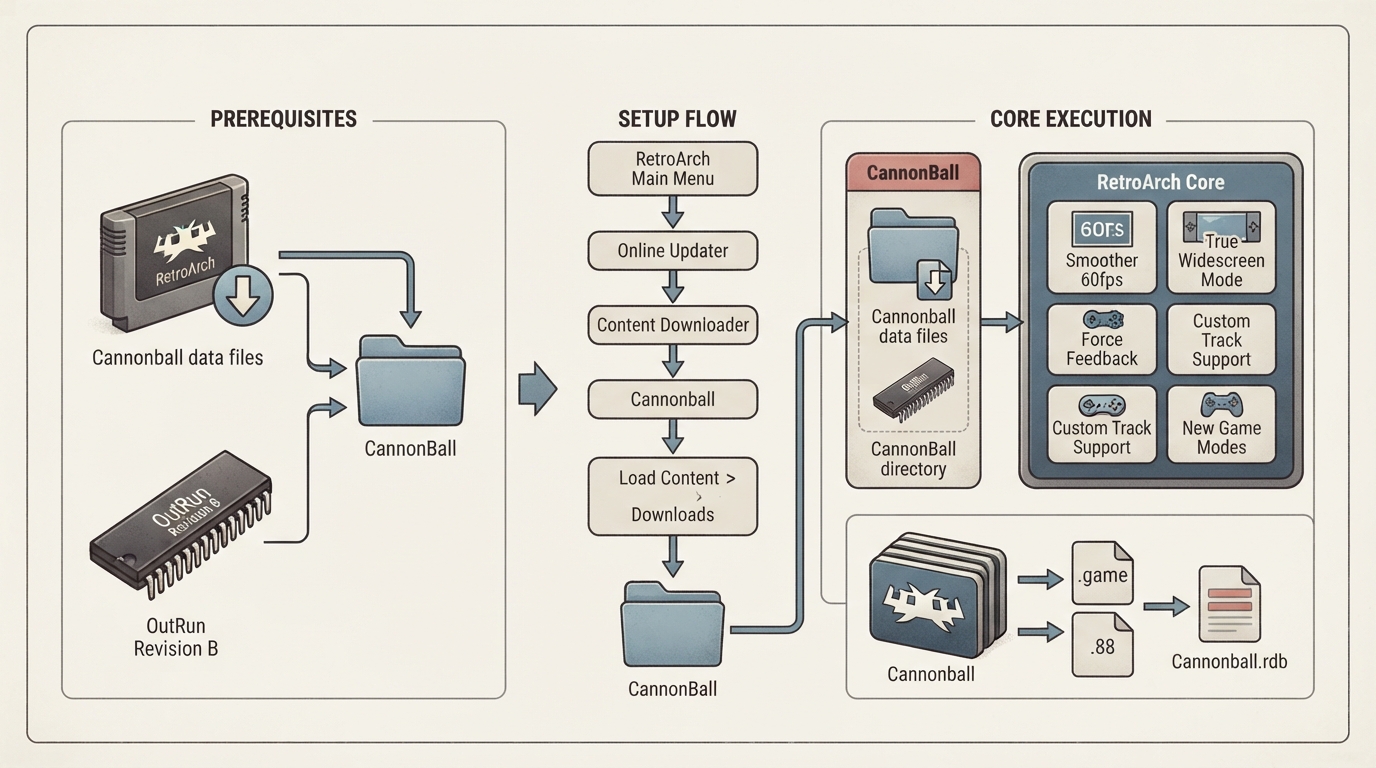
- Obtain Cannonball's data files from within RetroArch: open the main menu, choose Online Updater, then Content Downloader, select Cannonball, and choose CannonBall.zip.
- Follow the linked ROM guide and place OutRun Revision B ROMs in the CannonBall directory.
- A working setup places the ROMs inside that CannonBall directory, as shown in the documentation's example image.
Starting the core
- In RetroArch's main menu, select Load Content, then Downloads.
- Select the CannonBall directory, then select CannonBall.game.
- If RetroArch asks which core to use, choose Cannonball.
- The content should now start running.
The Cannonball core loads content with the extensions .game and .88. A RetroArch database file specifically for Cannonball also exists, called Cannonball.rdb.
Documented features
- Smoother 60fps gameplay
- True Widescreen Play Mode
- Force Feedback support
- Custom Track support from LayOut
- New Game Modes, including Continuous Mode and Time Trial Mode
- The documentation notes that Cannonball adds many further enhancements beyond this list.
Frontend features the core respects
The documentation lists which RetroArch frontend-level settings and features the Cannonball core respects. Supported items include Saves, Core Options, Controls and Remapping. Unsupported items include Restart, States, Rewind, Netplay, RetroArch Cheats, Native Cheats, Multi-Mouse, Rumble, Sensors, Camera and Memory Monitoring for achievements.
Saves, config and directories
The core's library name is Cannonball. It saves and loads from the frontend's Home directory, writing config.xml as its config file and hiscores.xml as its hiscores file.
Geometry and timing
The base resolution is 320x224 and the maximum is 640x448. The core-provided FPS depends on the Video Framerate core option: 60 fps for Smooth (60) or Original (60/30), 120 fps for Ultra Smooth (120), and 30 fps for Low (30). The core-provided sample rate is 44040 Hz when the Video Framerate option is set to Ultra Smooth (120), and 44100 Hz otherwise. The core-provided aspect ratio is 4/3 when Video Widescreen Mode is Off and 16/9 when it is On.
Core options
The core exposes a set of options in the core options menu. In the documentation the default setting for each option is shown in bold. Options marked (Restart) require closing the core and relaunching for the new value to be applied. The default values below reflect the documentation's listing.
- Menu At Start (cannonball_menu_enabled), default ON: shows the main menu at startup when enabled, or goes into attract mode when disabled.
- Menu Road Scroll Speed (cannonball_menu_road_scroll_speed), default 50: sets the speed at which the road on the main menu scrolls.
- Video Widescreen Mode (cannonball_video_widescreen), default ON: toggles the widescreen mode.
- Video High-Resolution Mode (cannonball_video_hires), default OFF: doubles the original 320x224 resolution to 640x448 and renders sprites and road at higher resolution where possible.
- Video Framerate (cannonball_video_fps), default Smooth (60): Smooth (60), Ultra Smooth (120), and Original (60/30).
- Advertise Sound (cannonball_sound_advertise), default ON: plays sounds in attract mode.
- Preview Music (cannonball_sound_preview), default ON: previews music tracks at the point of selection in-game, unlike the original game where the audio track was not heard until the game started.
- Fix Samples (use opr-10188.71f) (cannonball_sound_fix_samples), default ON: relates to fixing corrupted audio.
- Gear Mode (cannonball_gear), default Manual: options are Manual (click to shift), Manual Cabinet (hold to shift), Manual 2 Buttons (separate buttons for high and low) and Automatic.
- Analog Controls (off to allow digital speed setup) (cannonball_analog), default ON.
- Digital Steer Speed (cannonball_steer_speed), default 3. The documentation lists this option without a description.
- Digital Pedal Speed (cannonball_pedal_speed), default 4. The documentation lists this option without a description.
- Time (cannonball_dip_time), default Easy (80s): also Normal (75s), Hard (72s), Very Hard (70s) and Infinite Time.
- Traffic (cannonball_dip_traffic), default Normal: also Hard, Very Hard, No Traffic and Easy.
- Freeplay Mode (cannonball_freeplay), default OFF. The documentation lists this option without a description.
- Use Japanese Tracks Version (cannonball_jap), default OFF.
- Use Prototype Stage 1 (cannonball_prototype), default OFF.
- Objects Limit Enhanced (cannonball_level_objects), default ON.
- Original Traffic Patterns Randomization (cannonball_randomgen), default ON. The documentation lists this option without a description.
- Force AI To Play (cannonball_force_ai), default OFF. The documentation lists this option without a description.
- Fix Original Game Bugs (cannonball_fix_bugs), default ON.
- Fix Timing Bugs (cannonball_fix_timer), default OFF. The documentation lists this option without a description.
- Display Debug Info For LayOut (cannonball_layout_debug), default OFF. The documentation lists this option without a description.
- New Attract (cannonball_new_attract), default ON.
- Time Trial Laps (cannonball_ttrial_laps), default 3. The documentation lists this option without a description.
- Time Trial Traffic Amount (cannonball_ttrial_traffic), default 3. The documentation lists this option without a description.
- Continuous Mode Traffic Amount (cannonball_cont_traffic), default 3. The documentation lists this option without a description.
Controls
The documentation maps RetroPad inputs to Cannonball user 1 actions: B for Accelerate, Y for Brake, Select for Coin, Start for Start, the D-pad directions for Up/Down/Left/Right, A and X for Gear, L1 for Adjust View, R1 for Go Back To Menu, and the left analog stick X and Y for Analog X and Analog Y. The Gear Mode core option changes how gear shifting behaves on your target hardware.
Reference table · Scroll horizontally to see all columns.
| Item | Value |
|---|---|
| Loadable extensions | .game, .88 |
| RetroArch database | Cannonball.rdb |
| Library name | Cannonball |
| Config file (Home dir) | config.xml |
| Hiscores file (Home dir) | hiscores.xml |
Reference table · Scroll horizontally to see all columns.
| Feature | Supported |
|---|---|
| Restart | No |
| Saves | Yes |
| States | No |
| Rewind | No |
| Netplay | No |
| Core Options | Yes |
| Memory Monitoring (achievements) | No |
| RetroArch Cheats | No |
| Native Cheats | No |
| Controls | Yes |
| Remapping | Yes |
| Multi-Mouse | No |
| Rumble | No |
| Sensors | No |
| Camera | No |
Reference table · Scroll horizontally to see all columns.
| Metric | Value |
|---|---|
| Base resolution | 320x224 |
| Maximum resolution | 640x448 |
| FPS (Video Framerate: Smooth 60 / Original 60-30) | 60 |
| FPS (Video Framerate: Ultra Smooth 120) | 120 |
| FPS (Video Framerate: Low 30) | 30 |
| Sample rate (Ultra Smooth 120) | 44040 Hz |
| Sample rate (other framerate settings) | 44100 Hz |
| Aspect ratio (Widescreen Mode Off) | 4/3 |
| Aspect ratio (Widescreen Mode On) | 16/9 |
Sources & references
Content responsibility: FrameTinker editorial desk. Source authors and software maintainers are credited separately below; this is not a claim of hands-on testing.
Published .
RetroArch: cannonball — official gaming software documentation https://raw.githubusercontent.com/libretro/docs/master/docs/library/cannonball.mdRetrieved Oct 12, 2026Something doesn’t match your setup?
Suggest a correction