

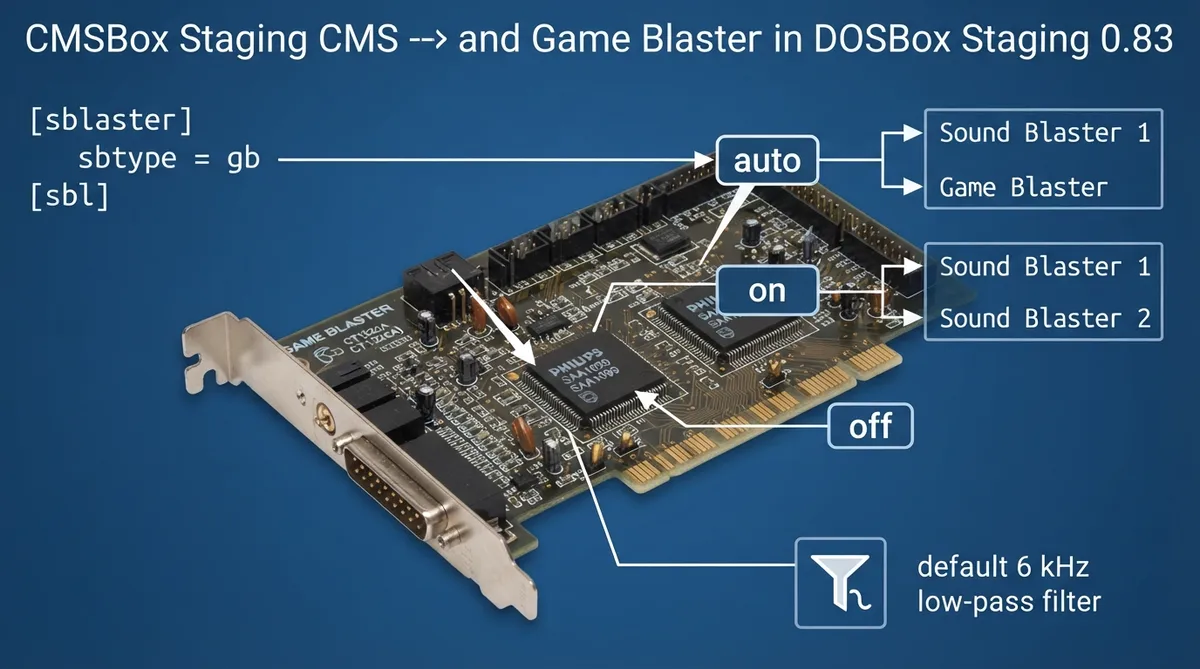
This guide summarizes the CMS and Game Blaster sound-device settings documented in the official DOSBox Staging 0.83 manual. It covers what the hardware was, where the emulation options are configured, the documented modes and the default output filter. The instructions are a source summary drawn from the official documentation, not a hands-on tested procedure.
What CMS and Game Blaster are
The Creative Music System, also called CMS or C/MS, was released in August 1987 by Creative Technology as the company's first sound card. It used two Philips SAA1099 chips for square-wave synthesis, which the manual describes as a much simpler sound than the AdLib card's FM synthesis. According to the manual, the card did not sell well. A year later it was rebranded as the Game Blaster with no changes to the hardware.
Where the settings are configured
CMS and Game Blaster settings are configured in the [sblaster] section of the configuration. The related Sound Blaster digital-audio settings are covered on the separate Sound Blaster page of the manual, which this guide does not duplicate.
CMS emulation modes
- - auto (default): Auto-enable CMS emulation for Sound Blaster 1 and Game Blaster.
- - on: Enable CMS emulation on Sound Blaster 1 and Sound Blaster 2.
- - off: Disable CMS emulation (except when the Game Blaster is selected).
Selecting Game Blaster emulation
To select the Game Blaster as the sound device, set sbtype to gb in the [sblaster] section, as shown in the documented snippet below.
[sblaster]
sbtype = gb
CMS output filter
The CMS output filter has three documented forms. The default, on, applies a first-order low-pass filter at 6 kHz (documented as lpf 1 6000). The off setting leaves the CMS output unfiltered. A custom value accepts a custom filter definition, which the manual points to its separate custom filter settings section for.
- - on (default): Applies a 1st order low-pass filter at 6 kHz (lpf 1 6000).
- - off: No filtering on the CMS output.
- - <custom>: Custom filter definition; see the manual's Custom filter settings section.
Mixer routing
The CMS synthesizer outputs to the CMS mixer channel, which is listed in the manual's mixer channel reference.
Reference table · Scroll horizontally to see all columns.
| Setting | Documented value | Meaning |
|---|---|---|
| CMS emulation mode | auto (default) | Auto-enable CMS for Sound Blaster 1 and Game Blaster |
| CMS emulation mode | on | Enable CMS on Sound Blaster 1 and Sound Blaster 2 |
| CMS emulation mode | off | Disable CMS except when Game Blaster is selected |
| sbtype | gb | Select Game Blaster device |
| CMS filter | on (default) | 1st order low-pass filter at 6 kHz (lpf 1 6000) |
| CMS filter | off | No filtering |
| CMS filter | <custom> | Custom filter definition |
Sources & references
Content responsibility: FrameTinker editorial desk. Source authors and software maintainers are credited separately below; this is not a claim of hands-on testing.
Published .
DOSBox Staging: cms — official gaming software documentation https://raw.githubusercontent.com/dosbox-staging/dosbox-staging/main/website/docs/0.83/manual/sound/sound-devices/cms.mdRetrieved Nov 1, 2026Something doesn’t match your setup?
Suggest a correction