

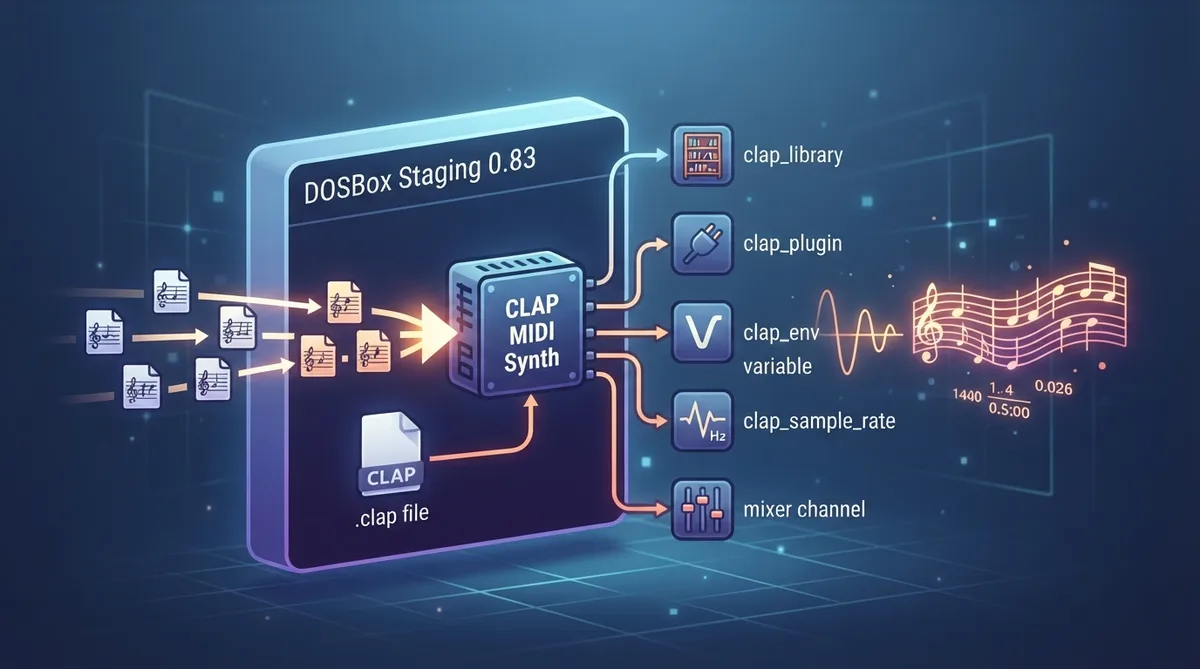
The CLAP MIDI synth is a DOSBox Staging sound device that plays MIDI music through a software synthesiser plugin in CLAP (CLever Audio Plugin) format. This lets DOSBox Staging use any General MIDI-capable synthesiser plugin in the CLAP format. This guide summarizes the official DOSBox Staging 0.83 documentation; the steps below have not been hands-on tested.
Prerequisites: a General MIDI-capable plugin
You must use a General MIDI-capable CLAP plugin. Using a plugin that is not General MIDI-capable will produce utterly wrong music and sound. All CLAP synthesisers support MIDI as a communication protocol, but only a small subset of them support the General MIDI standard, so check the plugin's capabilities before relying on it.
Install the plugin
- 1. Download the CLAP plugin of your choice for your operating system.
- 2. Place the .clap file in the plugins folder inside your DOSBox configuration folder, creating the folder if it does not exist.
Enable and select the plugin
To enable a CLAP plugin, set mididevice to clap in the [midi] section of the configuration. Then select your plugin in the [clap] section using one of the documented methods.
Documented CLAP configuration settings
The official documentation describes these settings under the [clap] section: clap_library, clap_plugin and clap_env for selecting the plugin and passing environment variables, plus clap_sample_rate and a mixer channel setting.
Each of these settings is documented on its own subsection of the CLAP page: clap_library, clap_plugin, clap_env, clap_sample_rate, and the mixer channel. Consult the official 0.83 manual for their exact accepted values and defaults, which are not reproduced here.
MIDI background worth reading first
If you are new to MIDI in DOS games, the documentation recommends reading the MIDI overview first. It explains how DOS games use MIDI and the difference between the Roland MT-32 family of devices and Roland Sound Canvas / General MIDI devices. The MT-32 vs General MIDI comparison is also relevant to CLAP plugin choice.
Sources & references
Content responsibility: FrameTinker editorial desk. Source authors and software maintainers are credited separately below; this is not a claim of hands-on testing.
Published .
DOSBox Staging: clap — official gaming software documentation https://raw.githubusercontent.com/dosbox-staging/dosbox-staging/main/website/docs/0.83/manual/sound/sound-devices/clap.mdRetrieved Nov 1, 2026Something doesn’t match your setup?
Suggest a correction