

1. Install Heroic
For the Flatpak route, first make sure Flatpak is installed. The official guide points to https://flatpak.org/setup/ for setup instructions and notes that SteamOS on Steam Deck and Bazzite already include Flatpak.
Open your software manager, search for “Heroic Games Launcher,” and verify that the selected package is the Flatpak version before installing. On KDE, including SteamOS, the software manager is called Discover; on GNOME, it is called Software.
Alternatively, use the following terminal command to install the Heroic Flatpak:
flatpak install com.heroicgameslauncher.hglIf you want a non-Flatpak package, the guide also lists AppImage and other formats at https://heroicgameslauncher.com/downloads. After installing Heroic, open it to begin account setup.
2. Connect your store accounts
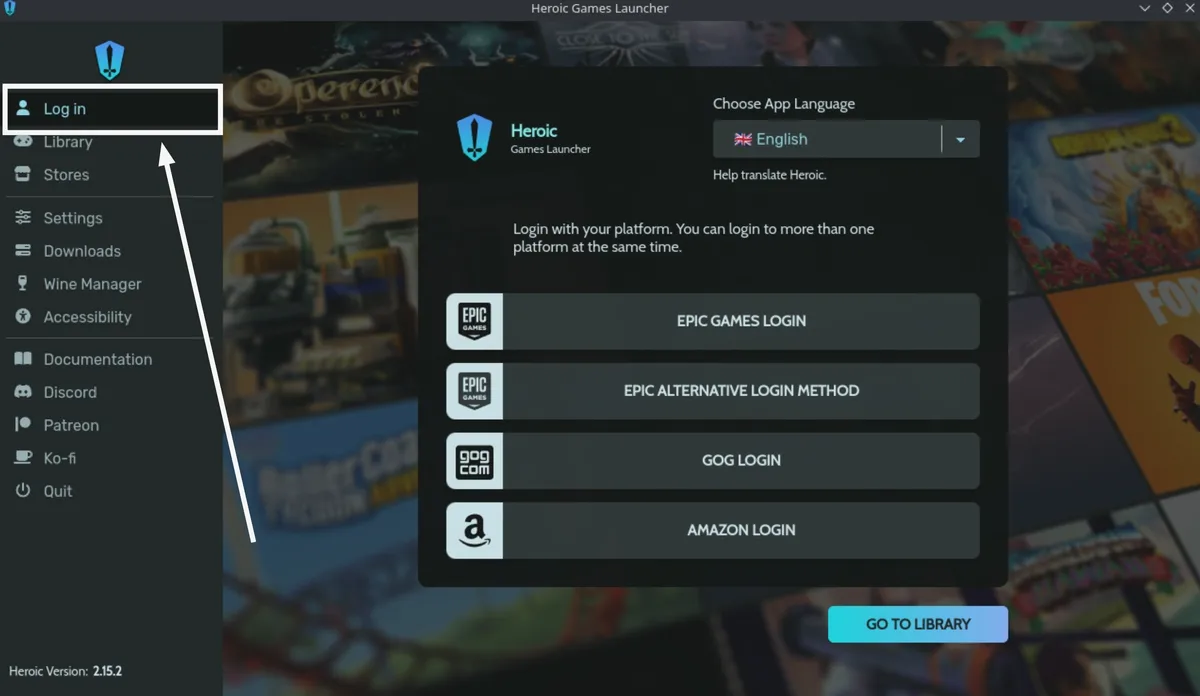
Select Log in on the left side of Heroic and sign in to your Epic, GOG, or Amazon account. You can connect all three through this menu. Games from the connected stores then populate your Heroic library. The official guide says to finish the initial setup steps before installing games.
3. Download Proton-GE and select a game
- 1. Open Wine Manager from the left sidebar.
- 2. Select the Proton-GE tab at the top.
- 3. Download either the latest numbered Proton-GE version or the entry labeled Proton-GE Latest.
- 4. Open Library and select a game to install. The Library entry appears after you have signed in to an account.
Installation choices
When a game offers both Linux and Windows downloads, the official guide generally advises choosing Windows. Its stated reason is that some Linux builds may depend on older libraries or may not work. This is general guidance from the source, not a compatibility finding for a specific game.
The installation page lets you choose both the game’s installation path and its prefix. The installation folder holds the game’s main files; the prefix acts like a virtual Windows C: drive and contains dependencies and game saves.
Sources & references
Content responsibility: FrameTinker editorial desk. Source authors and software maintainers are credited separately below; this is not a claim of hands-on testing.
Published .
Heroic Games Launcher: Linux Quick Start Guide — official gaming software documentation https://raw.githubusercontent.com/wiki/Heroic-Games-Launcher/HeroicGamesLauncher/Linux-Quick-Start-Guide.mdRetrieved Nov 8, 2026Something doesn’t match your setup?
Suggest a correction