

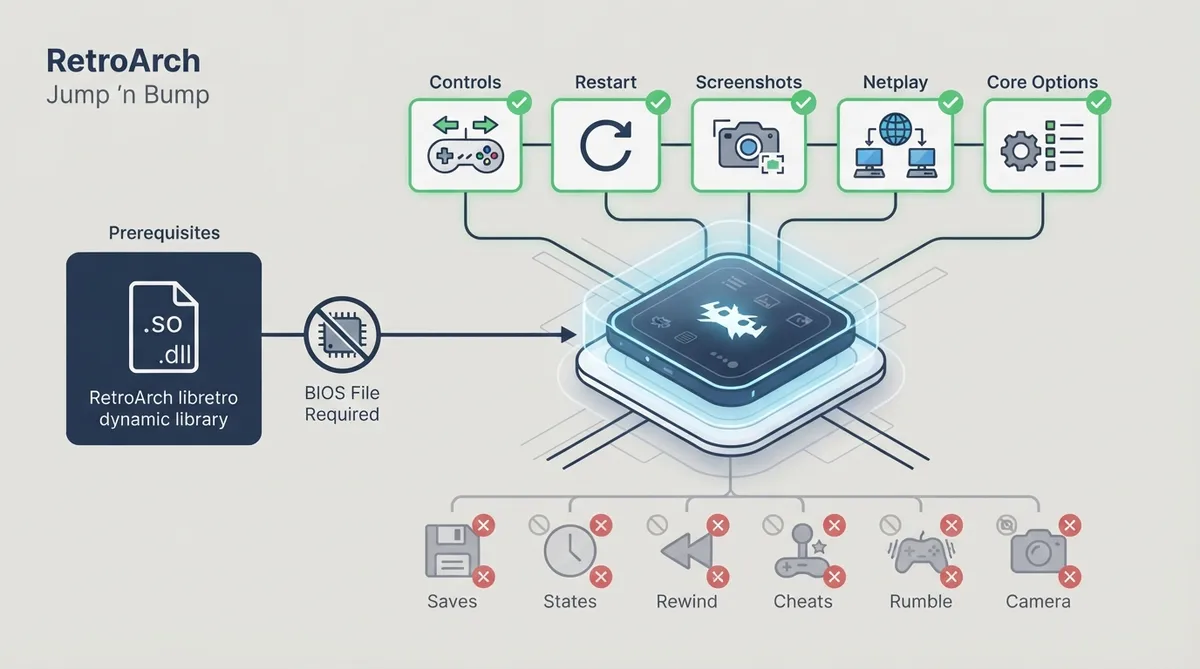
Jump 'n Bump is described in the official RetroArch documentation as a game for the whole family, and it is distributed as a libretro core for RetroArch. This guide summarizes what the official core documentation states about prerequisites, supported features and limitations.
Prerequisites
No BIOS files are required. According to the official documentation, there are no required BIOS for this core, so you do not need to supply a BIOS image to run it.
Because this is a libretro core, the prerequisite is a RetroArch installation that can load the Jump 'n Bump core. The documentation is scoped to the core inside RetroArch rather than to standalone play.
Supported features
- The official documentation marks the following features as supported: Restart; Screenshots; Netplay; Core Options; Controls; Remapping.
Controls and remapping are both listed as supported, which means the core exposes input handling through RetroArch's usual control and remapping paths as documented for this core.
Netplay is marked as supported in the official feature table, so the core is documented as compatible with RetroArch's netplay feature.
Documented limitations
The official documentation marks a number of features as unsupported by this core, including Saves, States (save states), Rewind, RetroArch Cheats, Native Cheats, Multi-Mouse, Softpatching, Disk Control and memory monitoring for achievements.
Sensor input, camera, location, rumble and LEDs are also listed as unsupported, so gameplay is not documented to rely on motion, camera, position or haptic hardware.
Core Options are supported, so settings exposed by the core appear through RetroArch's core options interface. The source does not enumerate the individual option names or default values in the material summarized here.
Reference table · Scroll horizontally to see all columns.
| Feature | Documented support |
|---|---|
| Restart | Supported |
| Screenshots | Supported |
| Netplay | Supported |
| Core Options | Supported |
| Controls | Supported |
| Remapping | Supported |
| Saves | Not supported |
| States | Not supported |
| Rewind | Not supported |
| RetroArch Cheats | Not supported |
| Native Cheats | Not supported |
| Multi-Mouse | Not supported |
| Softpatching | Not supported |
| Disk Control | Not supported |
| Memory Monitoring (achievements) | Not supported |
| Rumble | Not supported |
| Sensors | Not supported |
| Camera | Not supported |
| Location | Not supported |
| LEDs | Not supported |
| BIOS files | None required |
Sources & references
Content responsibility: FrameTinker editorial desk. Source authors and software maintainers are credited separately below; this is not a claim of hands-on testing.
Published .
RetroArch: jumpnbump — official gaming software documentation https://raw.githubusercontent.com/libretro/docs/master/docs/library/jumpnbump.mdRetrieved Oct 25, 2026Something doesn’t match your setup?
Suggest a correction