

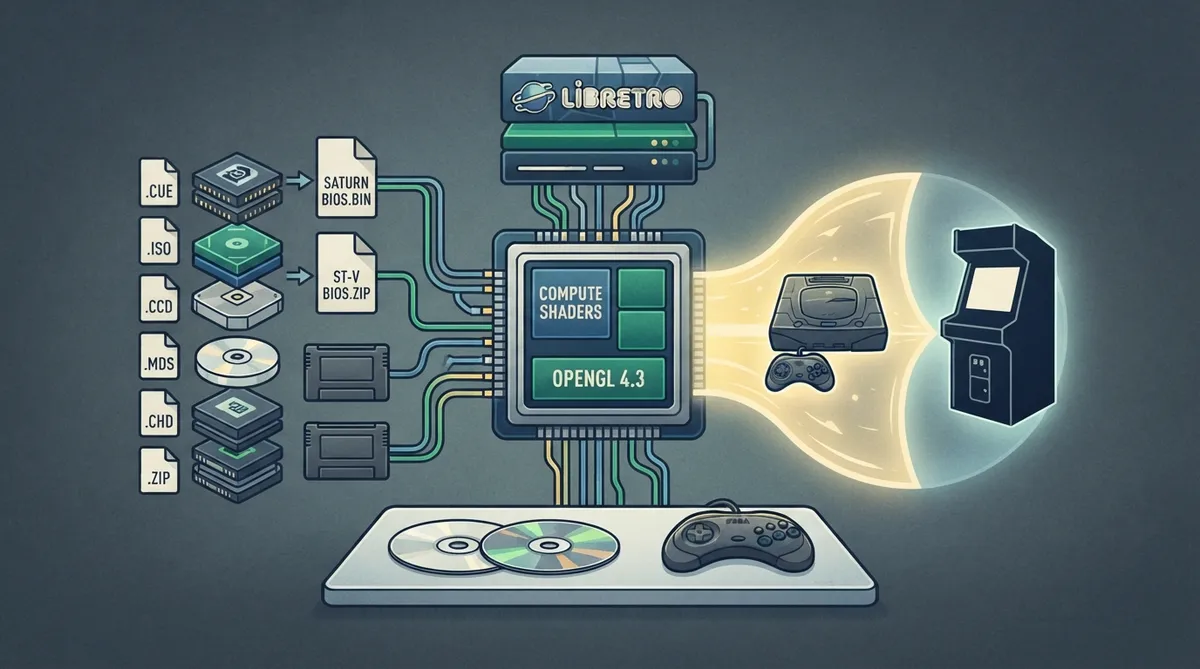
This guide summarizes the official Libretro documentation for the Kronos core. Kronos is a fork of Yabause that emulates both the Sega Saturn and its arcade board version, the Sega Titan Video (ST-V). It uses compute shaders, and the documentation states it requires OpenGL 4.3 and is the only Sega Saturn libretro core officially supported by upstream.
Prerequisites
- The documentation lists the following requirements and context:
- - A graphics setup capable of OpenGL 4.3, because the core uses compute shaders.
- - The required firmware files placed in the frontend's system directory.
- - Content in a supported file format.
BIOS and firmware files
Required or optional firmware files go in the frontend's system directory. The Saturn BIOS is required for Saturn games, and the ST-V BIOS is required for ST-V games. Two additional cartridge ROM files are listed as required for specific games. The documentation notes the md5sum for the Saturn BIOS is only a hint and that any valid Saturn BIOS should work. Kronos will also search locations commonly used by other Sega Saturn libretro cores if it cannot find a BIOS at the expected path. Unlike Yabause, Kronos does not automatically switch to an HLE BIOS when a BIOS file is missing, because the Kronos project does not recommend that HLE BIOS and does not provide support for issues related to its use.
Loading content
The core supports content with the following file extensions: .cue, .iso, .ccd, .mds, .chd and .zip.
- Documented content notes:
- - Kronos is not compatible with cue sheets that reference audio files with wav, mp3, ogg, flac or ape extensions.
- - Zip files containing cue and bin files can be loaded directly, but the dump is loaded into RAM, using roughly 700 MB depending on the size of the dump.
- - The documentation recommends Redump releases because that is described as the most thoroughly tested format.
Core options
The core options menu exposes the settings below. The documentation lists the first value as the default. Several options require a core restart after they are changed.
- - Force HLE BIOS (disabled by default): forces the HLE BIOS. The documentation describes this as mainly for debugging, neither recommended nor supported, to be used at your own risk, and requiring a restart.
- - Video format (auto by default): options are auto, NTSC and PAL. Auto tries to detect the format from the loaded content.
- - Frameskip (0 by default): options 0 to 5. Skips rendering at a fixed rate and can improve playability dramatically on lower-end devices.
- - SH-2 cache support (experimental) (kronos by default): options kronos and old. Adds support for the SH-2 cache, required for some games to work properly; the documentation notes it can kill performance.
- - Share saves with beetle (disabled by default): tries to match Sega Saturn savefiles with Beetle Saturn. Requires a restart.
- - Addon Cartridge (none by default): options include 1M, 4M and 16M extended RAM, plus 512K, 1M, 2M and 4M backup RAM. This is the default cartridge. The choice is ignored if Kronos detects the game requires a specific cartridge. Requires a restart.
- - 6Player Adaptor on Port 1 (disabled by default): enables the multitap in port 1.
- - 6Player Adaptor on Port 2 (disabled by default): enables the multitap in port 2.
- - Resolution (original by default): options include 480p, 720p, 1080p, 4k and 8k. Modifies rendering resolution. Requires a restart.
- - Output to original resolution (disabled by default): useful when using a resolution higher than your screen's; also replaces meshed transparency with real transparency to avoid a moiré effect.
- - Improved mesh (disabled by default): replaces meshed transparency with real transparency.
- - Improved banding (disabled by default): applies Gouraud shading instead of flat shading; requires the OpenGL CS renderer.
- - Wireframe mode (disabled by default): requires the OpenGL CS renderer.
- - ST-V Service/Test Buttons (disabled by default): enables Service/Test for ST-V to enter cabinet settings. Not mapped by default so they are not pressed by mistake.
- - ST-V Favorite Region (EU by default): options are EU, US, JP and TW. Ignored if not compatible with your game.
- - Bios Language (English by default): options are English, German, French, Spanish, Italian and Japanese. Translates some games. Requires a restart.
Savefiles and timing
Savefile locations depend on the content running and the chosen core options. By default they are stored in a kronos subdirectory of your savefiles directory, split further between saturn and stv directories. The "Share saves with beetle" core option instead tries to match Sega Saturn savefiles with Beetle Saturn. The core reports 60 FPS for NTSC games and 50 FPS for PAL games, a 44100 Hz sample rate and a 4/3 aspect ratio, and it asks the frontend to rotate the display for ST-V vertical games.
Frontend features
The documentation states the core supports Restart, Screenshots, Saves, States, Core Options, Memory Monitoring for achievements, RetroArch Cheats, Controls, Remapping and Disk Control. It lists the following as not supported: Rewind, Netplay, Native Cheats, Multi-Mouse, Rumble, Sensors, Camera, Location, Subsystem, Softpatching, Username, Language, Crop Overscan and LEDs.
Controllers
The controls menu offers the device types None, Saturn Pad, Saturn 3D Pad, Saturn Wheel and Saturn Mouse, with Saturn Pad as the default. Multitap support must be enabled in the core options. The documented joypad mapping covers up to 12 users and includes A, X, Start, the D-Pad directions, B, Y, C, Z, L, R and the analog X and Y axes.
Known issues
- - Savestates work but the documentation says they can sometimes be quite unstable.
- - Enabling both multitaps at the same time causes some kind of autofire bug.
- - Switching between windowed and fullscreen causes issues, so the documented advice is to start the core in your preferred mode and stick with it.
- - The documentation reports apparent compatibility issues between RetroArch's threaded video setting and this core.
Where to get more information
The documentation points to the official Kronos repository for issue reports, the Libretro Kronos core info file, the Libretro Kronos repository and the Libretro Yabause issues page, as well as an official Kronos compatibility list. It also links to related Sega Saturn cores: Beetle Saturn, Yabause and YabaSanshiro.
This article is a summary of the official Libretro documentation for the Kronos core. It has not been hands-on tested, and specifics such as file locations or on-screen labels may differ from your setup. For downloads, use content and firmware you are legally entitled to use.
Reference table · Scroll horizontally to see all columns.
| Filename | Description | md5sum |
|---|---|---|
| kronos/saturn_bios.bin | Saturn BIOS - Required for Saturn games | af5828fdff51384f99b3c4926be27762 |
| kronos/stvbios.zip | ST-V BIOS - Required for ST-V games | |
| mpr-18811-mx.ic1 | The King of Fighters '95 ROM Cartridge - Required for this game | 255113ba943c92a54facd25a10fd780c |
| mpr-19367-mx.ic1 | Ultraman: Hikari no Kyojin Densetsu ROM Cartridge - Required for this game | 1cd19988d1d72a3e7caa0b73234c96b4 |
Sources & references
Content responsibility: FrameTinker editorial desk. Source authors and software maintainers are credited separately below; this is not a claim of hands-on testing.
Published .
RetroArch: kronos — official gaming software documentation https://raw.githubusercontent.com/libretro/docs/master/docs/library/kronos.mdRetrieved Oct 13, 2026Something doesn’t match your setup?
Suggest a correction