

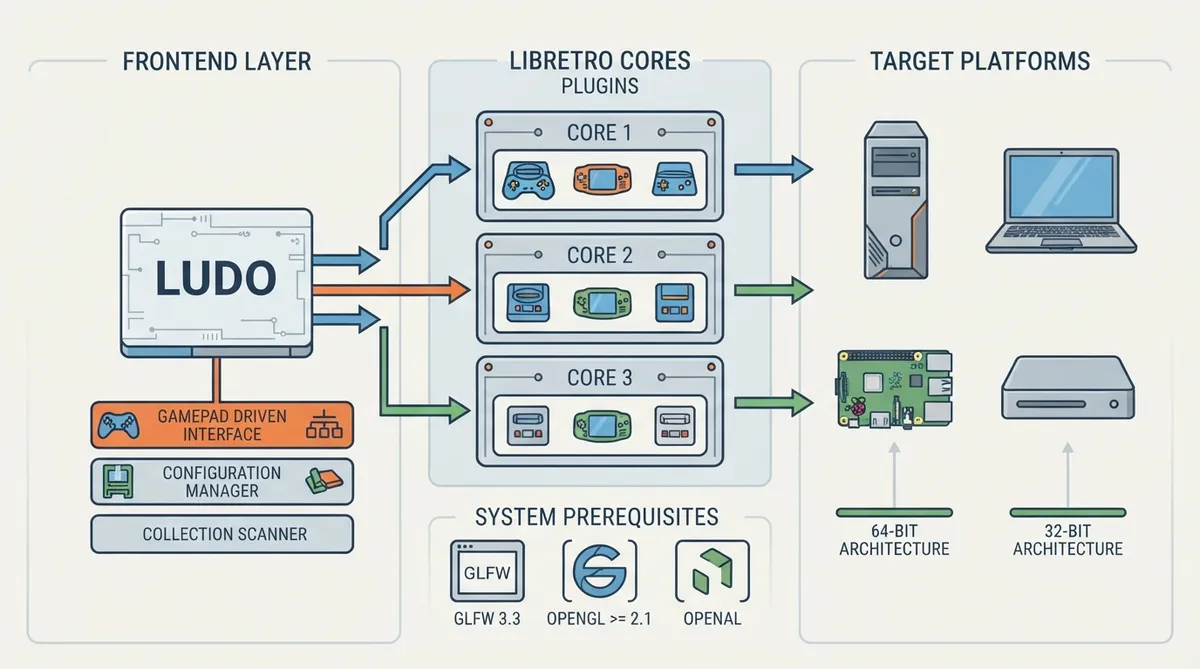
Ludo is an emulator frontend for running retro video games. It does not emulate consoles itself; instead it relies on emulator plugins called libretro cores, which the documentation describes as well-known emulators stripped of their original user interface and containing only console-specific logic. The following is a source-based summary of the official Libretro documentation page for downloading, installing and updating Ludo on PC. The instructions have not been hands-on tested by this article.
What Ludo Is
Ludo is an emulator frontend able to run retro video games. It does not emulate the consoles itself; it does so through emulator plugins called libretro cores. Libretro cores are well-known emulators such as Snes9x, Genesis Plus GX or PCSX stripped of their original user interface and containing only console-specific logic.
Prerequisites
The documentation lists three dependencies that must be present before Ludo can run on PC:
- - GLFW 3.3
- - OpenGL >= 2.1
- - OpenAL
Supported Platforms
- - Windows 64-bit (tested on Windows 10)
- - Mac OS X 64-bit
- - Linux 64-bit
- - Linux on Raspberry Pi 32-bit
A build must match both the stated operating system and the stated 64-bit or 32-bit architecture: the documentation names 64-bit Windows, Mac OS X and Linux builds plus a 32-bit Linux build for the Raspberry Pi. The only recorded test environment is Windows 10 on 64-bit Windows.
Downloading Ludo
The documentation directs readers to the latest release download page rather than providing a versioned installer link, so the recommended source for the current build is the project's latest releases page. Because the project is in an early development phase, the documentation notes that Ludo may not work on every OS as expected, while stating that in most scenarios it works as intended.
Interface and Feature Set
The documentation lists the following interface capabilities for Ludo. Each one shapes how a player gets from launching the frontend to running a game:
- - Gamepad-driven: everything can be done through the gamepad instead of the mouse
- - TV optimized: designed to look good on a wide screen
- - Controller auto-configuration when plugged in
- - Automatic configuration of the described settings
- - Game collection scanner that generates playlists with thumbnails
- - Video filters through simple shaders
- - Taking game screenshots
- - Saving and loading game state at any time, organized by date with screenshots
- - Emulator-specific settings
- - Soft-patching of .ips and .ups files
Two documented features carry most of the day-to-day workflow. First, the game collection scanner indexes a library and produces playlists with thumbnails; those playlists let a player browse by system rather than by folder. Second, save states can be taken and reloaded at any time and are organized by date with screenshots, so a player can return to an earlier point in a game without replaying from the start. Soft-patching of .ips and .ups files means a player can apply a patch file to a game without altering the original ROM, and video filters through simple shaders change rendering output without touching game data.
Ludo as an Operating System: LudOS
Ludo also exists as an operating system variant called LudOS, which the documentation says looks and behaves the same way as the PC frontend. It can be written to a USB drive or SD card to recreate a video games console experience, set up on a dedicated TV box for couch gaming, or booted from USB on a laptop for a portable setup.
Documented LudOS Images
- - PC 64-bit: LudOS-Generic.x86_64-1.0-alpha30.img.gz
- - Raspberry Pi 2/3: LudOS-RPi2.arm-1.0-alpha30.img.gz
- - Raspberry Pi 4: LudOS-RPi4.arm-1.0-alpha30.img.gz
The image choice follows the target hardware: a generic x86_64 build for 64-bit PCs, a Raspberry Pi 2/3 ARM build, and a separate Raspberry Pi 4 build. The documented images carry the version tag 1.0-alpha30, so a newer release may exist on the project's release page.
LudOS-Specific Functionality
- - Flashable using Etcher
- - Auto-expanded filesystem on first boot
- - Connecting to Wi-Fi networks, with a virtual keyboard
- - Monolithic updates for the OS, described as robust
- - Adding games through the Windows Share protocol or SSH
- - Controlling services such as SSH, Samba and Bluetooth
Read together, these features describe the LudOS setup path. A player writes one of the documented images to a USB drive or SD card with Etcher, and the filesystem expands automatically on first boot. Wi-Fi is configured on-device with a virtual keyboard, and games are then added over the Windows Share protocol or SSH. Service controls let the user manage SSH, Samba and Bluetooth, while updates are delivered as monolithic OS updates.
Included libretro Cores
The documentation lists the following libretro cores as bundled with Ludo:
- - bluemsx
- - fbneo
- - fceumm
- - gambatte
- - genesis_plus_gx
- - handy
- - mednafen_ngp
- - mednafen_pce_fast
- - mednafen_psx
- - mednafen_saturn
- - mednafen_supergrafx
- - mednafen_vb
- - mednafen_wswan
- - mgba
- - np2kai
- - o2em
- - pcsx_rearmed
- - picodrive
- - pokemini
- - prosystem
- - snes9x
- - stella
- - vecx
- - virtualjaguar
Each bundled core is the emulation layer for one or more systems, while Ludo supplies the shared interface and configuration. This is why emulator-specific settings are exposed inside one frontend: a player can adjust a core's behavior for a particular system without leaving Ludo or reconfiguring a separate emulator application.
Systems the Documentation Says Ludo Can Run
Mapped to the bundled cores above, the documentation lists the following systems:
- - Atari 5200, Atari 7800, Atari Jaguar, Atari Lynx
- - GCE Vectrex
- - MSX, MSX2
- - Various arcade games
- - Game Boy
- - Sega SG-1000, Sega Game Gear, Sega Master System, Sega Genesis / Mega Drive, Sega 32X, Sega CD, Sega Saturn
- - Nintendo NES, Super Nintendo / Super Famicom, Nintendo Virtual Boy, Nintendo Game Boy, Nintendo Game Boy Advance
- - NEC PC Engine, NEC PC Engine CD, NEC PC-98, NEC PC-FX
- - Sharp X68000
- - Sony PlayStation
- - 3DO
Documented Limitations
The documentation carries an explicit disclaimer: Ludo is still under heavy development. In its current state the project allows playing most games on most platforms, but readers should expect bugs, missing features or features not working as intended, and hardware that is not yet supported. Bugs can be reported in the project tracker unless they have already been reported.
Where to Find More Information
Reference table · Scroll horizontally to see all columns.
| Target | LudOS image file |
|---|---|
| PC 64-bit | LudOS-Generic.x86_64-1.0-alpha30.img.gz |
| Raspberry Pi 2/3 | LudOS-RPi2.arm-1.0-alpha30.img.gz |
| Raspberry Pi 4 | LudOS-RPi4.arm-1.0-alpha30.img.gz |
Sources & references
Content responsibility: FrameTinker editorial desk. Source authors and software maintainers are credited separately below; this is not a claim of hands-on testing.
Published .
RetroArch: install ludo — official gaming software documentation https://raw.githubusercontent.com/libretro/docs/master/docs/guides/install-ludo.mdRetrieved Oct 8, 2026Something doesn’t match your setup?
Suggest a correction