

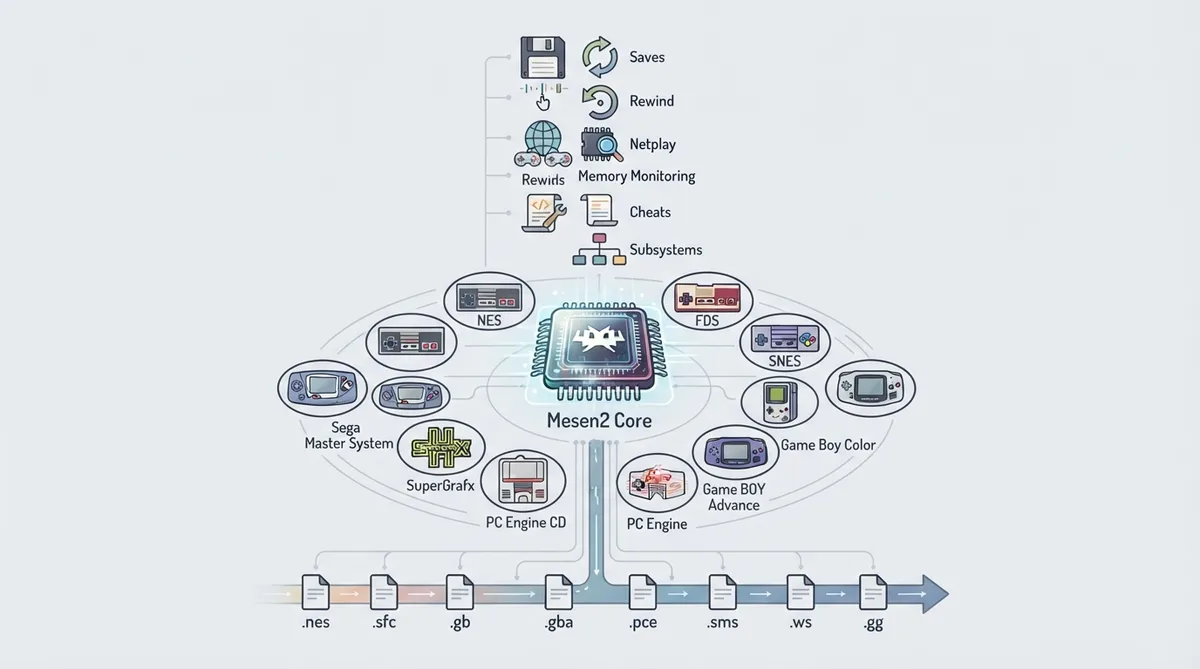
Mesen2 is a libretro core for RetroArch, described in the official documentation as a port of MesenCE built by M. Bibaud (Sour) together with the NESdev community. It targets a large set of home consoles, from the Nintendo Entertainment System through SNES, Game Boy family, Game Boy Advance, PC Engine, Sega Master System and Game Gear, and WonderSwan. This guide summarises what the documentation states about supported content, frontend features, options, and controllers. It is a source summary, not a hands-on walkthrough.
Systems and content covered
The core's documented scope covers NES/FC and FDS, SNES/SFC, Game Boy, Game Boy Color, Game Boy Advance, PC Engine and PC Engine CD, Sega Master System and Game Gear, and Bandai WonderSwan. The documentation notes that Super Game Boy is handled through the libretro subsystem mechanic.
File extensions the core loads
The documentation lists the following content extensions as loadable by the Mesen2 core:
- .nes; .fds; .unf; .unif; .sfc; .smc; .gb; .gbc; .gba; .pce; .sgx; .cue; .sms; .gg; .ws; .wsc
The core is associated with RetroArch databases for several platforms, including Nintendo - Super Nintendo Entertainment System, Nintendo - Satellaview, Nintendo - Game Boy, Nintendo - Game Boy Color, Nintendo - Game Boy Advance, Bandai - WonderSwan, Bandai - WonderSwan Color, NEC - PC Engine SuperGrafx, NEC - PC Engine - TurboGrafx 16, NEC - PC Engine CD - TurboGrafx-CD, Nintendo - Nintendo Entertainment System, and Nintendo - Family Computer Disk System.
Frontend features the core respects
According to the documentation, the Mesen2 core supports saves, save states, rewind, netplay, core options, memory monitoring for achievements, RetroArch cheats, controls, and subsystems. Disk control is listed as not supported.
Core options
Core options are grouped under System, Video, Audio, Enhancements, and Input. The lists below give the option groups and their available values as documented. Bold values in the official table indicate defaults; where the documentation bolds a value it is noted here. Many options are platform-specific: the NES, SNES, Game Boy, GBA, PC Engine, Master System/Game Gear, and WonderSwan each have their own settings.
System options
- Region: Auto (default), NTSC, PAL, Dendy; RAM Power-On State: All 0s (default), All 1s, Random; Overclock: None (default), Low, Medium, High, Very High; Overclock Type: Before NMI (default), After NMI; FDS Auto Insert: Off (default), On; FDS Fast Forward: Off (default), On; Allow Invalid Input: Off (default), On; Randomize Mapper Power-On: Off (default), On; Randomize CPU/PPU Alignment: Off (default), On; SNES Disable Frame Skipping: Off (default), On; SNES Strict Board Mappings: Off (default), On; SNES Randomize Power-On: Off (default), On; Game Boy Model: Auto (Best), Auto (GBC) (default), Auto (SGB), Auto (GB), Game Boy, Game Boy Color, Super Game Boy; GBA Skip Boot Screen: Off (default), On; GBA Disable Frame Skipping: Off (default), On; GBA Save Type: Auto Detect (default), None, SRAM, EEPROM 512, EEPROM 8192, Flash 64, Flash 128; GBA RTC Type: Auto Detect (default), Enabled, Disabled; PCE Console Type: Auto (default), PC Engine, SuperGrafx, TurboGrafx; PCE CD-ROM Type: CD-ROM, Super CD-ROM, Arcade (default); PCE Disable Frame Skipping: Off (default), On; WonderSwan Model: Auto (default), Monochrome, Color, SwanCrystal, PocketChallenge
Video options
- Palette: Default (default), Composite Direct (by FirebrandX), NES Classic, Nestopia RGB, Original Hardware, PVM Style, Sony CXA2025AS, Unsaturated v6, YUV v3, Wavebeam, Custom; NTSC Filter: Disabled (default), Composite (Blargg); PAL Borders: Off (default), On; SNES Color Correction: None (default), NTSC Black Level, Deep Black Boost; SNES High-Res Blend Mode: None (default), Blend All, Blend Even/Odd; SNES Deinterlace Mode: Weave (default), Bob Blend, Bob, Current Field; SNES Force Fixed Resolution: Off (default), On; Game Boy Blend Frames: On (default), Off; Game Boy Adjust Colors: On (default), Off; Game Boy Hide SGB Borders: Off (default), On; GBA Blend Frames: On (default), Off; GBA Adjust Colors: On (default), Off; PCE Force Fixed Resolution: Off (default), On; SMS Use SG Palette: Off (default), On; SMS/GG Blend Frames: On (default), Off; WonderSwan Auto Rotate: Off (default), On; WonderSwan Blend Frames: Off (default), On; WonderSwan LCD Adjust Colors: Off (default), On; WonderSwan LCD Show Icons: Off (default), On
Audio options
- Fake Stereo: Off (default), On; Reduce Triangle Popping: On (default), Off; Reduce DMC Popping: On (default), Off; Swap Duty Cycles: Off (default), On; Disable Noise Mode: Off (default), On; Sample Rate: 48000 Hz, 96000 Hz, 11025 Hz, 22050 Hz, 44100 Hz (default); PCE Use HuC6280 Audio: On (default), Off; SMS FM Audio: On (default), Off; WonderSwan Audio Mode: Headphones (default), Speakers
Enhancement options
- SNES layer and sprite options: Hide BG Layer 1/2/3/4, Hide Sprites, Remove Sprite Limit (all Off by default); Game Boy: Disable Background, Disable Sprites, Remove Sprite Limit (all Off by default); GBA: Disable Sprites, Disable Background, Hide BG Layer 1/2/3/4 (all Off by default); PCE: Disable Sprites, Disable VDC2 Sprites, Disable Background, Disable VDC2 Background, Remove Sprite Limit (all Off by default); SMS: Disable Sprites, Disable Background, Remove Sprite Limit (all Off by default); WonderSwan: Disable Sprites (Off by default); Shared: Sprites Enabled (On by default), Background Enabled (On by default), Game Genie Bus Conflicts (Off by default), Sprite Limit: Normal (default), Adaptive, Off
Input options
- Controller Turbo Speed: Fast, Very Fast, Disabled, Slow, Normal (default)
Controllers
The documentation lists five controller ports. Ports 1 and 2 accept Auto, Standard Controller, Zapper, Power Pad, Arkanoid, SNES Controller, and SNES Mouse. Ports 3 and 4 accept Auto and Standard Controller. Port 5 accepts a wider range including Auto, Arkanoid, Ascii Turbo File, Bandai Hypershot, Battle Box, Exciting Boxing, Family Trainer, Four Player Adapter, Hori Track, Konami Hypershot, Pachinko, Partytap, and Oeka Kids Tablet.
Using the core in RetroArch
- Confirm your frontend is a libretro/RetroArch build that can load libretro cores; Load the Mesen2 core in the frontend; Load content that uses one of the extensions listed above; Adjust core options from the core options menu if needed (System, Video, Audio, Enhancements, Input); Controller ports can be configured per the lists above; Save states, saves, rewind, netplay, cheats, and subsystems are listed as supported frontend features
Author and license
Documented limitations
Disk control is listed as not supported. The documentation does not describe troubleshooting outcomes or hardware requirements, and no hands-on performance or compatibility testing is presented here.
Reference table · Scroll horizontally to see all columns.
| Feature | Documented support |
|---|---|
| Saves | Yes |
| States | Yes |
| Rewind | Yes |
| Netplay | Yes |
| Core Options | Yes |
| Memory Monitoring (achievements) | Yes |
| RetroArch Cheats | Yes |
| Controls | Yes |
| Subsystem | Yes |
| Disk Control | No |
Reference table · Scroll horizontally to see all columns.
| Extension | Comment |
|---|---|
| .nes | NES |
| .fds | Famicom Disk System |
| .unf | .unif — NES format variants |
| .sfc | .smc — SNES |
| .gb | .gbc — Game Boy / Game Boy Color |
| .gba | Game Boy Advance |
| .pce | .sgx — PC Engine / SuperGrafx |
| .cue | Disc image descriptor |
| .sms | .gg — Master System / Game Gear |
| .ws | .wsc — WonderSwan / WonderSwan Color |
Sources & references
Content responsibility: FrameTinker editorial desk. Source authors and software maintainers are credited separately below; this is not a claim of hands-on testing.
Published .
RetroArch: mesen2 — official gaming software documentation https://raw.githubusercontent.com/libretro/docs/master/docs/library/mesen2.mdRetrieved Oct 13, 2026Something doesn’t match your setup?
Suggest a correction