

This guide summarizes the official libretro documentation for getting RetroArch onto an Android device. It covers the documented non-Google Play distribution routes, the sideloading permission prompts Android may show, and how the documentation describes working around Google Play Protect blocking. All steps and URLs below come from that documentation.
Sideloading means installing manually downloaded APK files on Android, outside the official stores. The documentation states that you must follow the installation notes described further below when using this route.
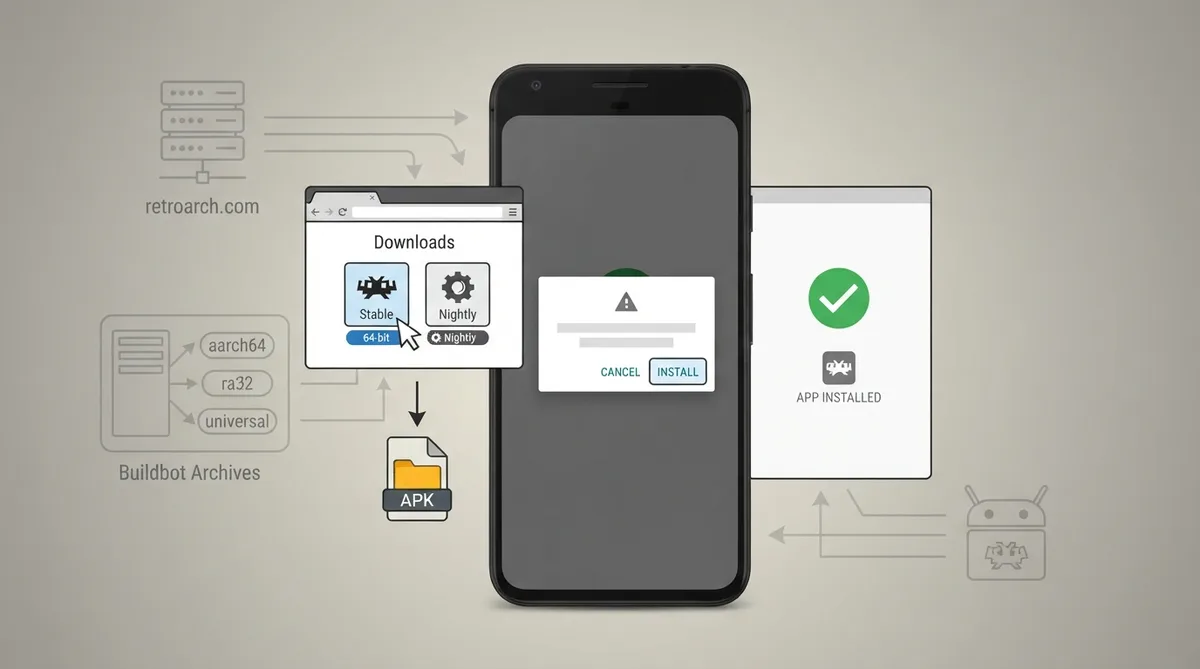
Installing from retroarch.com downloads
- 1. Visit the retroarch.com Downloads page and select Download Stable or Download Nightly.
- 2. Open the downloaded APK — use a file manager if your browser does not prompt you when the download is completed.
- 3. Select Install.
Installing from the Buildbot archives
Stable and nightly bundles are also distributed through Buildbot. The documentation points to the stable Android directory and the nightly Android directory, and notes that these archives are useful when you need a specific architecture or build for testing.
- aarch64 — a 64-bit build.
- ra32 — a 32-bit build.
- No suffix — a universal build that opts for 64-bit if your system supports it.
Installing via F-Droid
RetroArch's most recent stable release can be found in the F-Droid repository, which the documentation describes as an easier route for automatic updating. The package listing is published at f-droid.org under the com.retroarch package name.
Google Play versions and why they are not recommended
RetroArch is available on the Google Play Store, but the documentation states it has not been updated for years due to Play Store policy changes. The documentation marks the Play Store route as NOT RECOMMENDED and says you may choose to use this older version, but it is not recommended.
- RetroArch Plus — described as being for 64-bit devices only, with additional cores.
- RetroArch — described as being for 32- or 64-bit devices, with fewer cores.
Allowing APK installs when Android blocks the prompt
Android may tell you that the app doesn't have permission to install APKs. The documentation's instructions are to click the Settings button in that prompt, turn on the toggle in the next menu that allows the app to install APKs, then hit the back button to return to your installation.
Handling Google Play Protect
To install RetroArch from non-Google Play sources such as F-Droid or retroarch.com, the documentation says to ensure Google Play Protect either approves the installation or is disabled entirely. It describes two methods for this.
Method 1: choose Install anyway in Google Play Protect. When you select Install anyway, Play Protect asks you to authenticate your identity; the documentation notes this step cannot be captured in a screenshot for security reasons. If Play Protect still fails to install the app even after you have entered the correct password, the documentation directs you to Method 2.
- Open the Play Store app first.
- Tap your profile icon.
- Select Play Protect.
- Tap the gear icon in settings.
- Toggle off "Scan apps with Play Protect".
The documentation describes disabling Play Protect as necessary when it still blocks the installation even after you entered the correct password in Method 1, calling this a common issue on older Android versions. Once disabled, it states, install the APK — Play Protect will no longer interfere with the process.
Reference table · Scroll horizontally to see all columns.
| Build suffix | Target | Notes |
|---|---|---|
| aarch64 | 64-bit | Named architecture-suffixed build |
| ra32 | 32-bit | Named architecture-suffixed build; 32-bit support being phased out industry-wide |
| (no suffix) | Universal | Opts for 64-bit if your system supports it |
Reference table · Scroll horizontally to see all columns.
| Route | Source | Documentation status |
|---|---|---|
| Direct download | retroarch.com Downloads page (Stable or Nightly) | Non-Google Play; sideloading notes apply |
| Buildbot archives | Stable and nightly Android bundles | Useful when a specific architecture or build is needed for testing |
| F-Droid | F-Droid repository, package com.retroarch | Most recent stable release, easier automatic updating |
| Google Play | Play Store listings (RetroArch Plus, RetroArch) | Marked NOT RECOMMENDED; not updated for years |
 View full image
 Sources & references
Published .
RetroArch: install android — official gaming software documentation https://raw.githubusercontent.com/libretro/docs/master/docs/guides/install-android.mdRetrieved Oct 8, 2026Something doesn’t match your setup?
Suggest a correction