

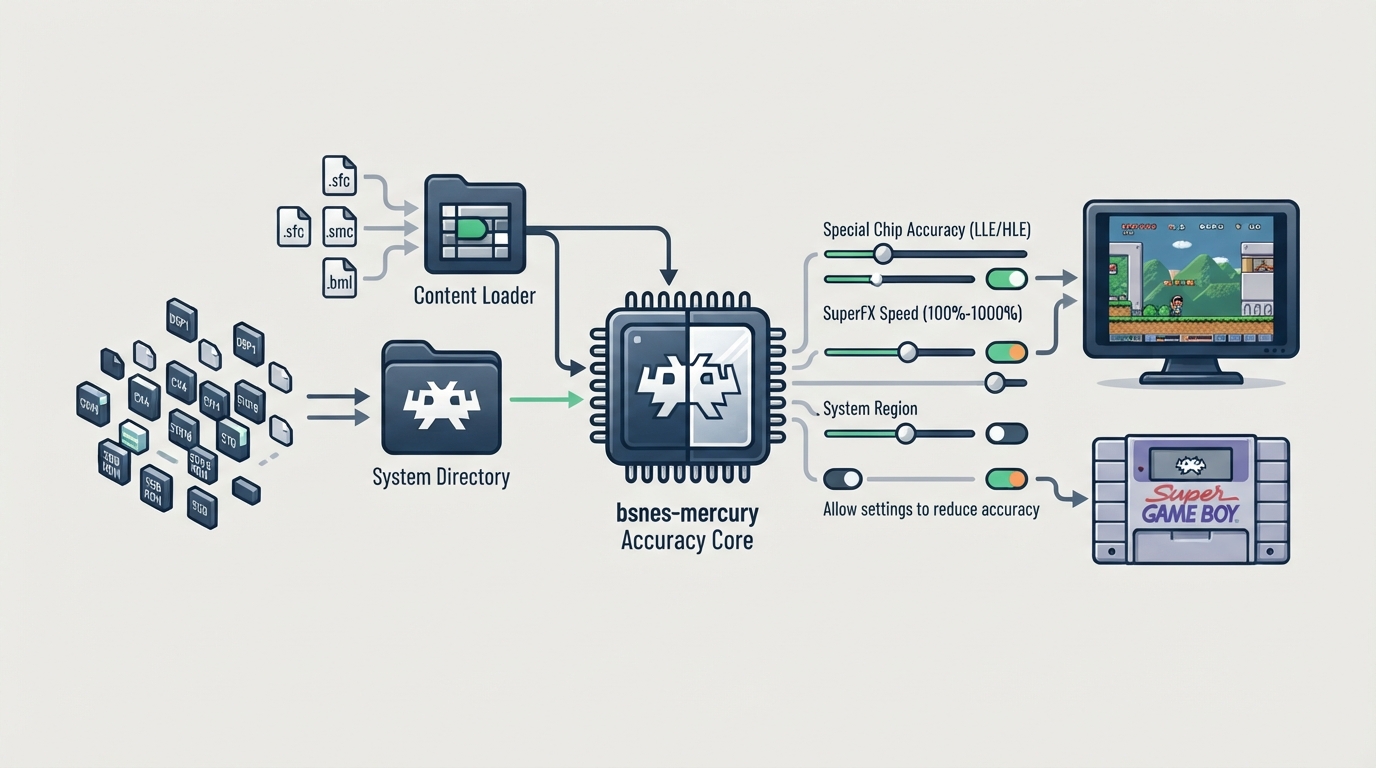
bsnes-mercury Accuracy is a RetroArch core built from a fork of higan, compiled with the Accuracy profile. It targets the Nintendo SNES / Famicom platform and exposes accuracy-related settings as optional core options. This article summarizes the official documentation so you can prepare the frontend, load content, and configure the accuracy options deliberately.
Before you start
- RetroArch with the bsnes-mercury Accuracy core installed.
- SNES / Famicom content with one of the supported extensions: .sfc, .smc, or .bml.
- Optional firmware files placed in the frontend's system directory. These cover the DSP1, DSP1B, DSP2, DSP3, DSP4, CX4, ST010, ST011, and ST018 co-processors, plus sgb.boot.rom for Super Game Boy use.
- Optional Game Boy ROM and Super Game Boy ROM, unzipped, for Super Game Boy use.
- Optional .bml manifest file for MSU-1 content.
Load SNES content
Content that can be loaded by the bsnes-mercury Accuracy core uses the following file extensions: .sfc, .smc, and .bml. Select the core in RetroArch and load content with a matching extension. The core's internal core name is 'bsnes-mercury'.
Place firmware in the system directory
Required or optional firmware files go in the frontend's system directory. The documentation lists the following filenames for the special co-processors and the Super Game Boy BIOS.
- dsp1.data.rom, dsp1.program.rom, dsp1b.data.rom, dsp1b.program.rom
- dsp2.data.rom, dsp2.program.rom, dsp3.data.rom, dsp3.program.rom, dsp4.data.rom, dsp4.program.rom
- cx4.data.rom
- st010.data.rom, st010.program.rom, st011.data.rom, st011.program.rom, st018.data.rom, st018.program.rom
- sgb.boot.rom (Super Game Boy BIOS)
Review the accuracy-related core options
The default settings keep maximum accuracy intact. Accuracy-reducing options are off by default and must be enabled explicitly. The documentation states that the bsnes-mercury cores are not less accurate at default settings than the mainline bsnes cores; you have to explicitly enable two core options to switch to the less accurate special chip HLE.
- Allow settings to reduce accuracy (bsnes_violate_accuracy): disabled by default. This core option must be enabled for the next two options to function properly.
- Special chip accuracy (bsnes_chip_hle): LLE by default, with HLE as the alternative. ST-0011 and ST-0018 cannot use HLE.
- SuperFX speed (bsnes_superfx_overclock): 100% by default, with 150%, 200%, 300%, 400%, 500%, and 1000% available. 100% is stock clockspeed.
- System region (bsnes_region): auto by default, with ntsc and pal available.
- Preferred aspect ratio (bsnes_aspect_ratio): auto by default, with ntsc and pal available. RetroArch's aspect ratio must be set to Core provided in the Video settings.
- Crop overscan (bsnes_crop_overscan): disabled by default.
- Gamma ramp (bsnes_gamma_ramp): disabled by default. Requires a restart.
Configure controllers
The core supports the SNES Joypad, SNES Mouse, Multitap, SuperScope, and Justifier device types. For User 1, the default device type is the SNES Joypad, with SNES Mouse also available. For User 2, the SNES Joypad is the default, with SNES Mouse, Multitap, SuperScope, Justifier, and Justifiers also available. Multitap support in compatible games is configured by switching User 2 to the Multitap device type.
Super Game Boy (with limitations)
- Place sgb.boot.rom in RetroArch's System directory.
- Ensure the Game Boy ROM and Super Game Boy ROM are unzipped.
- Via the GUI: load the Game Boy ROM through 'Load Super GameBoy' in RetroArch's Main Menu, then load the Super Game Boy ROM through 'Load Super GameBoy' in RetroArch's Menu Menu, then select 'Start GameBoy' in RetroArch's Menu Menu.
- Via command line: run retroarch -L {path to bsnes core} {path to Super GameBoy ROM} --subsystem sgb {path to GameBoy rom}.
MSU-1 (with limitations)
Expected outcomes and limitations
Once the core and firmware are in place and compatible content is loaded, the core's reported timing is 60.0988118623 FPS for NTSC games and 50.0069789082 FPS for PAL games, with a sample rate of 32040.5 Hz. The aspect ratio depends on the 'Preferred aspect ratio' core option. The documentation states that the core fully emulates all SNES games that have ever been officially released; that statement is a compatibility claim from the official page, not a guarantee specific to any individual setup. This guide does not cover troubleshooting outcomes or measurements.
Reference table · Scroll horizontally to see all columns.
| Filename | Description | md5sum |
|---|---|---|
| dsp1.data.rom | DSP1 co-processor firmware | 3d81b45fa0c2aa8b852dfb1ece7c0971 |
| dsp1.program.rom | DSP1 co-processor firmware | ae209fbe789fbf11a48aea5ab1197321 |
| dsp1b.data.rom | DSP1B co-processor firmware | 1e3f568634a7d8284020dddc0ae905bc |
| dsp1b.program.rom | DSP1B co-processor firmware | d10f446888e097cbf500f3f663cf4f6d |
| dsp2.data.rom | DSP2 co-processor firmware | e9417e29223b139c3c4b635a2a3b8744 |
| dsp2.program.rom | DSP2 co-processor firmware | aa6e5922a3ed5ded54f24247c11143c5 |
| dsp3.data.rom | DSP3 co-processor firmware | 0a81210c0a940b997dd9843281008ee6 |
| dsp3.program.rom | DSP3 co-processor firmware | d99ca4562818d49cee1f242705bba6f8 |
| dsp4.data.rom | DSP4 co-processor firmware | ee4990879eb68e3cbca239c5bc20303d |
| dsp4.program.rom | DSP4 co-processor firmware | a151023b948b90ffc23a5b594bb6fef2 |
| cx4.data.rom | CX4 co-processor firmware | 037ac4296b6b6a5c47c440188d3c72e3 |
| st010.data.rom | ST010 co-processor firmware | 254d70762b6f59f99c27c395aba7d07d |
| st010.program.rom | ST010 co-processor firmware | 1d70019179a59a566a0bb5d3f2845544 |
| st011.data.rom | ST011 co-processor firmware | 10bd3f4aa949737ab9836512c35bcc29 |
| st011.program.rom | ST011 co-processor firmware | 95222ebf1c0c2990bcf25db43743f032 |
| st018.data.rom | ST018 co-processor firmware | 49c898b60d0f15e90d0ba780dd12f366 |
| st018.program.rom | ST018 co-processor firmware | dda40ccd57390c96e49d30a041f9a9e7 |
| sgb.boot.rom | Super Game Boy BIOS | (not listed) |
Reference table · Scroll horizontally to see all columns.
| Feature | Supported |
|---|---|
| Restart | Yes |
| Screenshots | Yes |
| Saves | Yes |
| States | Yes |
| Rewind | Yes |
| Netplay | Yes |
| Core Options | Yes |
| Memory Monitoring (achievements) | Yes |
| RetroArch Cheats | Yes |
| Native Cheats | No |
| Controls | Yes |
| Remapping | Yes |
| Multi-Mouse | - |
| Rumble | No |
| Sensors | No |
| Camera | No |
| Location | No |
| Subsystem | Yes |
| Softpatching | Yes |
| Disk Control | No |
| Username | No |
| Language | No |
| Crop Overscan | No |
| LEDs | No |
Reference table · Scroll horizontally to see all columns.
| Location | File pattern | Purpose |
|---|---|---|
| Frontend's Save directory | 'content-name'.srm | Cartridge battery save |
| Frontend's State directory | 'content-name'.state# | State |
Sources & references
Content responsibility: FrameTinker editorial desk. Source authors and software maintainers are credited separately below; this is not a claim of hands-on testing.
Published .
RetroArch: bsnes mercury accuracy — official gaming software documentation https://raw.githubusercontent.com/libretro/docs/master/docs/library/bsnes_mercury_accuracy.mdRetrieved Oct 12, 2026Something doesn’t match your setup?
Suggest a correction