

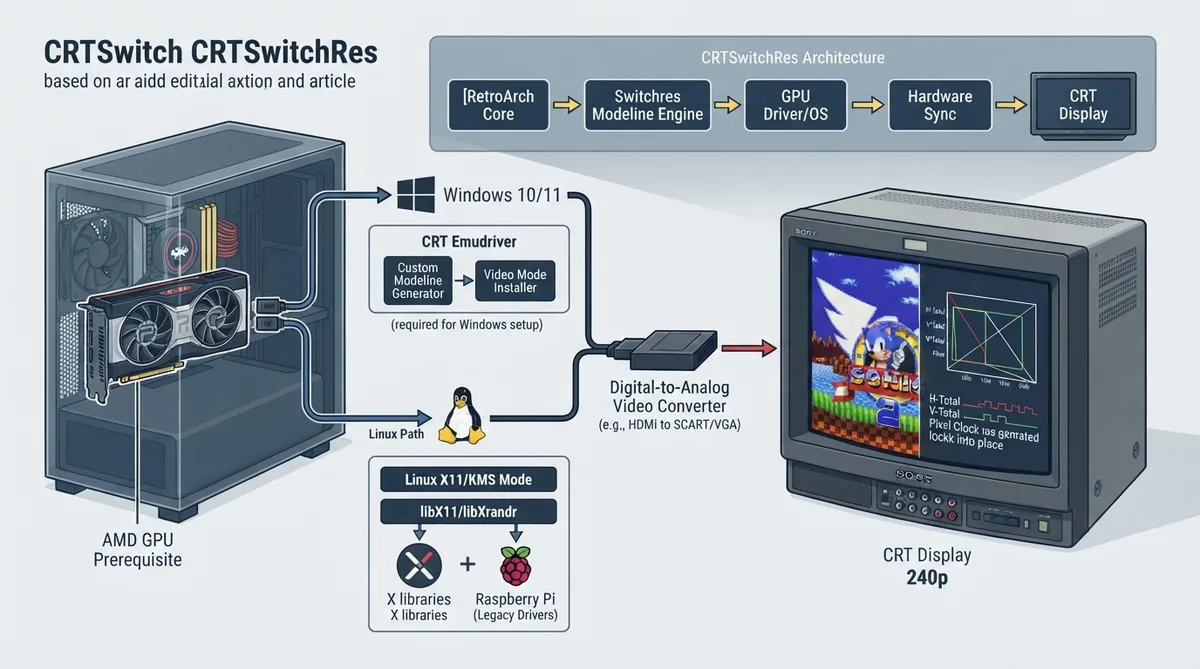
CRTSwitchRes is a RetroArch feature built on Switchres, a modeline generation engine for emulation. Switchres creates fully customized video modes on the fly to reproduce the video modes of emulated systems. Based on a monitor profile, it provides a video mode for a given width, height, and refresh rate. The usual motivation is to connect a CRT display and drive it at the original resolution (at least vertically), which is otherwise too low for modern display systems. The connection is typically from a digital connector such as HDMI on the computer side and requires an external converter for the CRT.
Supported platforms and environments
- On Linux, Switchres can work in the following environments:
- - X11
- - KMS mode
- - Raspberry Pi with legacy graphics drivers
Windows setup
On Windows, an AMD video card is needed. Windows works best with CRT Emudriver. Once that setup is running, turning CRTSwitchRes on and choosing settings is straightforward. Other options are also available, and the general requirement is getting the resolutions installed on the Windows PC.
Linux setup notes
In some cases a Linux distribution may be missing X libraries. The documentation advises installing libx11-dev libxrandr-dev in that situation.
Enabling CRTSwitchRes and changing settings
- 1. Navigate to Settings.
- 2. Navigate to Video.
- 3. Navigate to CRT SwitchRes.
CRTSwitchRes options
- The options and their available values in the menu are:
- - CRT SwitchRes: off, 15KHz, 31KHZ Standard, 31KHZ- 120Hz, INI
- - CRT Super resolution: Native, Dynamic, 1920, 2560, 3840
- - X Centering: Currently not in use
- - Porch Adjust: Currently not in use
- - Use Custom refresh rate: Currently not in use
Option 1: CRT SwitchRes
This option turns SwitchRes on and selects the main output hardware. The value "off" turns SwitchRes off. "15KHz" requests SwitchRes to be set up for 15KHz monitors or TVs. "31KHz" requests it to be set up for 31KHz monitors or TVs. "31KHz, 120z" requests 31KHz at 120Hz output for 240p. "INI" requests SwitchRes to look at switchres.ini for the monitor or TV output.
Option 2: CRT Super Resolution
"Native" passes the core's native resolution to Switchres. "Dynamic" is currently not in use. The numeric values 1920, 2560, and 3840 pass a hard-set super width of that value to Switchres.
On Linux, you can add the switchres.ini into your RetroArch folder, edit the file and change dotclock_min from 0 to 25.0. This then calculates dynamic super widths for cards that do not support low dotclocks, since native widths produce low dotclocks.
Advanced settings and switchres.ini
Because CRTSwitchRes uses Switchres by Calamity, many options can be customized in switchres.ini, although some options are available directly in the CRTSwitchRes settings menu in RetroArch. More settings can be set in switchres.ini, but it is not a required step; it does allow more customization.
Core and directory overrides
If you use a switchres.ini configuration file and want to fine-tune settings for certain cores or directories, core and directory overrides are possible. These files are placed at the same locations as the usual .cfg files for RetroArch's core and directory overrides, replacing the .cfg extension with .switchres.ini.
For example, if you use native resolution in your configuration but want a 2560 super resolution on the Gambatte core, you can create the file CONFIG_DIR/config/Gambatte/Gambatte.switchres.ini with the content user_mode 2560x0 in it. This setting overrides the one in the original switchres.ini file while running that specific core. When closing the core or switching to a different core, the default switchres.ini file is reloaded to undo the change.
The same works for directory overrides. For example, to use a super resolution of 2560 for ROMs in the "Sega - Game Gear" directory while using the Genesis Plus GX core, create the file CONFIG_DIR/config/Genesis Plus GX/Sega - Game Gear.switchres.ini and add the user mode to that file.
Sources & references
Published .
RetroArch: crtswitchres — official gaming software documentation https://raw.githubusercontent.com/libretro/docs/master/docs/guides/crtswitchres.mdRetrieved Oct 8, 2026Something doesn’t match your setup?
Suggest a correction