

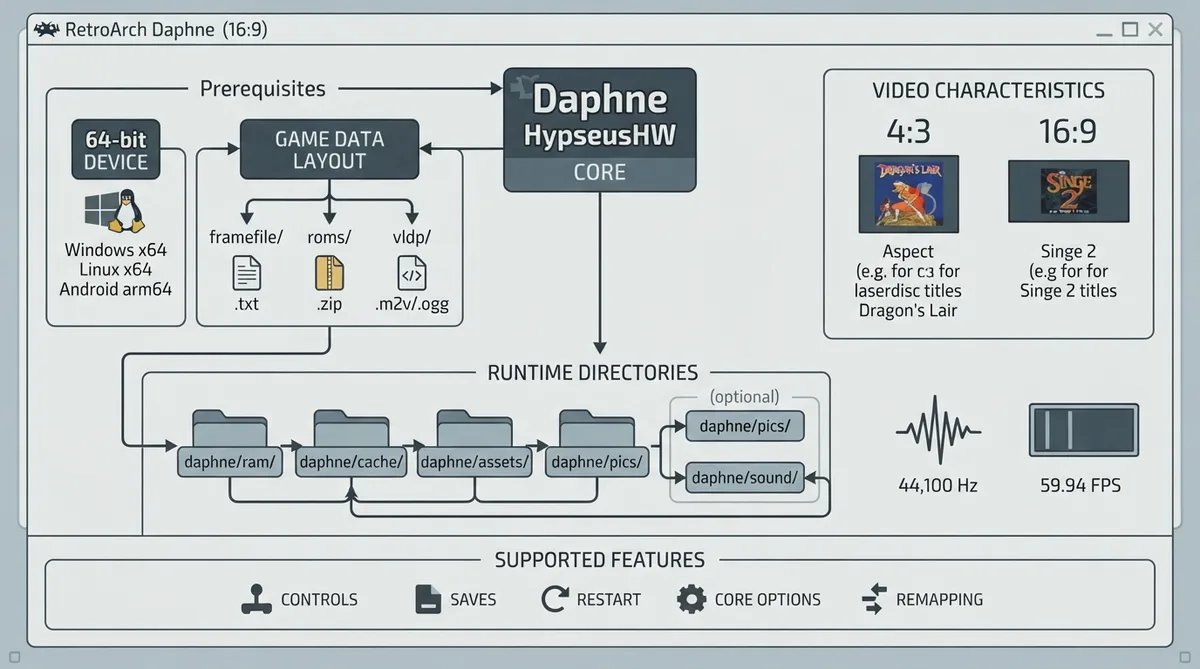
Arcade (Daphne HypseusHW) is a RetroArch core for laserdisc arcade games such as Dragon's Lair, Space Ace and Cliff Hanger. It is built on Hypseus Singe, the maintained fork of Matt Ownby's Daphne, and reads the same data as daphne.exe: the game ROMs plus laserdisc video and audio with a framefile. It also runs Singe 1 and Singe 2 games. This guide summarizes the official core documentation; it has not been hands-on tested.
Prerequisites
Three things must be in place before the core will run anything. First, the device must be 64-bit: Windows x64, Linux x64 or Android arm64, because the core itself is 64-bit. Second, the game data must sit in Daphne's folder layout (framefile/, roms/, vldp/). Third, if you plan to play Full-HD Singe 2 video decoded on the CPU — through CPU Fallback, or on Linux — you need a desktop-class CPU; TV boxes instead play it with their hardware decoder.
Game data and file types the core loads
Daphne games need the game ROMs together with the laserdisc video (.m2v) and audio (.ogg) plus a framefile. Singe 2 games use an MP4 video file, which the core plays as it is. Recognizing the right content file is the decision that tells the core which kind of game it is loading.
- The core recognizes three content file types:
- - .txt — a framefile stored as framefile/<game>.txt
- - .zip — a game's ROMs stored as roms/<game>.zip
- - .bat — a RocketLauncher Daphne Batch file that runs daphne.exe or Singe.exe; Singe 1 and Singe 2 games play from these
Directories the core uses
The core keeps runtime data in three folders. daphne/ram/ holds NVRAM for Daphne games (<game>.gz) and the files Singe games write. daphne/cache/ holds frame indexes the core builds for video files without a usable .dat, along with the framefiles it writes for Singe 2 games. daphne/assets/ holds the engine's images and sounds, unpacked on first use. Two optional folders, daphne/pics/ and daphne/sound/, can replace the built-in images and sounds, so custom art and audio are a choice you can make without touching the core itself.
Video and audio characteristics
The core reports 59.94 FPS and a 44100 Hz sample rate. Base resolution is the game's own — 640x480 before a game starts — while maximum resolution is 1920x1080. The aspect ratio follows the game's video aspect, either 4:3 or 16:9, so laserdisc-era 4:3 titles and 16:9 Singe 2 titles each display with the correct framing.
Controls
The core accepts three input devices: RetroPad (joypad), Lightgun and Mouse. The Lightgun and Mouse devices are intended for Singe gun games, which is the main reason to choose between them at setup: a pad suits Dragon's Lair-style action games, while a gun or mouse suits the shooting titles. Controls and remapping are both supported, so either mapping can be adjusted per game.
Supported and unsupported features
Supported: Restart, Saves, Core Options, Controls and Remapping. Not supported: save states, Rewind, Netplay, RetroAchievements, RetroArch and native cheats, Multi-Mouse, Rumble, Sensors, Camera, Location, Subsystem, Softpatching, Disk Control, Username, Language, Crop Overscan and LEDs. In practice this means progress has to be carried by in-game saves and NVRAM rather than save states, and there is no rewind buffer to lean on.
Games the core plays
Among the Daphne games Hypseus Singe supports are Dragon's Lair, Space Ace, Cliff Hanger, Thayer's Quest, Super Don Quix-ote, Astron Belt, Galaxy Ranger, Badlands, Bega's Battle, Cobra Command, Road Blaster, Esh's Aurunmilla, GP World, Interstellar, MACH 3 and Us vs Them. This is not an exhaustive list, and no independent compatibility testing is reported.
Reference table · Scroll horizontally to see all columns.
| Feature | Supported |
|---|---|
| Restart | Yes |
| Saves | Yes |
| States | No |
| Rewind | No |
| Netplay | No |
| Core Options | Yes |
| RetroAchievements | No |
| RetroArch Cheats | No |
| Native Cheats | No |
| Controls | Yes |
| Remapping | Yes |
| Multi-Mouse | No |
| Rumble | No |
| Sensors | No |
| Camera | No |
| Location | No |
| Subsystem | No |
| Softpatching | No |
| Disk Control | No |
| Username | No |
| Language | No |
| Crop Overscan | No |
| LEDs | No |
Sources & references
Content responsibility: FrameTinker editorial desk. Source authors and software maintainers are credited separately below; this is not a claim of hands-on testing.
Published .
RetroArch: hypseushw — official gaming software documentation https://raw.githubusercontent.com/libretro/docs/master/docs/library/hypseushw.mdRetrieved Oct 22, 2026Something doesn’t match your setup?
Suggest a correction