

Overview
The page lists general FlyCast issues that can affect Dreamcast emulation in RetroArch, along with game-specific settings for two titles: Sonic Adventure (PAL) and The Typing of the Dead (NTSC-J).
Documented general FlyCast issues
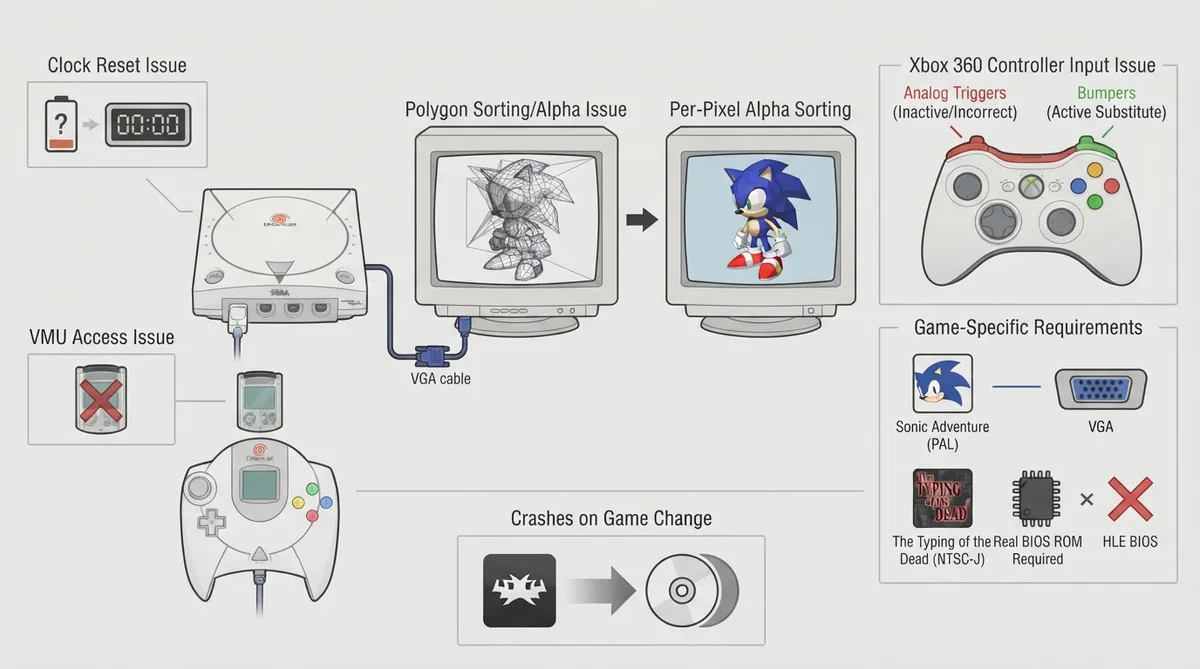
- The documentation records the following general issues with the FlyCast core:
- - Date and time do not appear to save properly, so the system asks you to set the clock every time you start.
- - After you save to a VMU slot with any game, that VMU becomes inaccessible the next time you load the emulator.
- - Polygon and alpha sorting issues can make objects appear distorted in the regular Flycast core. The page suggests using Per-Pixel Alpha sorting for complete/accurate emulation.
- - With an Xbox 360 Controller, analog triggers do not work properly; the page advises using the bumpers instead.
- - Changing games without closing and reloading RetroArch often leads to RetroArch crashing.
Game-specific settings
Sonic Adventure (PAL) must be set to use VGA output in the core options. According to the documentation, TV mode will cause all subsequent FMV to make RetroArch become unresponsive.
The Typing of the Dead (NTSC-J) requires a real BIOS for kanji, hiragana and katakana to display, because the HLE BIOS only contains US/ASCII characters.
Documented workarounds
- Based on the page, the following adjustments are suggested:
- - Use Per-Pixel Alpha sorting to address polygon/alpha sorting distortion.
- - On an Xbox 360 Controller, use the bumpers instead of the analog triggers.
- - Close and reload RetroArch when changing games to avoid crashes.
- - For Sonic Adventure (PAL), select VGA output in the core options.
- - For The Typing of the Dead (NTSC-J), supply a real BIOS for Japanese character support.
Reference table · Scroll horizontally to see all columns.
| Issue | Documented detail | Suggested adjustment |
|---|---|---|
| Clock not saving | System asks to set the clock on every start | None given |
| VMU becomes inaccessible | After saving to a VMU slot, it is inaccessible next load | None given |
| Polygon/alpha sorting | Objects may appear distorted in regular Flycast core | Use Per-Pixel Alpha sorting |
| Xbox 360 controller triggers | Analog triggers do not work properly | Use the bumpers |
| Changing games | Often crashes RetroArch | Close and reload RetroArch |
| Sonic Adventure (PAL) | TV mode makes later FMV cause RetroArch to become unresponsive | Set VGA output in core options |
| The Typing of the Dead (NTSC-J) | HLE BIOS only has US/ASCII characters | Use a real BIOS |
Sources & references
Content responsibility: FrameTinker editorial desk. Source authors and software maintainers are credited separately below; this is not a claim of hands-on testing.
Published .
RetroArch: dc — official gaming software documentation https://raw.githubusercontent.com/libretro/docs/master/docs/library/compatibility/dc.mdRetrieved Oct 17, 2026Something doesn’t match your setup?
Suggest a correction