

This guide outlines using the EasyRPG core within RetroArch to run RPG Maker 2000, 2003, and EasyRPG games. It is compiled from the official libretro documentation page and has not been hands-on tested.
Overview
EasyRPG Player is a game interpreter designed to play RPG Maker 2000, 2003, and EasyRPG games. It uses the LCF parser library (liblcf) to read RPG Maker game data and is part of the EasyRPG Project. The core's internal name in RetroArch is 'EasyRPG'.
Prerequisites
- A RetroArch installation. The RTP2000 and RTP2003 run-time packages, available from rpgmakerweb.com. These are exe/zip files that can be extracted with tools such as 7zip. Your own legally-obtained RPG Maker 2000/2003 or EasyRPG game files.
Setup steps
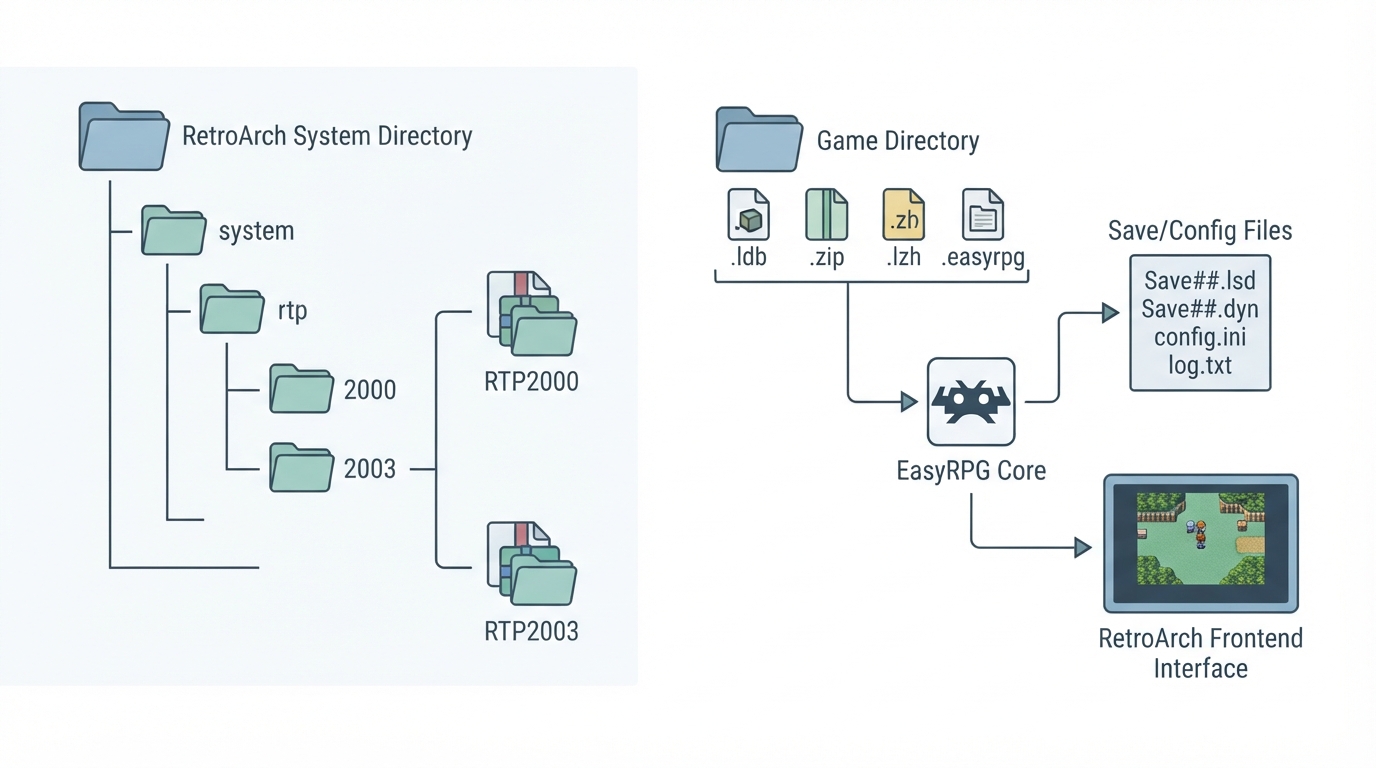
- 1. Download the RTP2000 and RTP2003 run-time packages. 2. Extract them (for example, using 7zip). 3. Create a folder named 'rtp' inside the 'system' folder of your frontend. 4. Place the extracted RTP2000 data under 'rtp/2000' and the extracted RTP2003 data under 'rtp/2003'.
Load your game content using one of the supported file extensions. The EasyRPG core supports the following file extensions: .ldb, .zip, .lzh, and .easyrpg.
Save and configuration directories
The EasyRPG core saves to and loads from the loaded content's directory. Files created there include Save##.lsd (save files), Save##.dyn (additional save data used by some games), Save.lgs (global save data used by some games), and easyrpg_log.txt (the EasyRPG log file). Depending on the game, arbitrary files may also be created in the game directory.
In the frontend's system directory, the core uses easyrpg-player/config.ini (engine configuration), easyrpg-player/Soundfont (soundfont files), easyrpg-player/Font (font files), and wildmidi.cfg (WildMIDI configuration, to be combined with an instruments folder).
Supported features
The following frontend-level features are supported: Restart, Screenshots, Saves, Core Options, Controls, and Remapping.
These features are not supported: Save States, Rewind, Netplay, Memory Monitoring (achievements), RetroArch Cheats, Native Cheats, Multi-Mouse, Rumble, Sensors, Camera, Location, Subsystem, Softpatching, Disk Control, Username, Language, Crop Overscan, and LEDs.
Controllers
The core supports the RetroPad and RetroPad w/Analog device types. RetroPad is the default and recommended setting. The 'None' device type does not disable input, so there is no reason to select it.
Reference table · Scroll horizontally to see all columns.
| RetroPad Input | EasyRPG Core Input |
|---|---|
| D-pad Up | Up |
| D-pad Down | Down |
| D-pad Left | Left |
| D-pad Right | Right |
| A | Decision |
| B | Cancel |
| X | Cancel |
| Y | Shift |
| L3 | Number 0 |
| Right Stick | Number 1 |
| Right Stick | Number 2 |
| Right Stick | Number 3 |
| Right Stick | Number 4 |
| R3 | Number 5 |
| Right Stick | Number 6 |
| Right Stick | Number 7 |
| Right Stick | Number 8 |
| Right Stick | Number 9 |
| Start | Settings Menu |
| Select | Reset |
| R2 | Fast Forward (x3) |
| R2 | Fast Forward (x10) |
| L2 | Debug Menu (Test Play mode only) |
| L2 | Debug Through (Test Play mode only) |
| R1 | Debug Save (Test Play mode only) |
| L1 | Debug Abort Event (Test Play mode only) |
Sources & references
Content responsibility: FrameTinker editorial desk. Source authors and software maintainers are credited separately below; this is not a claim of hands-on testing.
Published .
RetroArch: easyrpg — official gaming software documentation https://raw.githubusercontent.com/libretro/docs/master/docs/library/easyrpg.mdRetrieved Oct 12, 2026Something doesn’t match your setup?
Suggest a correction