

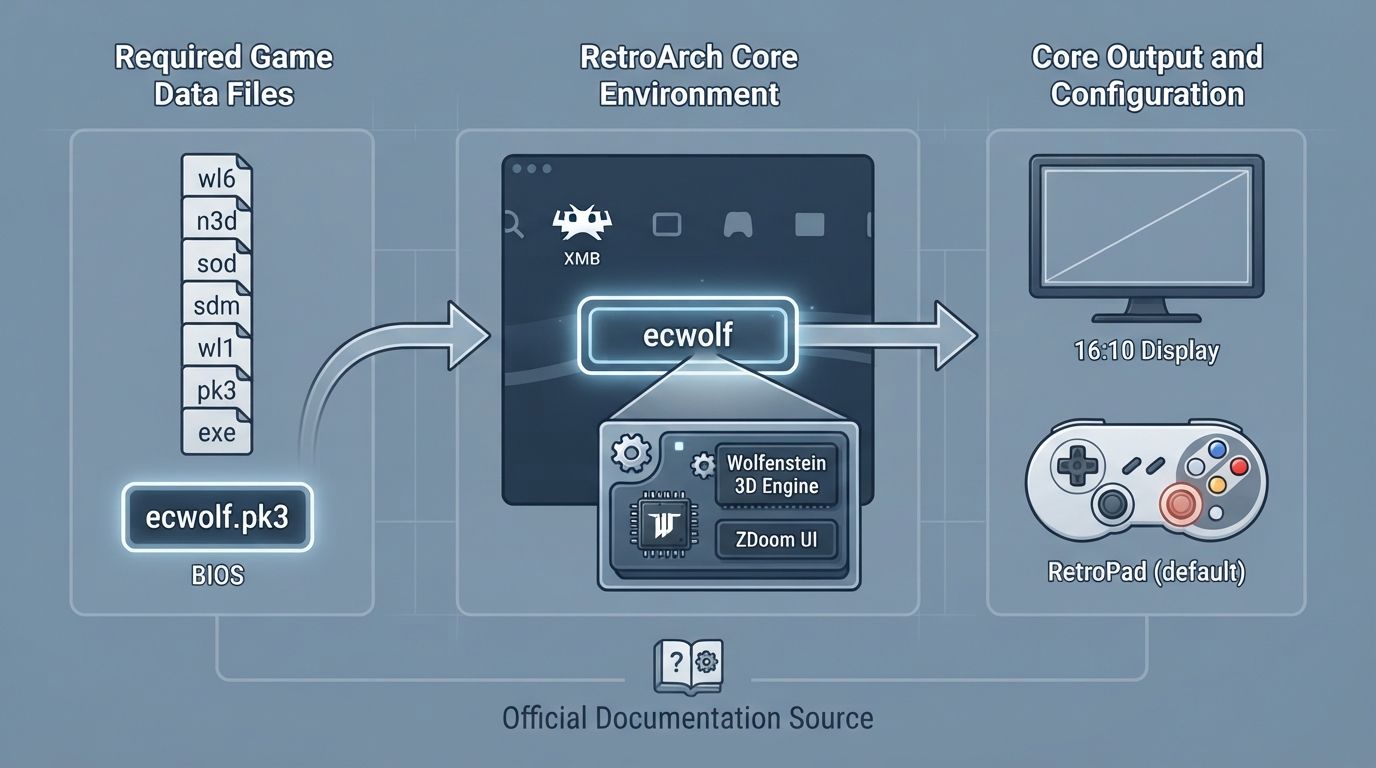
ECWolf is a source port of the Wolfenstein 3D engine, built on Wolf4SDL and combined with the user experience of ZDoom, per the official libretro core documentation. This guide summarizes what that documentation records about the libretro ECWolf core: which content it loads, the file it requires to run, which RetroArch features it reports as supported, its display aspect ratio, and its RetroPad control mapping.
What the core loads
- wl6
- n3d
- sod
- sdm
- wl1
- pk3
- exe
These are the file extensions the documentation lists for content that the ECWolf core can load. The same page notes that ECWolf is intended to support the Wolfenstein 3D engine games generally, with Blake Stone support described as coming in ECWolf 3.0, and Macintosh Wolfenstein 3D support described as coming in ECWolf 2.0. Because the page is labeled a work in progress, treat any version-specific roadmap statement as a plan rather than a current guarantee.
Prerequisite: the required data file
The core documentation states that the ECWolf core requires a BIOS (bootrom) file to work, and names that file as ecwolf.pk3. Make sure that file is available within your RetroArch environment before attempting to launch content with this core; the documentation does not describe a specific folder layout, so keep the file in the location your RetroArch setup expects for core system files.
Core identity and display
- Internal core name: ecwolf
- Core-provided aspect ratio: 16:10
Feature support reported by the documentation
The documentation's feature table marks the following as supported for this core: screenshots, saves, save states, rewind, controls, and remapping. The same table marks the following as not supported: restart, netplay, core options, memory monitoring for achievements, RetroArch cheats, native cheats, multi-mouse, rumble, sensors, camera, location, subsystem, softpatching, disk control, username, and crop overscan in RetroArch's video settings.
Controller device types and mapping
For user 1, the documentation lists three device types in the controls menu: None (input disabled), RetroPad (joypad, shown as the default), and RetroPad w/Analog (joypad). The documentation adds that there is no reason to switch to RetroPad w/Analog.
- D-pad up: Move forward
- D-pad down: Move backward
- D-pad left: Turn left
- D-pad right: Turn right
- L1: Strafe left
- R1: Strafe right
- A: Fire
- B: Use
- X: Run
- Y: Show status
- Select: Map
- L2: Previous weapon
- R2: Next weapon
- Start: Pause
- Left stick, X axis: Strafe left/right
- Left stick, Y axis: Move forward/backward
- Right stick, X axis: Turn left/right
Using the documented information
- Confirm the content you intend to load uses one of the listed extensions.
- Confirm the required ecwolf.pk3 file is present in your RetroArch environment before launching.
- Expect a 16:10 core-provided aspect ratio rather than a 4:3 default.
- Use the RetroPad mapping above as the documented default; remapping is listed as supported if you want to change it.
- Do not expect netplay, core options, cheats, rumble, or softpatching, which the documentation lists as unsupported.
Reference table · Scroll horizontally to see all columns.
| Feature | Documented status |
|---|---|
| Screenshots | Supported |
| Saves | Supported |
| Save states | Supported |
| Rewind | Supported |
| Controls | Supported |
| Remapping | Supported |
| Restart | Not supported |
| Netplay | Not supported |
| Core options | Not supported |
| Memory monitoring (achievements) | Not supported |
| RetroArch cheats | Not supported |
| Native cheats | Not supported |
| Multi-mouse | Not supported |
| Rumble | Not supported |
| Sensors | Not supported |
| Camera | Not supported |
| Location | Not supported |
| Subsystem | Not supported |
| Softpatching | Not supported |
| Disk control | Not supported |
| Username | Not supported |
| Crop overscan | Not supported |
Sources & references
Content responsibility: FrameTinker editorial desk. Source authors and software maintainers are credited separately below; this is not a claim of hands-on testing.
Published .
RetroArch: ecwolf — official gaming software documentation https://raw.githubusercontent.com/libretro/docs/master/docs/library/ecwolf.mdRetrieved Oct 12, 2026Something doesn’t match your setup?
Suggest a correction