

FreeJ2ME is a Libretro core that emulates J2ME (Java 2 Micro Edition), the platform used by games on pre-smartphone mobile phones. It implements MIDP 2.0 along with manufacturer extensions from Nokia, Siemens and Motorola, and runs the .jar file the phone would have run. This guide summarizes the official documentation's prerequisites, configuration and limitations.
How the core works
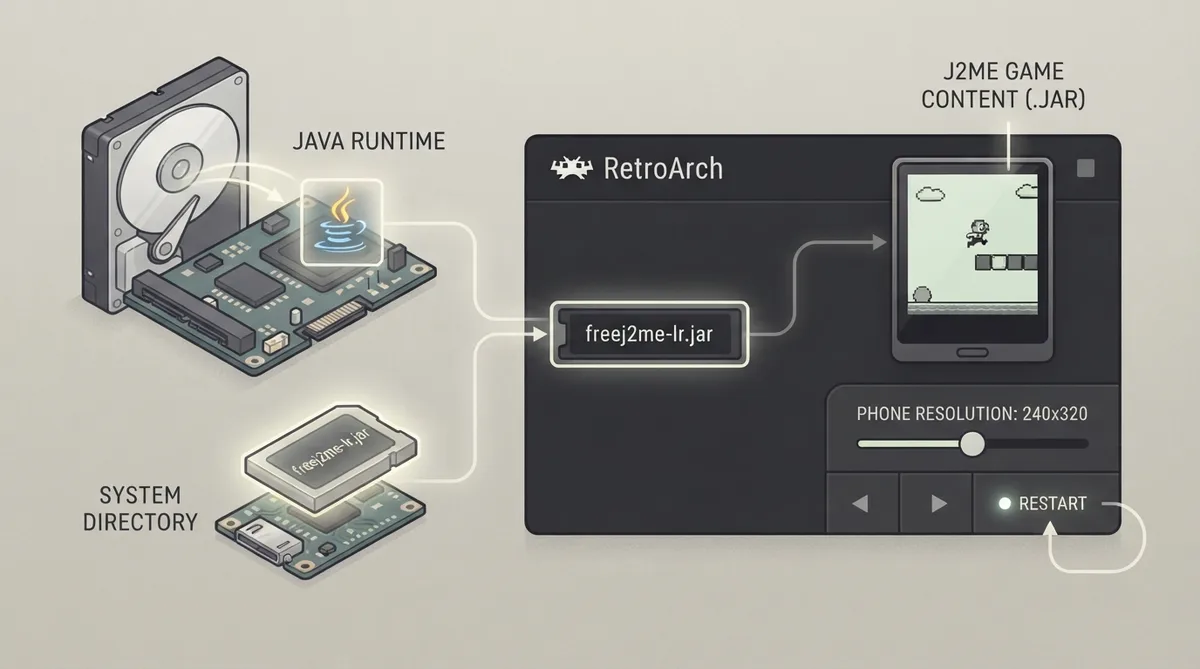
The core is a front end rather than a reimplementation: it starts FreeJ2ME's own Java application and exchanges video, input and settings with it. For this reason the core depends on an external Java runtime and an external jar file, and it cannot supply either of them itself.
Prerequisites
- Install a Java runtime on the machine; the core launches java -jar (javaw on Windows), so a system without one loads the core and then stops with nothing on screen.
- Place freej2me-lr.jar in the frontend's system directory; the core cannot supply this file.
- Have the J2ME game content available as a .jar file.
Setup steps
- Confirm the Java runtime is installed and available to the system, since the core invokes java -jar (or javaw on Windows).
- Copy freej2me-lr.jar into the frontend's system directory.
- Load the FreeJ2ME core in RetroArch.
- Load the game's .jar file as content.
- If the display size is wrong for your game, open the core options and set Phone Resolution. This option requires a core restart, so restart the core after changing it.
- Optional: build or load a playlist using the Mobile - J2ME database.
Core option: Phone Resolution
The documented core option is Phone Resolution, which controls the core's base and maximum size. It defaults to 240x320 and offers these values: 96x65, 96x96, 104x80, 128x128, 132x176, 128x160, 176x208, 176x220, 208x208, 240x320, 320x240, 240x400, 352x416, 360x640, 640x360, 480x800 and 800x480. Changing it requires a core restart.
Reported core behavior
The documentation states that the core's provided FPS is 30, its supported pixel format is XRGB8888, and its size follows the Phone Resolution option (240x320 by default).
Supported features and limitations
The feature table marks Restart, Screenshots, Core Options, Controls and Remapping as supported. Saves, States, Rewind, Netplay, Memory Monitoring (achievements), RetroArch Cheats, Native Cheats, Multi-Mouse, Rumble, Sensors, Camera, Location, Subsystem, Softpatching, Disk Control, Username, Language, Crop Overscan and LEDs are all marked unsupported.
Saves are written by the Java application into its own directory under the frontend's save directory, so they survive, but they do not go through the frontend's save handling. This is the documented reason there are no save states, no rewind and no netplay.
Sound is produced by the Java application itself rather than sent through the frontend, so the frontend's audio settings do not apply to it.
License
FreeJ2ME is distributed under the GPLv3 license.
Reference table · Scroll horizontally to see all columns.
| Feature | Supported |
|---|---|
| Restart | Yes |
| Screenshots | Yes |
| Core Options | Yes |
| Controls | Yes |
| Remapping | Yes |
| Saves | No |
| Save States | No |
| Rewind | No |
| Netplay | No |
| Cheats (RetroArch / Native) | No |
| Rumble | No |
| Camera / Location / Sensors | No |
| Disk Control | No |
| Softpatching | No |
Sources & references
Content responsibility: FrameTinker editorial desk. Source authors and software maintainers are credited separately below; this is not a claim of hands-on testing.
Published .
RetroArch: freej2me — official gaming software documentation https://raw.githubusercontent.com/libretro/docs/master/docs/library/freej2me.mdRetrieved Oct 13, 2026Something doesn’t match your setup?
Suggest a correction