

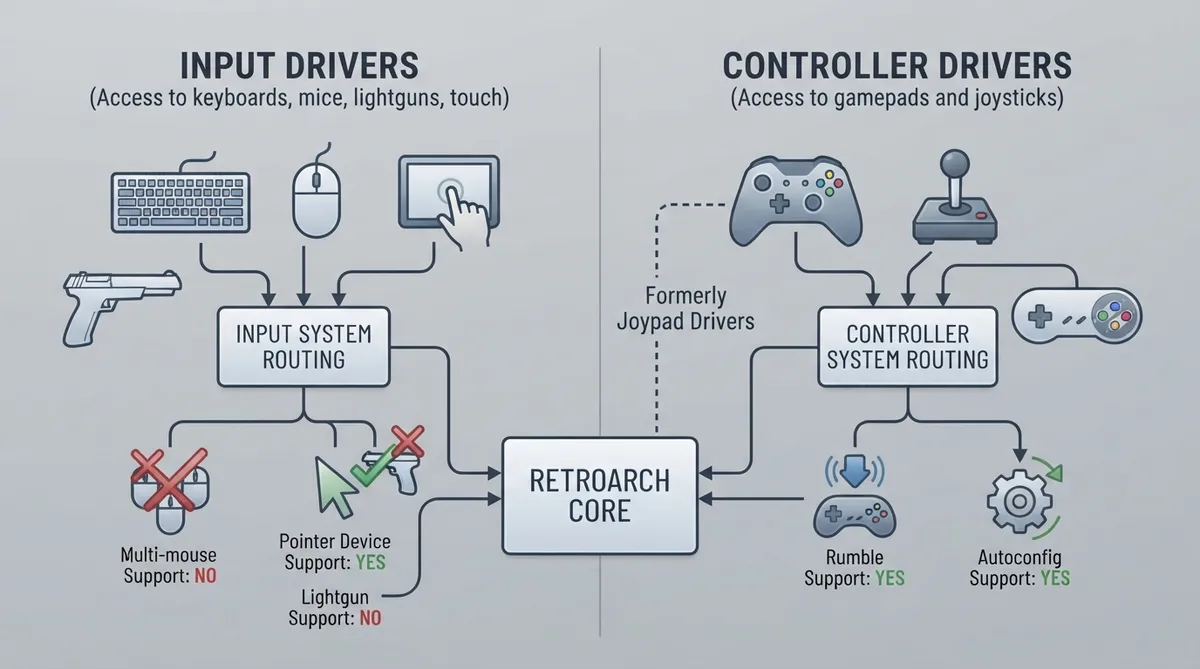
RetroArch uses two separate input systems to support the full range of input devices available across its supported platforms. Understanding the difference between them is the starting point for configuring controls correctly. This guide is based on the official libretro documentation and has not been hands-on tested.
How the two driver systems differ
Input drivers provide access to keyboards, mice, and mouse-like devices such as lightguns or touch screens. They are typically set up automatically, and are either not changeable or offer only a limited selection. Controller drivers provide access to gamepads and joysticks. On desktop platforms, controller drivers can usually be changed, and the autoconfiguration profile database is different for each controller driver.
What the capability columns mean
- Multi-mouse: whether a separate mouse-type device, such as a lightgun, can be selected for each player. When unsupported, pointing devices typically control the same default cursor.
- Pointer device: whether a core can query the absolute coordinates of the pointer, as opposed to the default relative mouse. Some cores may support only one or the other.
- Lightgun device: whether a core can query a specific lightgun device, which has a different button set compared to a RetroPad. A few platforms support physical lightguns natively, or lightguns may appear as pointer devices.
- Rumble support: whether the driver can pass on haptic feedback (vibration) signals.
- Autoconfig support: whether the driver can read controller vendor and product identifiers and apply an automatic mapping for RetroPad.
Apple operating systems
On Apple platforms, the documented input driver is cocoa, with no listed conditions; it reports no multi-mouse support and no lightgun device support, and it does report pointer device support. The documented controller drivers are mfi and sdl2, both with no listed conditions and both reporting rumble support and autoconfig support. MFi controllers are primarily supported on Apple devices, which the documentation notes includes iOS on iPhones and iPads, macOS on Mac computers, and tvOS on Apple TV devices.
Linux
The documented Linux input drivers are x, wayland, sdl, udev, and linuxraw. The x driver applies when the desktop environment is X11 and the video driver is OpenGL of any version or Vulkan. The wayland driver applies when the desktop environment is Wayland and the video driver is OpenGL of any version or Vulkan. The sdl driver applies when the video driver is sdl or sdl2. The udev driver applies when there is no desktop environment (KMS) or under X11. The linuxraw driver applies when there is no desktop environment (KMS).
Multi-mouse support for X11 was added after RetroArch 1.20.0 and requires that RetroArch is compiled with the XInput library. The documentation describes setting up a second pointer and assigning the physical device with the `xinput create-master` and `xinput reattach` commands.
Linux udev driver
udev is described as the newest input driver and uses the evdev joypad interface at /dev/input. It supports hotplugging and force feedback if supported by the device. udev reads evdev events directly and supports keyboard callback, mice, and touchpads. libudev is used to discover devices and support hotplugging. The libudev and libxkbdcommon packages are required. udev does not require X11, but it does depend on X11 keyboard layout files being installed.
Setting up udev permissions
Most Linux distributions prevent users from capturing keyboard and mouse information by default. Only root and users in the "input" group can access raw input, described as a security feature for systems used by multiple users. The documentation gives two approaches.
- Add your user to the "input" group with the command: sudo usermod -a -G input `whoami`
- Log out, then log back in.
If adding your user to the input group does not succeed, the documentation offers a udev rule which makes the input accessible to non-root users.
- Add to /etc/udev/rules.d/99-evdev.rules the following text: KERNEL=="event*", NAME="input/%k", MODE="666"
- Reload the rules with: sudo udevadm control --reload-rules
- Reboot.
The linuxraw controller driver uses the legacy joystick API at /dev/input/js*. The linuxraw input driver requires an active TTY in order to read keyboard events. On the controller side, linuxraw reports no rumble support but does report autoconfig support.
The hid driver on Linux detects Human Interface Devices via libusb. By default it is not enabled during compilation.
Windows
The documented Windows input drivers are dinput, raw, and sdl. The dinput and raw drivers apply when the video driver is not sdl or sdl2, and the sdl driver applies when the video driver is sdl or sdl2. The documented Windows controller drivers are dinput, which applies when the controller is connected as a DirectInput device, xinput, which applies when the controller is connected as an XInput device, and sdl2. All three report rumble support and autoconfig support. A hid controller driver is also documented, detecting Human Interface Devices via libusb; it is not enabled during compilation by default.
Auxiliary sensor support
The libretro API allows extra sensor inputs to be passed to cores: three axes of accelerometer or tilt sensor, three axes of gyroscope, and an illumination sensor. The documentation lists which input drivers support extra sensors.
- linuxraw: illumination
- sdl: illumination (only on Linux)
- android: accelerometer and gyroscope
- cocoa: accelerometer and gyroscope
- vita: accelerometer and gyroscope
- switch: accelerometer, gyroscope and illumination
- udev: illumination
- x: illumination
Reference table · Scroll horizontally to see all columns.
| Platform | Driver | Type | Notes |
|---|---|---|---|
| Apple | cocoa | Input | No multi-mouse, pointer device: yes, lightgun device: no |
| Apple | mfi | Controller | Rumble: yes, autoconfig: yes |
| Apple | sdl2 | Controller | Rumble: yes, autoconfig: yes |
| Linux | x | Input | X11 with OpenGL or Vulkan |
| Linux | wayland | Input | Wayland with OpenGL or Vulkan |
| Linux | sdl | Input | Video driver sdl or sdl2 |
| Linux | udev | Input | No desktop environment (KMS) or X11 |
| Linux | linuxraw | Input | No desktop environment (KMS); no mouse support |
| Windows | dinput | Input | Video driver not sdl or sdl2 |
| Windows | raw | Input | Video driver not sdl or sdl2 |
| Windows | sdl | Input | Video driver sdl or sdl2 |
Sources & references
Published .
RetroArch: input controller drivers — official gaming software documentation https://raw.githubusercontent.com/libretro/docs/master/docs/guides/input-controller-drivers.mdRetrieved Oct 8, 2026Something doesn’t match your setup?
Suggest a correction