

This guide summarizes the official LibreRetro documentation for installing the RetroArch libnx build on a Nintendo Switch. It covers the required custom firmware environment, the supported download methods, how to launch RetroArch through Atmosphère's title takeover, and how updating works. Everything below reflects the source documentation; it has not been independently verified by hands-on testing.
How to read this guide
Prerequisites
- Atmosphère custom firmware installed on the Switch. A FAT32 formatted SD card.
Downloading and installing
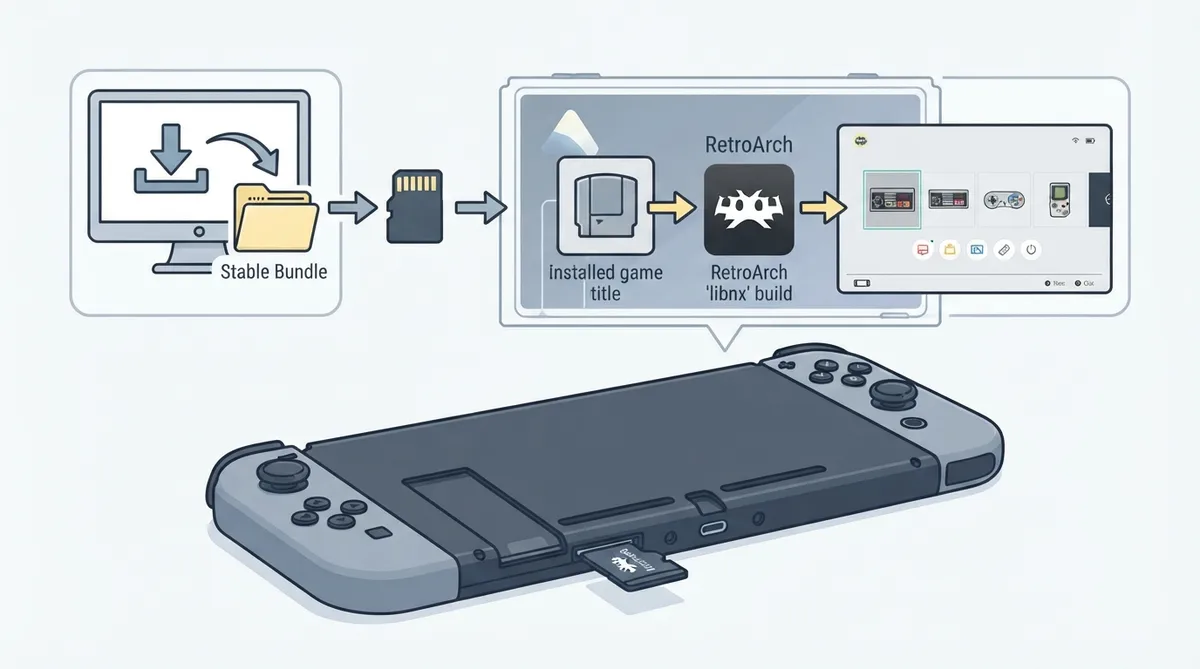
Using the stable bundle is the recommended method. The bundle contains RetroArch, all the cores and all the assets. Extract the archive to the root of your SD card to install or update your copy of RetroArch, overwriting any existing files.
Advanced users can instead download only the cores they want from the nightly build directory and place the NRO files in retroarch/cores on the SD card. Those NROs can be run directly from the homebrew menu. As another alternative, you can download a single core and then use the Online Updater inside RetroArch to download or update additional cores later.
Running RetroArch with title takeover
The preferred way to run RetroArch is Atmosphère's title takeover feature, which temporarily replaces a game with the homebrew loader. Make sure you are on the latest version of Atmosphère before continuing.
- Run any game while holding the R key. Keep holding the key until the homebrew menu appears. Select RetroArch from the list to start it. If you want to change the key, edit /atmosphere/loader.ini and change override_key. Adding a ! in front of the key flips the condition, meaning homebrew runs when the key is not pressed.
Updating RetroArch
Updating works the same way as installing: download a higher or lower version than the one you have — a lower version is a downgrade — and overwrite the existing files.
Glossary
- Atmosphère: a work-in-progress customized firmware for the Nintendo Switch. NRO: an executable file used by the Nintendo Switch that contains compiled code for an application or game; NRO files may also store assets for the Homebrew Launcher, such as an icon and metadata.
Reference table · Scroll horizontally to see all columns.
| Method | What you download | Where files go |
|---|---|---|
| Stable bundle (recommended) | RetroArch with all cores and assets | Extracted to the root of the SD card |
| Nightly cores | Selected NRO cores only | retroarch/cores on the SD card |
| Single core plus Online Updater | One core, then additional cores via the Online Updater in RetroArch | As directed by the Online Updater inside RetroArch |
 View full image
 Sources & references
Published .
RetroArch: install libnx — official gaming software documentation https://raw.githubusercontent.com/libretro/docs/master/docs/guides/install-libnx.mdRetrieved Oct 8, 2026Something doesn’t match your setup?
Suggest a correction