

This guide summarizes the official libretro documentation for downloading and installing RetroArch on a PlayStation Portable (PSP). It covers only what the documentation states: the custom firmware requirement, available download builds, where to place files, storage differences on the PSP Go, how to update, and the data-relocation caveat. The instructions below are a source summary, not a hands-on tested procedure.
Prerequisite: custom firmware
According to the documentation, a custom firmware called PRO-C is required to run RetroArch on the PSP, and PRO-C must already be running before RetroArch is launched. The documentation states that if RetroArch is run before PRO-C, the device will report the executable as corrupted. The prerequisites list also names the latest version of Pro CFW.
Download the RetroArch bundle
The documentation offers two RetroArch builds for the PSP: a Stable version and a Nightly version. Each download is a bundle containing RetroArch, all supported cores, and all assets. Nightly builds deliver the latest development changes and are described as sometimes unstable; the official guide uses the Stable version.
Install to the memory stick
- 1. Create a folder named RetroArch under the PSP/Game directory on the Memory Stick.
- 2. Transfer the extracted archive files into the PSP/Game/RetroArch folder.
- 3. On the PSP, go to Memory Stick under Game and press X.
- 4. Select RetroArch.
- 5. Press X again to open it.
PSP Go storage options
The PSP Go uses a Memory Stick Micro (M2) card slot instead of the full-size Memory Stick slot, and it also has built-in internal storage. The documentation states RetroArch can be installed to either location. An M2 card appears as ms0:, the same as a regular PSP memory stick, while the internal storage appears as ef0:. RetroArch stores its user data, including configuration, saves, save states, and system files, on the drive it is installed to, so installing to internal storage keeps everything on ef0: without needing an M2 card.
Update RetroArch
To update, download the latest version and extract it into PSP/Game/RetroArch on the Memory Stick, then accept the prompt to overwrite existing files.
Reference table · Scroll horizontally to see all columns.
| Storage location | Reported drive | Notes |
|---|---|---|
| Memory Stick Micro (M2) card (PSP Go) | ms0: | Appears the same as a regular PSP memory stick |
| Internal storage (PSP Go) | ef0: | Keeps config, saves, save states and system files on internal storage |
| Memory Stick (standard PSP) | ms0: | Standard full-size Memory Stick slot |
Reference table · Scroll horizontally to see all columns.
| Item | Documented value |
|---|---|
| Firmware prerequisite | PRO-C, must run before RetroArch |
| Install path | PSP/Game/RetroArch |
| Download bundle contents | RetroArch, all supported cores, all assets |
| Update method | Extract latest version into PSP/Game/RetroArch and overwrite |
| Data location | Same drive RetroArch is installed to |
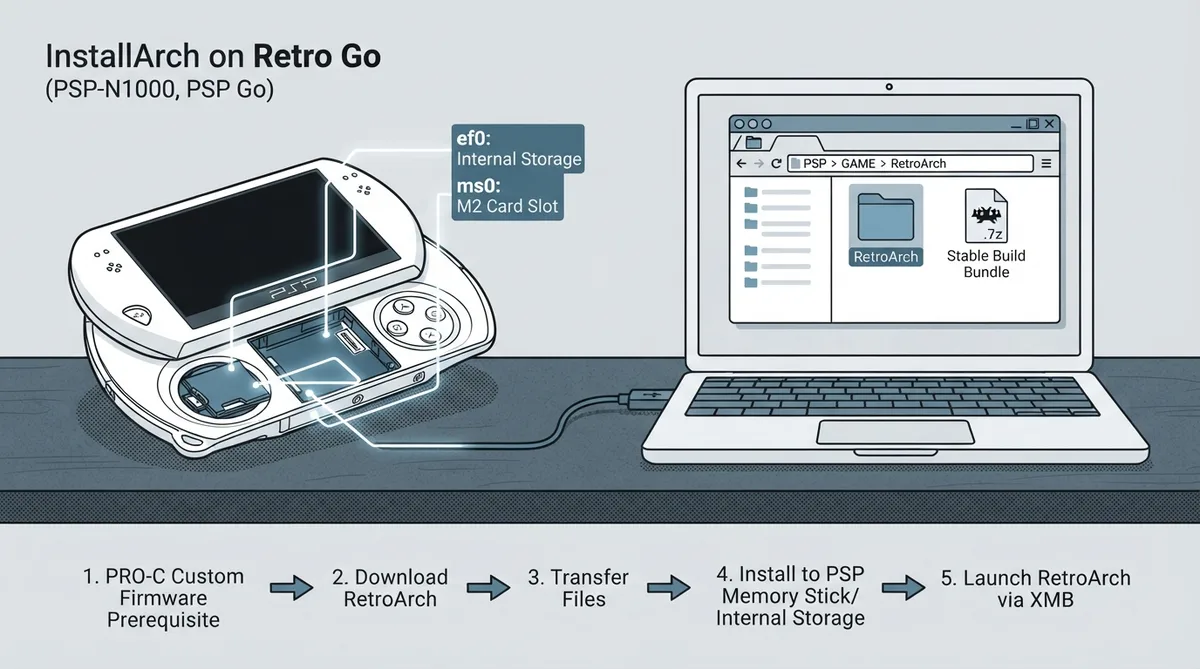 View full image
 Sources & references
Published .
RetroArch: install psp — official gaming software documentation https://raw.githubusercontent.com/libretro/docs/master/docs/guides/install-psp.mdRetrieved Oct 8, 2026Something doesn’t match your setup?
Suggest a correction