

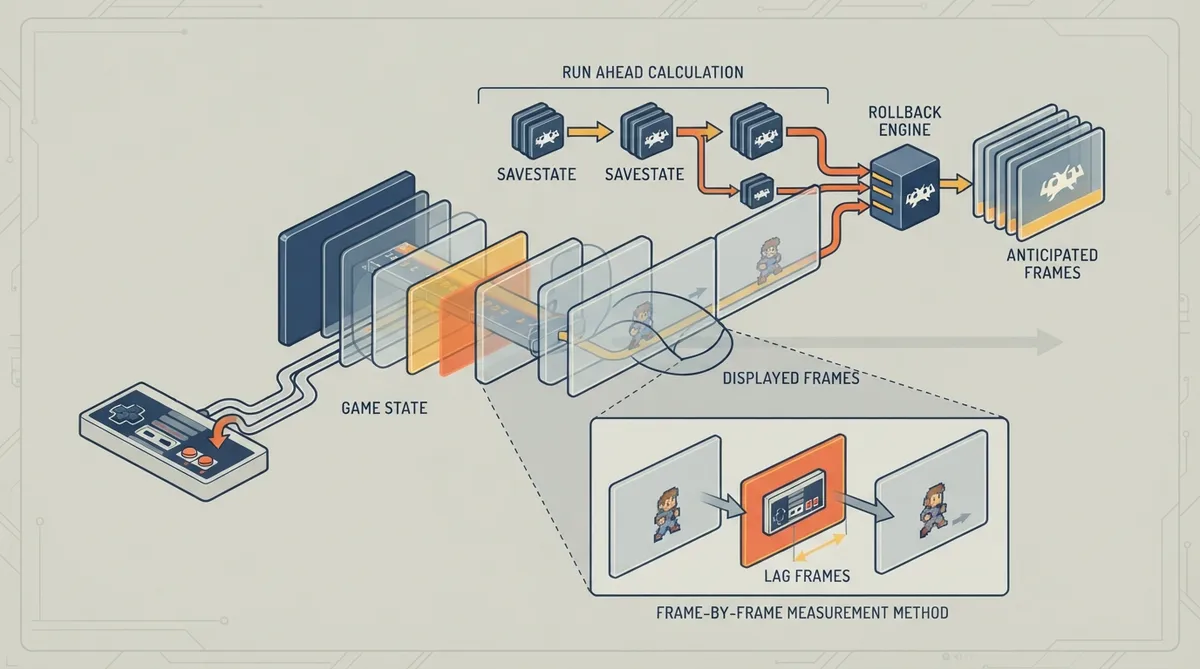
Run Ahead is a RetroArch feature that targets a specific kind of input delay: the lag built into a game's own logic. The official documentation notes that every game has some amount of this internal lag — some games react on the next displayed frame, while others can take two, three, or even more frames before a gamepad input is finally rendered on screen. Run Ahead works by calculating frames as fast as possible in the background in order to roll the action back as close as possible to the input command that was requested.
What Run Ahead Does and Does Not Address
Because Run Ahead deals with internal game logic lag, it does not replace the other latency-reduction methods in RetroArch. The documentation states that those methods happen later in the pipeline, so Hard GPU Sync and Frame Delay can still be used alongside Run Ahead rather than instead of it.
Where to Find the Setting
The Run Ahead option is located in Quickmenu > Latency. The same settings are also reachable from Settings > Latency.
How to Measure the Number of Frames to Run Ahead
The goal of the measurement described in the documentation is to find the shortest internal input lag a game can have. The recommended action for testing is usually something simple, such as moving the character. The test works by counting how many frames pass between an input and the game's visible response.
- Pause emulation by pressing the "P" hotkey on the keyboard. | Press and hold a direction on the controller. | Advance emulation frame by frame with the "K" hotkey on the keyboard until the character moves.
At best, an action becomes visible on the next frame. For that reason the documentation gives the lag in frames as the number of times you pushed "K" minus one.
Signs That the Frame Count Is Wrong
- If the selected number is higher than needed, you will see a stutter or rollback when pushing buttons, and possibly various weirdness. | If the selected number is lower than needed, repeating the test will take more than one push on the "K" hotkey before the character moves.
Prerequisites and Limitations
- Run Ahead relies on save states, so they need to be clean and fast enough. If a core does not support them, Run Ahead cannot work. | Second Instance mode works around some save state limitations, and the documentation advises using it if possible. | Calculating several frames in advance means the machine must be fast enough to run the core at that level of speed. The higher the number of frames you run ahead, the higher the demands placed on the CPU.
Single-Instance and Two-Instance Modes
The documentation describes two modes of operation: Single-Instance and Two-Instance. The explanation below comes from the feature's author, Dwedit, as quoted in the official guide.
Single-Instance Mode
- Disable audio and video, run a frame, then save state. | Run additional frames with audio and video disabled if running ahead more than one frame. | Enable audio and video and run the frame that should be seen. | Load state.
All save states and load states in this mode are done to RAM and never reach the disk, according to the documentation.
Two-Instance Mode
- The primary core does audio only, then saves state. | The secondary core loads state, runs frames ahead while discarding audio and video, then runs a frame with video only.
For performance reasons, the documentation states that the secondary core is resynced only when input is dirty. While input remains clean, it keeps running additional frames on the secondary core instead.
The reason Two-Instance mode exists is audio behavior: many cores do not leave audio emulation in a clean state after loading state, which would produce buzzing. Because the primary core in Two-Instance mode does not perform any load states, that problem is avoided.
The documentation notes that in Single-Instance mode it would be possible to improve performance further by running ahead without loading state while input is clean, but the author states that this is not currently done. No independent verification of the described behavior is available.
Reference table · Scroll horizontally to see all columns.
| Item | Value |
|---|---|
| Setting path | Quickmenu > Latency |
| Alternate path | Settings > Latency |
| Pause hotkey | P |
| Frame advance hotkey | K |
| Measurement target | Shortest internal input lag, usually character movement |
Reference table · Scroll horizontally to see all columns.
| Requirement or effect | Detail |
|---|---|
| Save states | Must be clean and fast enough; required for Run Ahead to function |
| Unsupported core | Run Ahead cannot work if the core does not support save states |
| Workaround | Second Instance mode works around some save state limitations |
| CPU load | Rises with the number of frames run ahead |
 View full image
 Sources & references
Published .
RetroArch: runahead — official gaming software documentation https://raw.githubusercontent.com/libretro/docs/master/docs/guides/runahead.mdRetrieved Oct 8, 2026Something doesn’t match your setup?
Suggest a correction