

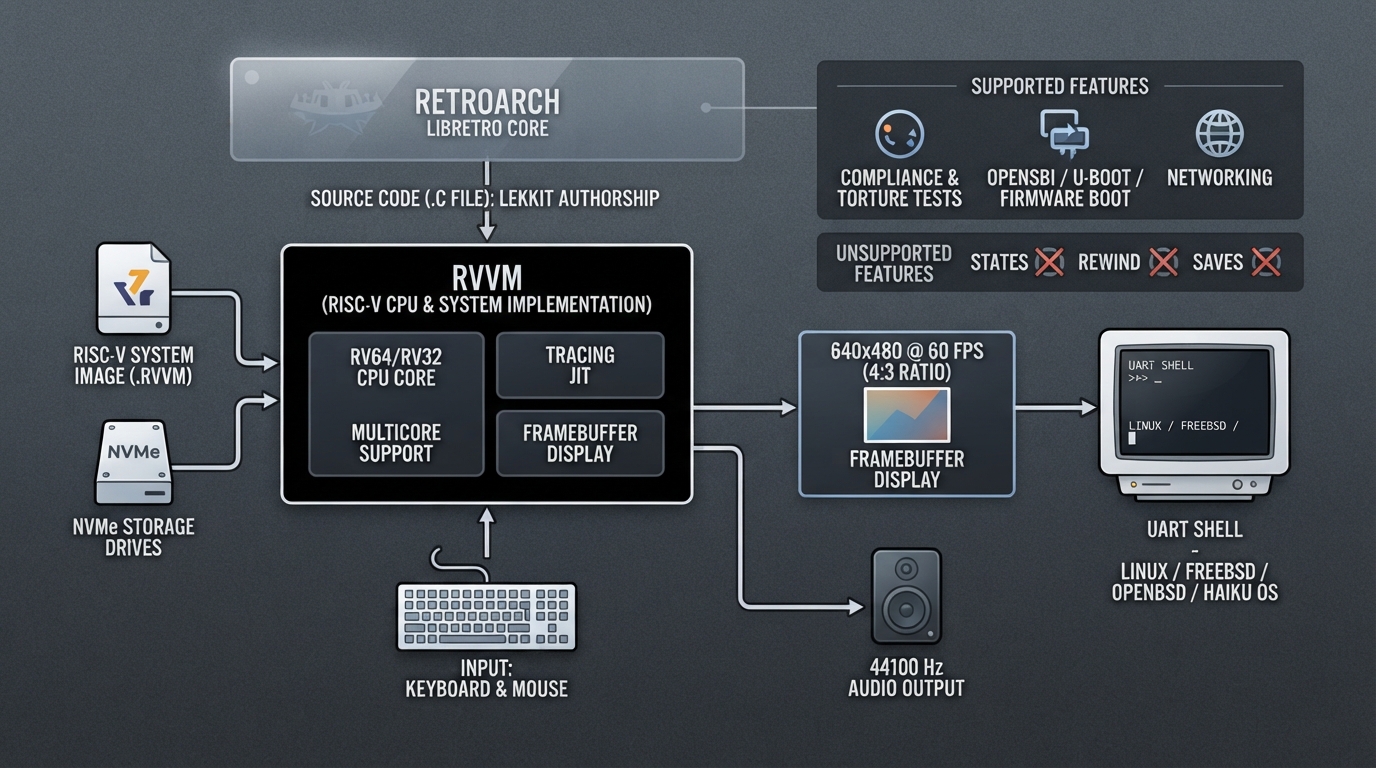
RVVM is a RISC-V CPU and system software implementation written in C, distributed as a libretro core for RetroArch. The official documentation describes it as passing RISC-V compliance and torture tests for RV64 and RV32, booting OpenSBI, U-Boot and custom firmwares, and running Linux, FreeBSD, OpenBSD and Haiku OS.
What the core provides
- According to the documentation, the core includes:
- - RISC-V compliance and torture test support for RV64 and RV32
- - Booting and execution of OpenSBI, U-Boot and custom firmwares
- - Working Linux, FreeBSD, OpenBSD, Haiku OS and other operating systems
- - A tracing JIT and multicore support
- - Framebuffer display, mouse and keyboard, and a UART shell
- - NVMe storage drives
- - Networking
Core identity and content format
- - Author: LekKit
- - Licenses: GPLv3 and MPLv2.0
- - Associated file extension: .rvvm
The documented file extension for this core is .rvvm. Any RISC-V system image intended for use with the core should follow that naming convention so RetroArch can associate the content with the core.
Display, audio and input output
- - Core-provided FPS: 60
- - Core-provided sample rate: 44100
- - Base width and height: 640 x 480
- - Maximum width and height: 640 x 480
- - Core-provided aspect ratio: 4:3
Keyboard and mouse input are supported by the core, so the emulated system can receive input through those devices.
RetroArch features the core does not support
The documentation marks several RetroArch features as unsupported by this core: saves, save states, rewind, netplay, memory monitoring for achievements, and cheats (both RetroArch cheats and native cheats). Plan around these limitations rather than expecting the usual RetroArch conveniences to work.
Source-summarized setup outline
- 1. Confirm the content is a RISC-V system image associated with the .rvvm extension.
- 2. Select the RVVM core in RetroArch for that content.
- 3. Expect a 640 x 480 framebuffer with a 4:3 aspect ratio and 60 FPS output.
- 4. Use keyboard and mouse input, since those are the documented supported input devices.
- 5. Do not rely on save states, rewind, netplay, memory monitoring or cheats, because the documentation lists them as unsupported.
Reference table · Scroll horizontally to see all columns.
| Attribute | Value |
|---|---|
| Core | RVVM |
| Author | LekKit |
| Licenses | GPLv3, MPLv2.0 |
| File extension | .rvvm |
| Core-provided FPS | 60 |
| Core-provided sample rate | 44100 |
| Base resolution | 640 x 480 |
| Maximum resolution | 640 x 480 |
| Aspect ratio | 4:3 |
| Keyboard and mouse input | Supported |
Reference table · Scroll horizontally to see all columns.
| RetroArch feature | Documented status |
|---|---|
| Controls | Supported |
| Saves | Not supported |
| Save states | Not supported |
| Rewind | Not supported |
| Netplay | Not supported |
| Memory monitoring (achievements) | Not supported |
| RetroArch cheats | Not supported |
| Native cheats | Not supported |
Sources & references
Content responsibility: FrameTinker editorial desk. Source authors and software maintainers are credited separately below; this is not a claim of hands-on testing.
Published .
RetroArch: rvvm — official gaming software documentation https://raw.githubusercontent.com/libretro/docs/master/docs/library/rvvm.mdRetrieved Oct 13, 2026Something doesn’t match your setup?
Suggest a correction