

RetroArch is described in its official documentation as the reference frontend for the libretro API. This guide is a summary of that documentation, not a hands-on walkthrough, and it does not cover emulator licensing, ROM sourcing, or tested performance.
What RetroArch is
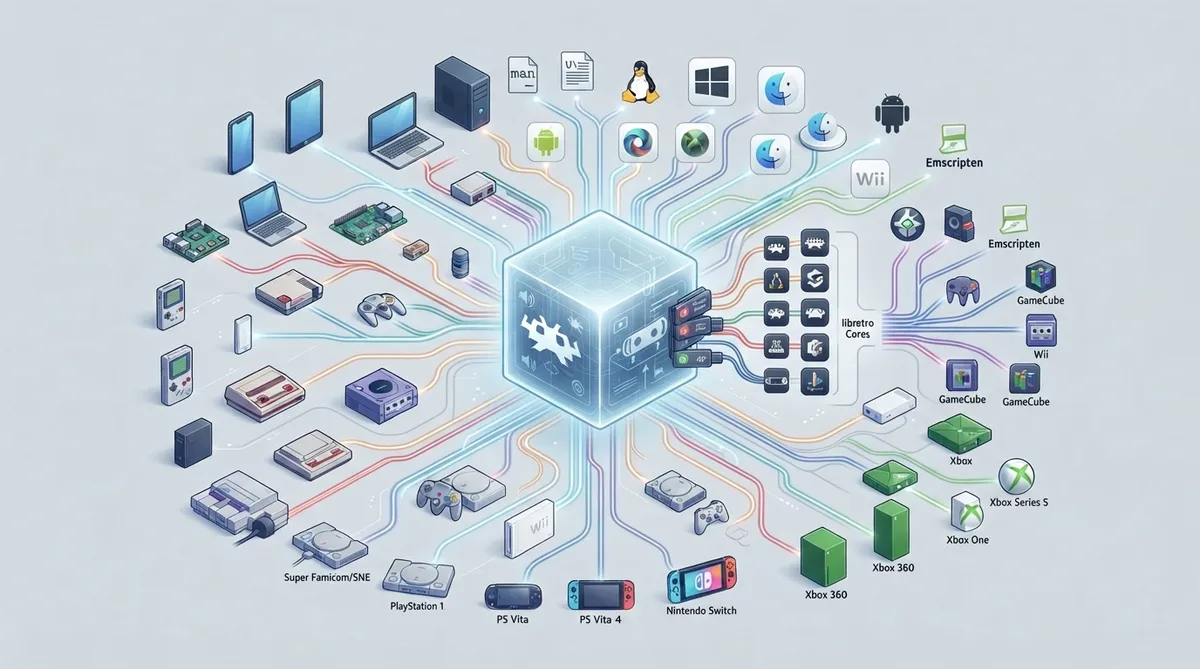
RetroArch is the reference frontend for the libretro API. The project documentation lists video game system emulators, game engines, and more generalized 3D programs as popular examples of implementations for that API. These implementations are instantiated as dynamic libraries, which the project refers to as libretro cores.
Frontend and core architecture
The libretro API exposes generic audio, video, and input callbacks. A libretro frontend such as RetroArch handles video output, audio output, input, and application lifecycle. According to the documentation, a libretro core written in portable C or C++ can run on many platforms with very little to no porting effort.
Platforms listed by the project
The official README lists a long set of ports. Aside from the families below, the list also names DOS, Haiku, ReactOS, Solaris, SerenityOS, Redox OS, Blackberry, Miyoo, and several handheld or retro firmware targets. Listing a platform in the project documentation is not by itself a statement about your specific device or build.
- Platforms named in the project documentation include:
- - Android (2.x to most recent version)
- - Apple iOS, macOS, and tvOS
- - Windows versions from Windows NT 3.5 through Windows 11
- - Linux, FreeBSD, NetBSD, and OpenBSD
- - Nintendo GameCube, Wii, Wii U, Switch, and NES/SNES Classic Edition
- - Nintendo 3DS/2DS
- - PlayStation 2, 3, 4, Portable, and Vita
- - Xbox, Xbox 360, Xbox One, and Xbox Series S/X
- - Raspberry Pi, Emscripten (WebAssembly and JavaScript), LG webOS, and OpenDingux
Binaries and documentation
The README states that the latest binaries are hosted on the project buildbot. Official documentation is published at docs.libretro.com, and on Unix, man-pages are provided. The documentation center is the entry point for compiling and installing instructions as well as developer-oriented material on the libretro overview.
Build dependencies on PC
The documentation states there are no true hard dependencies per se. On Windows, RetroArch can run with only Win32 as a dependency. On Linux, there are no true dependencies, but GL or Vulkan headers and X11 headers and libraries, or EGL/KMS/GBM, are recommended for optimal usage. The macOS port requires recent versions of Xcode to build.
RetroArch needs at least one audio driver library. The documented list includes ALSA, OSS, RoarAudio, RSound, OpenAL, JACK, SDL, PulseAudio, PipeWire, XAudio2, DirectSound, and CoreAudio. To run properly, RetroArch requires a libretro implementation to be present, though because it is typically loaded dynamically it is not required at build time.
Graphics drivers, shaders, and menu drivers
The documented driver tiers set minimum specifications. OpenGL 1.1 supports no shaders, and the XMB menu driver will not have shader pipeline effects under it. OpenGL 2.1 allows a choice between NVIDIA Cg shaders (marked deprecated and requiring a separate runtime) and GLSL shaders. OpenGL 3.2 core, Direct3D 11.0 with Shader Model 4.0, and Vulkan 1.0 each allow modern Slang shaders. MaterialUI, XMB, Ozone, and RGUI are documented as working correctly across these drivers.
Configuration files
The default configuration is defined in config.def.h, and the documentation advises against changing it unless you know what you are doing. A sample configuration file is installed to /etc/retroarch.cfg as the system-wide config file. On startup RetroArch creates a config file under $XDG_CONFIG_HOME/retroarch/retroarch.cfg if it does not exist. Joypads can be configured through the built-in menu or manually in retroarch.cfg.
CRT resolution switching
CRT SwitchRes turns on on the fly, but RetroArch must be restarted to disable it. With it enabled, RetroArch starts at 2560 x 480 at 60 Hz. On Windows, the documentation says to install CRTEmudriver and install modelines before enabling these options; separate NTSC and PAL modeline sets are listed, with the instruction to replace 2560 with your desired super resolution. The default super resolution is 2560, configurable in retroarch.cfg; only 1920, 2560, and 3840 are documented as compatible, and other values are ignored in favor of native switching. Native resolution mode requires a different modeline set organized by system and region.
Support channels
To reach developers, the documentation points to GitHub issues, the libretro forum, the project Discord, and the RetroArch subreddit with the Technical Support flair. It also lists official social and store channels and cautions that links other than the ones it provides may have been created by fans or independent members, recommending the original resources.
 View full image
 Sources & references
Published .
RetroArch — official gaming software documentation https://raw.githubusercontent.com/libretro/RetroArch/master/README.mdRetrieved Oct 8, 2026Something doesn’t match your setup?
Suggest a correction