

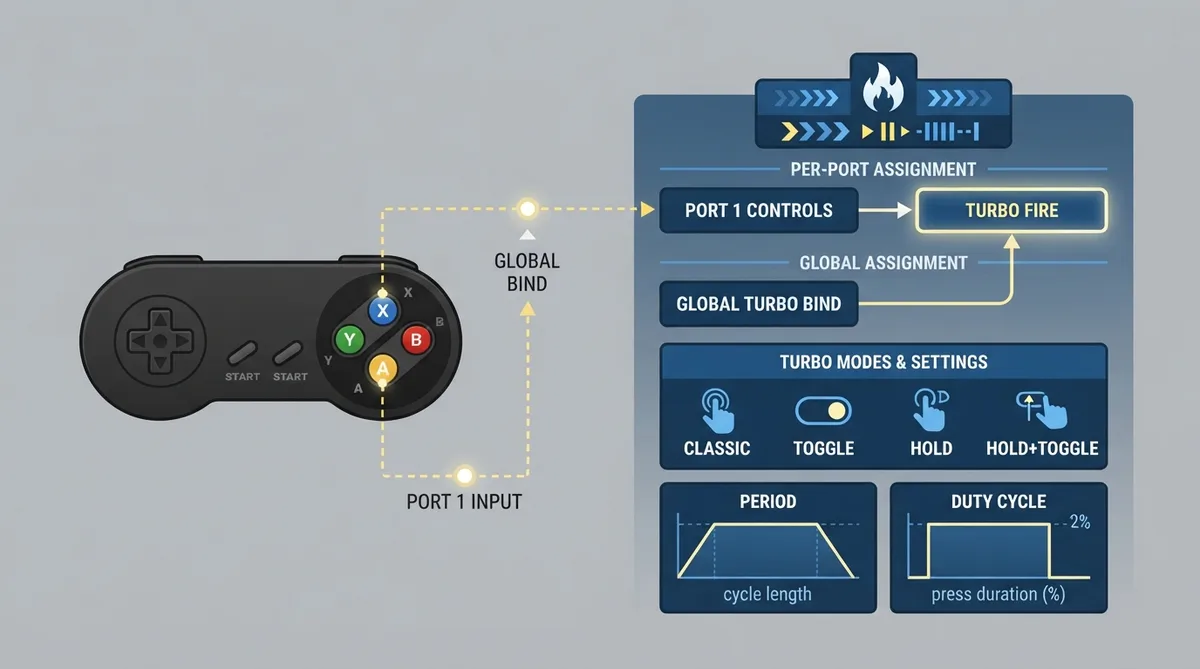
Turbo Fire makes RetroArch press and release a button over and over while you hold it, for games that expect you to hammer a fire button. According to the official documentation, it works with every core, whether or not the core has turbo buttons of its own.
Prerequisites and where the settings live
All Turbo Fire options live under Settings > Input > Turbo Fire. Turbo Fire itself is on by default, but nothing happens until a Turbo button is assigned.
Assigning the Turbo button
Turbo Fire needs a button that switches it on. You can assign it in one of two places:
- - Settings > Input > Port 1 Controls > Turbo Fire (and so on for each port) assigns it for that port only.
- - Turbo Bind in Settings > Input > Turbo Fire picks one RetroPad button to be the Turbo button on every port. Left empty, the per-port binding above is used.
Choosing a Turbo Mode
Turbo Mode decides how the Turbo button and the other buttons work together. Four modes are available:
- - Classic (default): Hold a button and press the Turbo button; that button fires repeatedly for as long as you keep holding it. Release it and turbo stops.
- - Classic (Toggle): Hold a button and press the Turbo button once; turbo stays on for that button, which now fires repeatedly whenever you hold it. Hold it and press the Turbo button again to switch turbo off.
- - Single Button (Toggle): Press the Turbo button once; the button chosen in Turbo Button fires repeatedly, without being held. Press the Turbo button again to stop.
- - Single Button (Hold): The button chosen in Turbo Button fires repeatedly while the Turbo button is held down.
Adjusting the fire rate
Turbo presses and releases the button in a repeating cycle. Turbo Period is the length of one cycle, in frames. The default is 6: at 60 frames per second, 10 presses a second. Turbo Duty Cycle is how many frames of each cycle the button is held down. The default, Half Period, holds it for half the cycle. A duty cycle equal to or longer than the period never releases the button.
Some games only count a press if the button stays down or up for a few frames. If turbo does not register, make Turbo Period longer.
Other Turbo Fire settings
- - Turbo Allow D-Pad Directions lets the D-pad directions be turbo in the Classic modes. It is off by default, so holding the Turbo button does not turn directions into turbo.
- - Turbo Fire switches the whole feature off or on.
- - The Turbo Fire (Toggle) hotkey in Settings > Input > Hotkeys does the same while playing.
Reference table · Scroll horizontally to see all columns.
| Mode | How to use it |
|---|---|
| Classic (default) | Hold a button and press the Turbo button: that button fires repeatedly for as long as you keep holding it. Release it and turbo stops. |
| Classic (Toggle) | Hold a button and press the Turbo button once: turbo stays on for that button, which now fires repeatedly whenever you hold it. Hold it and press the Turbo button again to switch turbo off. |
| Single Button (Toggle) | Press the Turbo button once: the button chosen in Turbo Button fires repeatedly, without being held. Press the Turbo button again to stop. |
| Single Button (Hold) | The button chosen in Turbo Button fires repeatedly while the Turbo button is held down. |
Reference table · Scroll horizontally to see all columns.
| Setting | Location | Default |
|---|---|---|
| Turbo Fire (feature toggle) | Settings > Input > Turbo Fire | On |
| Turbo button (per port) | Settings > Input > Port 1 Controls > Turbo Fire | Not assigned |
| Turbo Bind (all ports) | Settings > Input > Turbo Fire > Turbo Bind | Empty (per-port binding used) |
| Turbo Mode | Settings > Input > Turbo Fire | Classic |
| Turbo Period | Settings > Input > Turbo Fire | 6 frames |
| Turbo Duty Cycle | Settings > Input > Turbo Fire | Half Period |
| Turbo Allow D-Pad Directions | Settings > Input > Turbo Fire | Off |
| Turbo Fire (Toggle) hotkey | Settings > Input > Hotkeys | Not specified |
Sources & references
Content responsibility: FrameTinker editorial desk. Source authors and software maintainers are credited separately below; this is not a claim of hands-on testing.
Published .
RetroArch: turbo fire — official gaming software documentation https://raw.githubusercontent.com/libretro/docs/master/docs/guides/turbo-fire.mdRetrieved Oct 8, 2026Something doesn’t match your setup?
Suggest a correction