

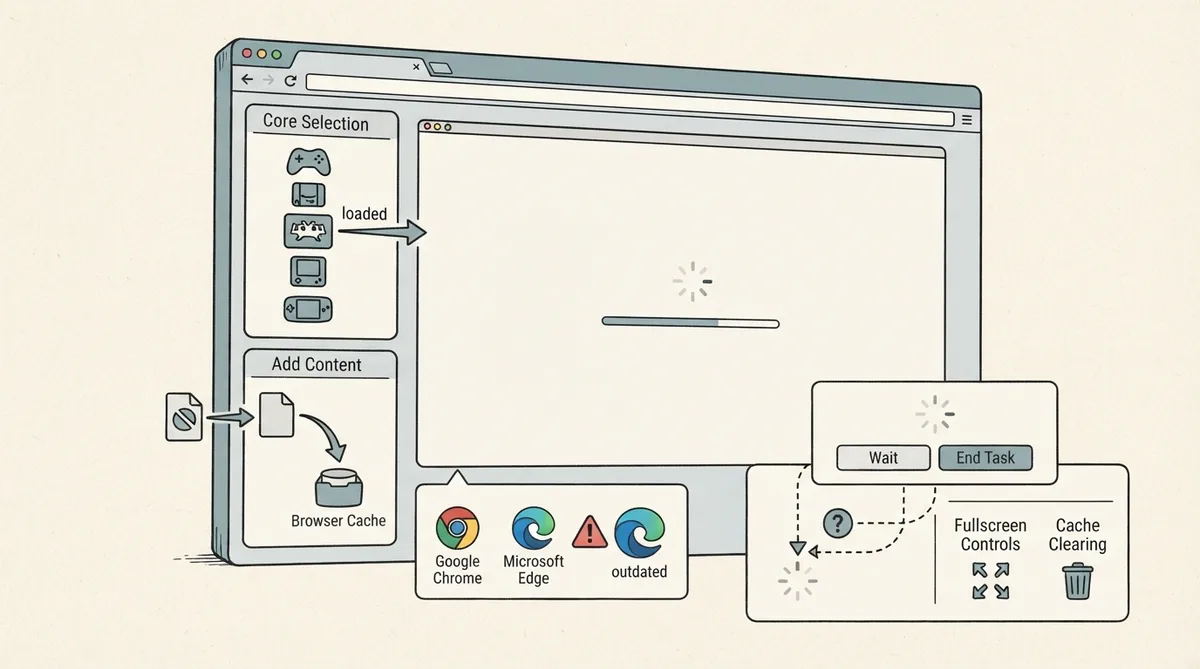
The RetroArch web player is a browser-based version of RetroArch that runs with the emulator's basic features on modern internet browsers. No installation is required. You select a core first, then add your own content to run.
Before you start
- A modern internet browser is required. The documentation names Google Chrome and Microsoft Edge as examples.
- An outdated browser may spoil the whole experience, according to the official documentation.
- No installation is needed for the web player itself.
Access the web player
Open the RetroArch web player in a modern internet browser at https://web.libretro.com/. The documentation warns that an outdated browser may spoil the experience.
Select and load a core
- Select the core you want to run from the first tab.
- Clicking the core name starts it running.
- Core loading time can vary depending on the selected core.
- During loading, your system's performance and actively used processes can cause the browser to crash. If this happens, a Wait or End option appears on screen. The documentation advises clicking Wait, which may appear several times.
Add your content
- Click Add Content from the second tab to choose the content to load. The documentation states this adds your content to the browser's cache, which can be deleted later.
- To reach an uploaded file, use Load Content > Start Directory.
- Uploaded files also appear in the Downloads folder. The documentation notes that this folder is where you can access open source content available from RetroArch's Content Downloader.
Quick menu, fullscreen, and cache
- Toggle the Quick Menu either by pressing F1 or by clicking the Menu Toggle button.
- Go fullscreen using the Full Screen key. The documentation explicitly says you do not want to press F11 when the screen is selected, even though F11 usually goes fullscreen elsewhere.
- Clear the cache in several ways, including CTRL + F5, or by right-clicking, opening inspect, right-clicking the refresh button at the top left, and using the clear cache key.
- The same information is also available by clicking the Help button in the web player.
Supported cores listed by the documentation
The documentation lists the supported cores at the time of writing, and notes that the list may vary. The listed cores are 2048, Beetle Lynx, Beetle NeoPop, Beetle PCE FAST, Beetle PC-FX, Beetle VB, Beetle WonderSwan, ChaiLove, Craft, FB Alpha 2012, FB Alpha 2012 CPS1, FB Alpha 2012 CPS2, FB Alpha 2012 NeoGeo, FCEUmm, FFmpeg, Gambatte, Game Music Emu, Genesi Plus GX, gPSP, Handy, MAME 2000, Mu, Nestopia, NX Engine, 02em, Opera, PicoDrive, PrBoom, QuickNES, Flycast, Snes9x 2002, Snes9x 2005, Snes9x 2010, Snes9x, SquirrelJME, TGB Dual, Theodore (Thompson T08/T09), TryQuake, VBA Next, Vecx, and Yabause.
Further help
The Help button inside the web player repeats the documentation's guidance if you need it while playing.
Reference table · Scroll horizontally to see all columns.
| Category | Cores listed |
|---|---|
| Standalone/homebrew | 2048, Craft, ChaiLove, NX Engine, SquirrelJME |
| Handheld | Beetle Lynx, Beetle NeoPop, Beetle VB, Beetle WonderSwan, Gambatte, gPSP, Handy, Mu, QuickNES, TGB Dual, Theodore (Thompson T08/T09), VBA Next |
| NEC PC Engine | Beetle PCE FAST |
| NEC PC-FX | Beetle PC-FX |
| Arcade | FB Alpha 2012, FB Alpha 2012 CPS1, FB Alpha 2012 CPS2, FB Alpha 2012 NeoGeo, MAME 2000, Opera |
| Nintendo | FCEUmm, Nestopia, Snes9x 2002, Snes9x 2005, Snes9x 2010, Snes9x |
| Sega | Genesi Plus GX, PicoDrive, Yabause |
| Multimedia/other | FFmpeg, Game Music Emu, PrBoom, TryQuake, Vecx, Flycast, 02em |
Reference table · Scroll horizontally to see all columns.
| Action | Method |
|---|---|
| Toggle Quick Menu | Press F1 or click the Menu Toggle button |
| Go fullscreen | Use the Full Screen key (the documentation says not to press F11) |
| Clear cache | CTRL + F5, or use inspect > refresh button > clear cache key |
Sources & references
Published .
RetroArch: web player — official gaming software documentation https://raw.githubusercontent.com/libretro/docs/master/docs/guides/web-player.mdRetrieved Oct 8, 2026Something doesn’t match your setup?
Suggest a correction