

RetroArch XMB Interface Overview
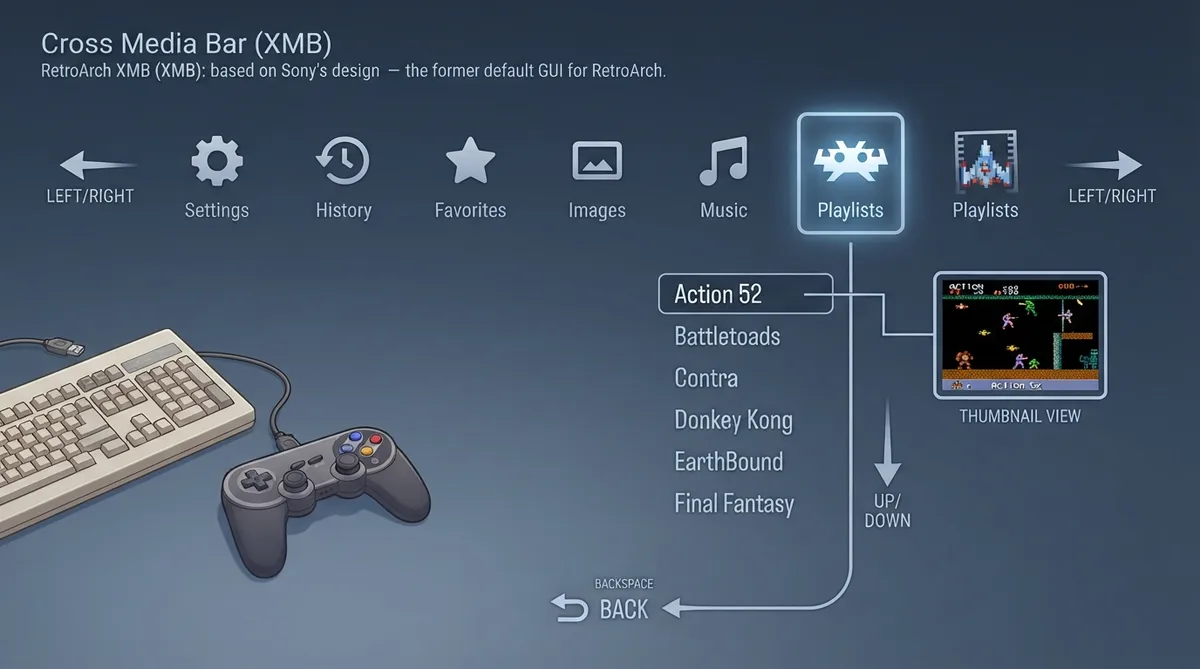
XMB was the default user interface for RetroArch until it was succeeded by Ozone in RetroArch 1.7.6. It is based on Sony's cross-media bar GUI, most widely known from the PSP and PlayStation 3. This guide covers menu structure, navigation, input, thumbnails, and themes based on the official libretro documentation.
Menu Structure
Navigating the Menus
Input Devices
XMB is designed for use with a gamepad or keyboard. Content is controlled using a keyboard or gamepad connected via USB or Bluetooth.
Thumbnails
By default, no thumbnails are displayed. Up to two can be enabled. The primary thumbnail appears on the lower right side of the screen when a playlist entry is selected. The secondary thumbnail appears on the left. Press the spacebar key to view the thumbnails full-screen, and press spacebar again to toggle the view off. Thumbnails can be boxart, a title screen screenshot, or a gameplay screenshot.
- Go to Settings > User Interface > Appearance.
- Toggle the Primary Thumbnail and/or Secondary Thumbnail option to enable thumbnails.
Themes
XMB has a number of built-in styles. They can be changed in the Settings > User Interface > Appearance menu. The background color can be changed by scrolling through Color Theme to select a color. The animated background wallpaper can also be changed via Shader Pipeline; the default is a PlayStation-style animated ribbon. XMB also has a selection of icon sets to choose from via Icon Theme.
XMB can show different wallpapers depending on the playlist selected. This is done using external wallpaper files referenced in the documentation.
Reference table · Scroll horizontally to see all columns.
| Action | Input |
|---|---|
| Move along primary row | Left / Right |
| Scroll submenu column | Up / Down |
| Go back one step | Backspace |
| Toggle full-screen thumbnails | Spacebar |
Sources & references
Published .
RetroArch: xmb — official gaming software documentation https://raw.githubusercontent.com/libretro/docs/master/docs/guides/xmb.mdRetrieved Oct 8, 2026Something doesn’t match your setup?
Suggest a correction