

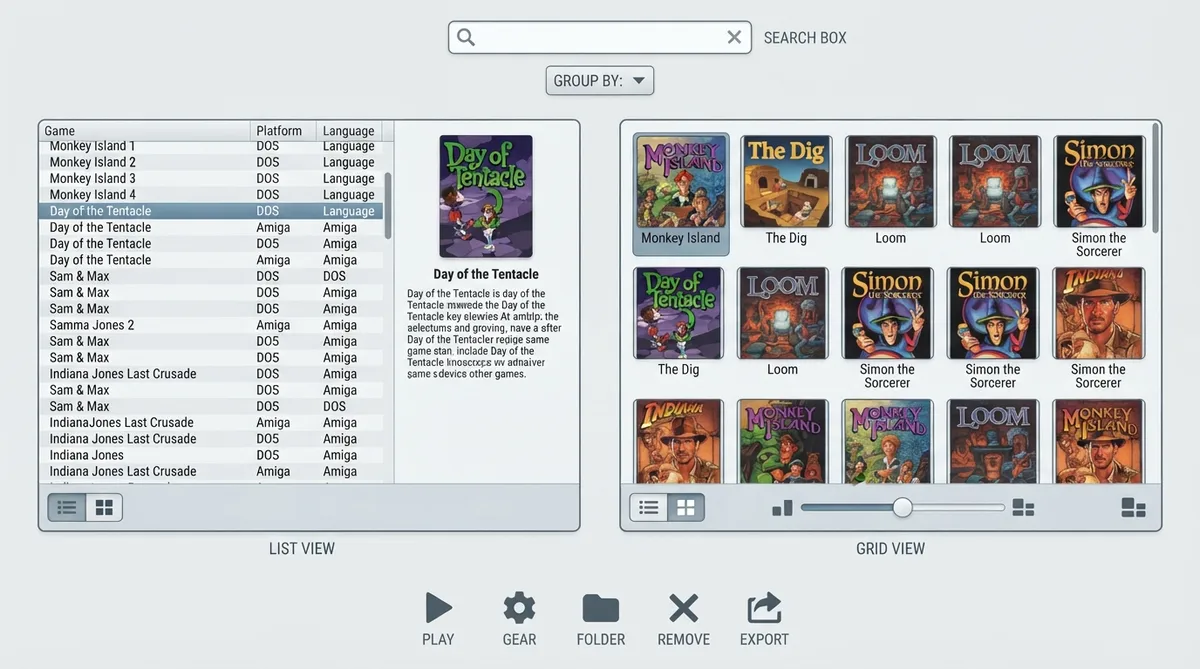
The main ScummVM window is called the Launcher. According to the official ScummVM documentation, the Launcher opens whenever you start ScummVM, unless you launch a game directly from the command line. The interface offers two ways to browse your library, a search box, a grouping menu, and a row of buttons along the bottom. This guide summarizes how the documented Launcher is organized and what each control does.
Switching between list view and grid view
The documentation states that the buttons at the bottom left of the screen toggle between list view and grid view. Both views present the same game library, but lay it out differently. List view emphasizes text and extra detail about each game, while grid view emphasizes artwork. The choice is mostly about how you prefer to scan a large collection.
What the list view shows
In list view, the pane on the left shows the games list, which contains all the games that have been added to ScummVM. The list usually offers some additional information about each game, such as original platform and language. To highlight a game, you can type the first letter or letters of its title, or click on it. The typing shortcut is useful when a long list makes clicking slower.
What the grid view shows
In grid view, the game icons appear in the pane above the buttons and show the game artwork. A slider labeled Icons per row at the bottom of the page changes the size of the icons, so you can trade larger thumbnails for more games visible at once. Clicking a game selects it, and a pop-up menu then offers a play icon to start the game, a gear icon to open the Game Options menu, and an export icon to load a saved game.
Filtering games with the search box
The search box filters the games list. It sits at the top of the page next to the magnifying glass icon. The filter is applied as you type and is not case sensitive, so typing a few letters of a title is usually enough to narrow the list. To clear the filter, click the X.
Grouping the games list
The grouping menu sits to the right of the search box. It groups games in alphabetical order or by engine, series, publisher, language, platform, or year. Each choice gives you a different way to organize a large collection: grouping by engine or series keeps related titles together, while grouping by year or language helps when you are looking for a particular release or localization. To hide or show a group of games, click the black arrow to the left of that group's heading.
The launcher buttons
If a game is not visible in the list
The documentation describes two filters that can affect what you see in the games list. If a title is missing, first check whether the search box is hiding it and clear the filter with the X if necessary. Then check whether the relevant group is collapsed, and click the black arrow next to the group heading to show its games.
Scope and verification status
This guide reflects only what the official ScummVM launcher documentation states. It does not claim universal behavior across ScummVM versions or platforms, and it should not be read as the result of independent testing.
Reference table · Scroll horizontally to see all columns.
| Control | Where it is documented | Documented behavior |
|---|---|---|
| Start | List view only | Launches the highlighted game |
| Add Game | Launcher button | Listed as a launcher control in the documentation |
| Remove Game | Launcher button | Listed as a launcher control in the documentation |
| Game Options | List view only | Listed as a launcher control in the documentation |
| Global Options | Launcher button | Listed as a launcher control in the documentation |
| Load | List view only | Named in the documentation, but the available source does not describe its behavior |
Sources & references
Content responsibility: FrameTinker editorial desk. Source authors and software maintainers are credited separately below; this is not a claim of hands-on testing.
Published .
ScummVM: the launcher — official gaming software documentation https://raw.githubusercontent.com/scummvm/scummvm/master/doc/docportal/use_scummvm/the_launcher.rstRetrieved Oct 19, 2026Something doesn’t match your setup?
Suggest a correction