

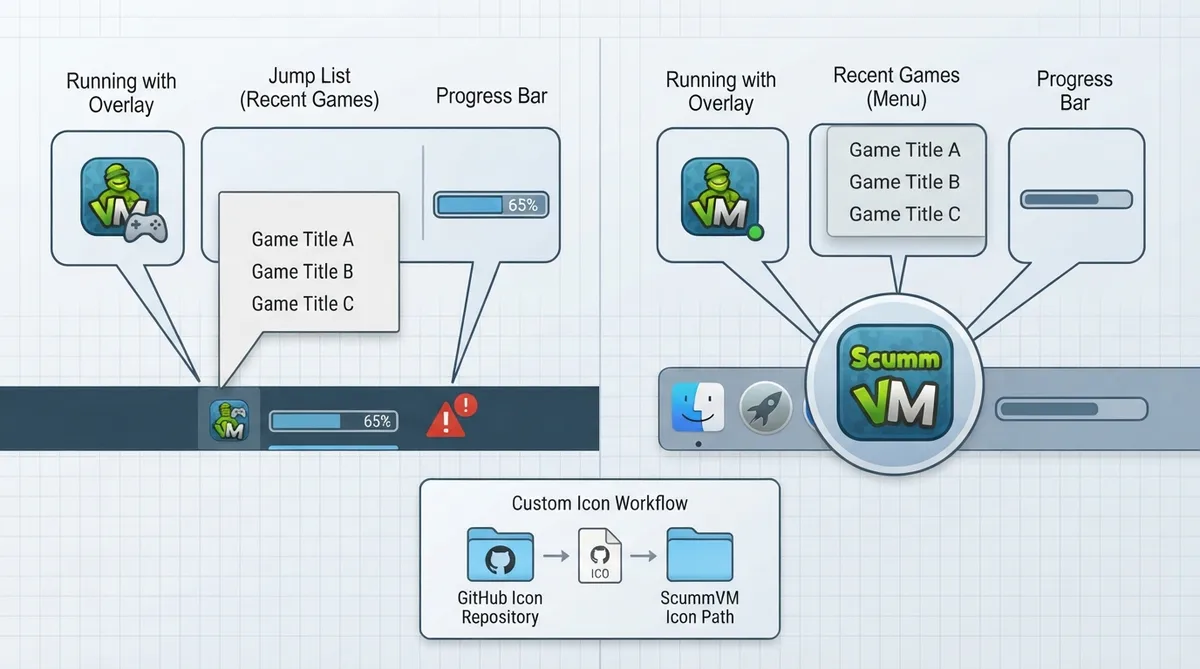
ScummVM's official documentation describes an optional taskbar/dock integration that ties the emulator's window to the operating system's taskbar on Windows or dock on macOS. The integration bundles several distinct features, and not all of them are available on every platform. This guide summarizes what the official documentation states about each feature, how to start a recent game from the taskbar/dock, and how to make custom game icons available.
What the integration does
- - Adds an overlay icon in the taskbar/dock when a game is running (Windows and macOS).
- - Updates a list of recently played games that can be started from the taskbar/dock (Windows and macOS).
- - Shows a progress bar during a mass add of games and shows the number of games found at the end (Windows, macOS and Linux).
- - Shows an error state in the taskbar if an error occurs when running a game (Windows only).
Starting a recently played game from the taskbar or dock
On Windows and macOS, the integration maintains a list of recently played games. To start one, right-click the ScummVM icon in the taskbar or dock and select the game you want to play from that list.
Supplying custom game icons
The overlay icon uses image files that follow strict naming rules. Icons must be ICO files on Windows or PNG files on macOS. Each supported name ends with the file extension (shown as xxx below).
The documentation lists four naming conventions that icons may follow: ID.xxx, gameid.xxx, engineid.xxx, and engineid-gameid.xxx.
According to the documentation, the taskbar integration cannot yet use the icon .dat files that can be downloaded from the Global Options. The icons therefore need to be downloaded manually from the project's GitHub icon repository, and then either placed in the default Icon Path or the Icon Path must be changed to point to the folder that contains the icons.
Feature availability by platform
Reference table · Scroll horizontally to see all columns.
| Feature | Windows | macOS | Linux |
|---|---|---|---|
| Overlay icon while a game runs | Yes | Yes | Not documented |
| Recently played games list | Yes | Yes | Not documented |
| Mass-add progress bar and game count | Yes | Yes | Yes |
| Taskbar error state | Yes | No | No |
| Icon file format | ICO | PNG | Not documented |
Sources & references
Content responsibility: FrameTinker editorial desk. Source authors and software maintainers are credited separately below; this is not a claim of hands-on testing.
Published .
ScummVM: taskbar integration — official gaming software documentation https://raw.githubusercontent.com/scummvm/scummvm/master/doc/docportal/use_scummvm/taskbar_integration.rstRetrieved Oct 19, 2026Something doesn’t match your setup?
Suggest a correction