

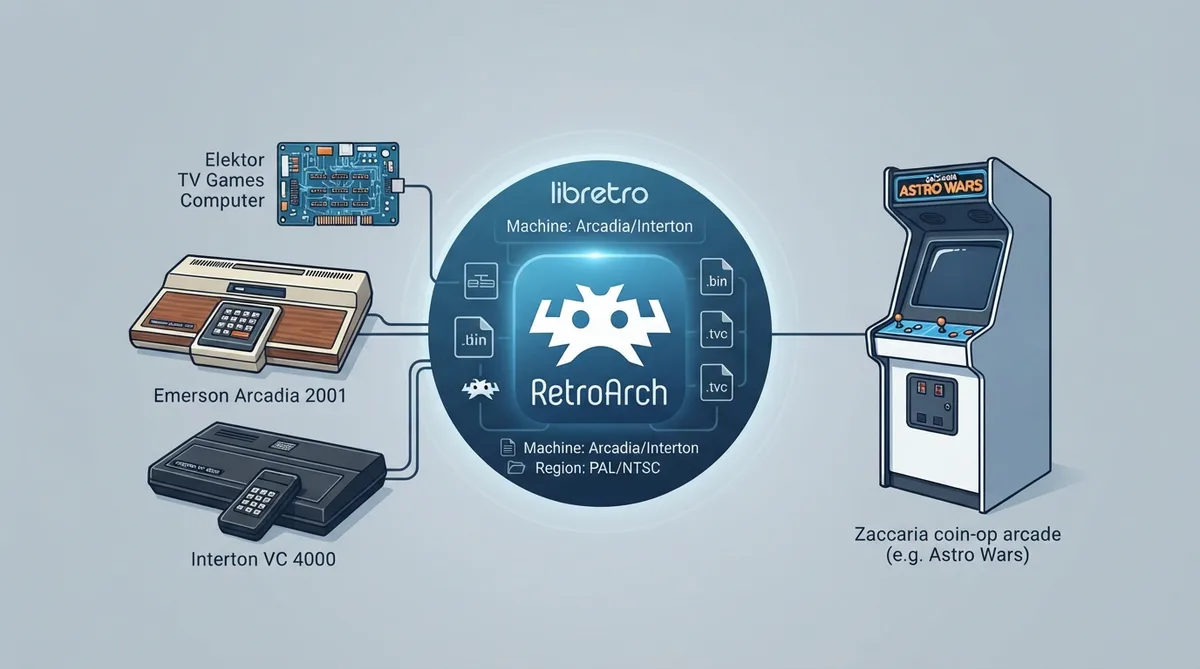
AmiArcadia is a libretro core for RetroArch that emulates Signetics 2650 CPU-based hardware. According to the official libretro documentation, it covers the Emerson Arcadia 2001 and its clones, the Interton VC 4000 family, the Elektor TV Games Computer, and Zaccaria/Malzak coin-op arcade machines. The same documentation describes automatic ROM identification by CRC32, a small set of core options, a fixed keyboard layout for the keypad, and a documented list of which RetroArch features the core does and does not support. This guide works through those documented behaviors so you can load content, pick the right machine, and know what to expect before you start.
What the core emulates
AmiArcadia is described as an emulator for Signetics 2650 CPU-based systems, and the documentation groups its supported hardware into a home-console class and a coin-op class. The console side covers the Emerson Arcadia 2001 and its many clones (named in the docs as Bandai, Grandstand and similar), the Interton VC 4000 family (Voltmace, Rowtron and similar), and the Elektor TV Games Computer. The arcade side covers Zaccaria machines (Astro Wars, Galaxia, Laser Battle, Lazarian) and Malzak (Malzak I and Malzak II).
- - Emerson Arcadia 2001 and compatible systems (Bandai, Grandstand, etc.)
- - Interton VC 4000 and compatible systems (Voltmace, Rowtron, etc.)
- - Elektor TV Games Computer
- - Zaccaria coin-ops: Astro Wars, Galaxia, Laser Battle, Lazarian
- - Malzak coin-ops: Malzak I and Malzak II
Because one core spans both home consoles and coin-ops, the practical decision when you load a file is which machine profile it should run under. The Machine core option exposes only Arcadia and Interton choices, so the documented path for unknown console ROMs is either of those two profiles; the arcade titles are handled through the core's known-ROM handling rather than a third Machine value.
Files and prerequisites
Content loaded by the AmiArcadia core uses the .bin and .tvc file extensions (the .tvc extension lines up with the Elektor TV Games Computer). The core does not require any BIOS files, so there is no separate BIOS setup step to complete before loading content. The core is authored by James Jacobs and distributed under a non-commercial license, which is worth knowing if you plan to redistribute it as part of a bundle.
- - Supported content extensions: .bin, .tvc
- - BIOS files: none required
- - Author: James Jacobs
- - License: non-commercial
Loading content and choosing the machine
- 1. Make sure the AmiArcadia core is installed in RetroArch; its library name is 'AmiArcadia'.
- 2. Load a supported .bin or .tvc file through RetroArch's normal content-loading flow.
- 3. If the ROM is known, the core identifies it by CRC32 and configures the correct machine type, memory map, and game-specific settings automatically.
- 4. If the ROM is unknown, open Core Options and set Machine to Arcadia or Interton depending on which system you want.
The CRC32 step is what makes most of the configuration work invisible: a recognized image gets its machine type, memory map, and game-specific settings set for you, so you normally do not touch Machine at all. The manual Machine choice therefore matters mainly for images the core cannot identify, where you are telling it which of the two documented profiles to assume.
Core options
- - Machine (amiarcadia_machine) — Arcadia or Interton, default Arcadia. Selects the profile for unknown ROMs; known ROMs are auto-detected.
- - Region — PAL or NTSC, default PAL.
- - Sprite Demultiplexing — enabled or disabled, default enabled.
These three options cover the documented tuning surface of the core. Machine is only a fallback for unidentified images; Region chooses between the PAL and NTSC sets, with PAL the default; and Sprite Demultiplexing is enabled by default, with the disabled state available when you want the alternate behavior. Because the documentation lists only these options, there is no separate per-core audio or video scaling menu to adjust through AmiArcadia itself.
Keyboard mapping
Desktop keyboard input is supported for Player 1's keypad. The documentation maps both the number row and the numeric keypad, so keys 0-9 correspond to keypad 0-9, and there are additional bindings for Keypad Clear and Keypad Enter. That gives you a full numeric keypad on a desktop without needing a controller, which is useful for the keypad-heavy software in this library.
Core features and limitations
According to the documentation, the core supports Restart, Screenshots, Save States, Rewind, Core Options, Memory Monitoring for achievements, Controls, and Remapping. It does not support Saves, Netplay, RetroArch Cheats, Native Cheats, Multi-Mouse, Rumble, Sensors, Camera, Location, Subsystem, Softpatching, Disk Control, Username, Language, Crop Overscan, or LEDs. The split has practical consequences: state-based recovery and rewind are available, but battery-style in-game saves will not persist through the core, and netplay sessions are not supported.
Read together, the supported list means the practical workflow for AmiArcadia relies on save states and rewind rather than save files. Remapping and Controls support let you reshape the controller layout in RetroArch itself if the default bindings do not suit a particular game's keypad use. Memory Monitoring is listed as supported, which matters if you use achievements that need to read memory.
Recovery notes
- - If content does not load, confirm the file uses .bin or .tvc, the two documented supported extensions.
- - If an unknown ROM runs as the wrong system, adjust Machine between Arcadia and Interton.
- - If a game that relies on battery-style saves loses progress, remember that Saves are not supported and use Save States instead.
- - If you expected netplay, note that it is documented as unsupported for this core.
Reference table · Scroll horizontally to see all columns.
| Feature | Supported |
|---|---|
| Restart | Yes |
| Screenshots | Yes |
| Saves | No |
| States | Yes |
| Rewind | Yes |
| Netplay | No |
| Core Options | Yes |
| Memory Monitoring | Yes |
| RetroArch Cheats | No |
| Native Cheats | No |
| Controls | Yes |
| Remapping | Yes |
| Multi-Mouse | No |
| Rumble | No |
| Sensors | No |
| Camera | No |
| Location | No |
| Subsystem | No |
| Softpatching | No |
| Disk Control | No |
| Username | No |
| Language | No |
| Crop Overscan | No |
| LEDs | No |
Reference table · Scroll horizontally to see all columns.
| Keyboard Input | Mapped Input |
|---|---|
| 0 / Numpad 0 | Keypad 0 |
| 1 / Numpad 1 | Keypad 1 |
| 2 / Numpad 2 | Keypad 2 |
| 3 / Numpad 3 | Keypad 3 |
| 4 / Numpad 4 | Keypad 4 |
| 5 / Numpad 5 | Keypad 5 |
| 6 / Numpad 6 | Keypad 6 |
| 7 / Numpad 7 | Keypad 7 |
| 8 / Numpad 8 | Keypad 8 |
| 9 / Numpad 9 | Keypad 9 |
| [ / Numpad * | Keypad Clear |
| ] / Numpad Enter | Keypad Enter |
Sources & references
Content responsibility: FrameTinker editorial desk. Source authors and software maintainers are credited separately below; this is not a claim of hands-on testing.
Published .
RetroArch: amiarcadia — official gaming software documentation https://raw.githubusercontent.com/libretro/docs/master/docs/library/amiarcadia.mdRetrieved Oct 12, 2026Something doesn’t match your setup?
Suggest a correction