

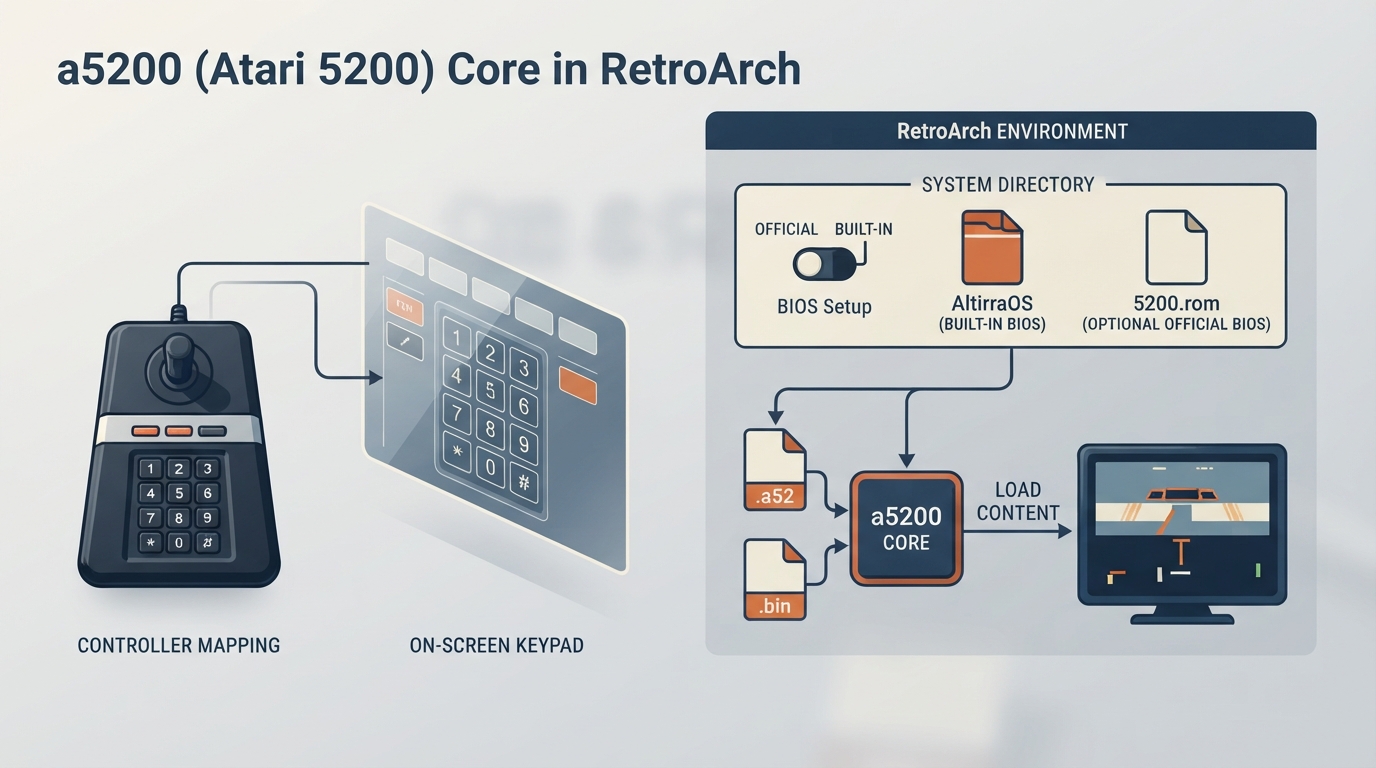
The a5200 core is a libretro core for the Atari 5200 that is based on Atari800 2.0.2 and was originally written for the GCW Zero. It is designed to be fast on low-powered hardware and to be plug and play. It includes an open-source BIOS built in and provides an on-screen keypad for the twelve keys of the 5200 controller.
Credits and License
The a5200 core is authored by Petr Stehlik, zx81, Alekmaul, and wavemotion-dave. It is licensed under GPLv2.
Prerequisites
- RetroArch installed with the a5200 core available.
- Content in a supported format (see below).
- Optional: the original 5200.rom BIOS file if you want to use the official BIOS instead of the built-in AltirraOS.
Supported Content Extensions
The a5200 core loads content with the .a52 or .bin file extensions. The associated RetroArch database for this core is Atari - 5200.
BIOS Setup
The core has AltirraOS built in and runs without a BIOS file. To use the original Atari 5200 BIOS instead, set the BIOS core option to Official and place the BIOS file in RetroArch's system directory.
The optional BIOS file is named 5200.rom. Its description in the documentation is "5200 BIOS - Optional" and its MD5 checksum is 281f20ea4320404ec820fb7ec0693b38.
Setup Steps
- Install the a5200 core in RetroArch (the core is available through the standard core download process).
- If you want to use the original BIOS instead of the built-in AltirraOS, obtain the 5200.rom file and place it in RetroArch's system directory, then set the BIOS core option to Official. The BIOS (Restart) option takes effect when the content is restarted.
- Load your Atari 5200 content (a .a52 or .bin file) through RetroArch.
- If needed, configure Port 1 controls under Controls > Port 1 Controls > Device Type. The default device type is Atari 5200 Joystick (OSD Keypad), which shows an on-screen keypad via the L button.
- Adjust core options as desired from the core options menu.
Core Options
The a5200 core provides options in three categories: Audio, Input, and General. Settings marked (Restart) take effect when the content is restarted. The default setting for each option is shown in bold in the source documentation.
- Audio: High Fidelity POKEY (Restart) [default: ON], Audio Filter [default: OFF], Audio Filter Level [default: 60%].
- Input: Controller Hacks [default: OFF], Pause acts as Reset [default: OFF], Digital Joystick Sensitivity [default: Auto], Analog Joystick Sensitivity [default: Auto], Analog Joystick Response [default: Linear], Analog Joystick Deadzone [default: 15%], Analog Device [default: Analog Stick].
- General: BIOS (Restart) [default: Official], Interframe Blending [default: OFF], Hi-Res Artifacting Mode [default: None].
Controller Configuration
Port 1 can be configured as one of two device types under Controls > Port 1 Controls > Device Type: Atari 5200 Joystick (OSD Keypad) or Atari 5200 Joystick (Direct Keypad Buttons). The default is Atari 5200 Joystick (OSD Keypad), where the L button shows and hides an on-screen keypad and the A button presses the highlighted key.
Port 2 is a plain Atari 5200 joystick. The Controller Hacks option maps player 2 to player 1's right stick for the dual-stick games Robotron: 2084 and Space Dungeon, or swaps the ports for Wizard of Wor.
Supported Frontend Features
The core supports Restart, Screenshots, States, Rewind, Netplay, Core Options, Controls, and Remapping. It does not support Saves, Memory Monitoring (achievements), RetroArch Cheats, Native Cheats, Multi-Mouse, Rumble, Sensors, Camera, Location, Subsystem, Softpatching, Disk Control, Username, Language, Crop Overscan, or LEDs.
Other Atari 5200 Cores
There is also an Atari800 core for Atari 8-bit computer systems and the 5200, documented separately.
Reference table · Scroll horizontally to see all columns.
| Feature | Supported |
|---|---|
| Restart | Yes |
| Screenshots | Yes |
| Saves | No |
| States | Yes |
| Rewind | Yes |
| Netplay | Yes |
| Core Options | Yes |
| Memory Monitoring (achievements) | No |
| RetroArch Cheats | No |
| Native Cheats | No |
| Controls | Yes |
| Remapping | Yes |
| Multi-Mouse | No |
| Rumble | No |
| Sensors | No |
| Camera | No |
| Location | No |
| Subsystem | No |
| Softpatching | No |
| Disk Control | No |
| Username | No |
| Language | No |
| Crop Overscan | No |
| LEDs | No |
Reference table · Scroll horizontally to see all columns.
| Category | Option | Default | Notes |
|---|---|---|---|
| Audio | High Fidelity POKEY | ON | Restart required |
| Audio | Audio Filter | OFF | |
| Audio | Audio Filter Level | 60% | |
| Input | Controller Hacks | OFF | Options: OFF, Dual Stick, Swap Ports |
| Input | Pause acts as Reset | OFF | |
| Input | Digital Joystick Sensitivity | Auto | |
| Input | Analog Joystick Sensitivity | Auto | |
| Input | Analog Joystick Response | Linear | Option: Quadratic |
| Input | Analog Joystick Deadzone | 15% | |
| Input | Analog Device | Analog Stick | Option: Mouse |
| General | BIOS | Official | Restart required; options: Official, Internal (Altirra OS) |
| General | Interframe Blending | OFF | Options: Simple, Ghosting (65%), Ghosting (75%), Ghosting (85%), Ghosting (95%) |
| General | Hi-Res Artifacting Mode | None | Options: blue/brown 1, blue/brown 2, GTIA, CTIA |
Sources & references
Content responsibility: FrameTinker editorial desk. Source authors and software maintainers are credited separately below; this is not a claim of hands-on testing.
Published .
RetroArch: a5200 — official gaming software documentation https://raw.githubusercontent.com/libretro/docs/master/docs/library/a5200.mdRetrieved Oct 12, 2026Something doesn’t match your setup?
Suggest a correction