

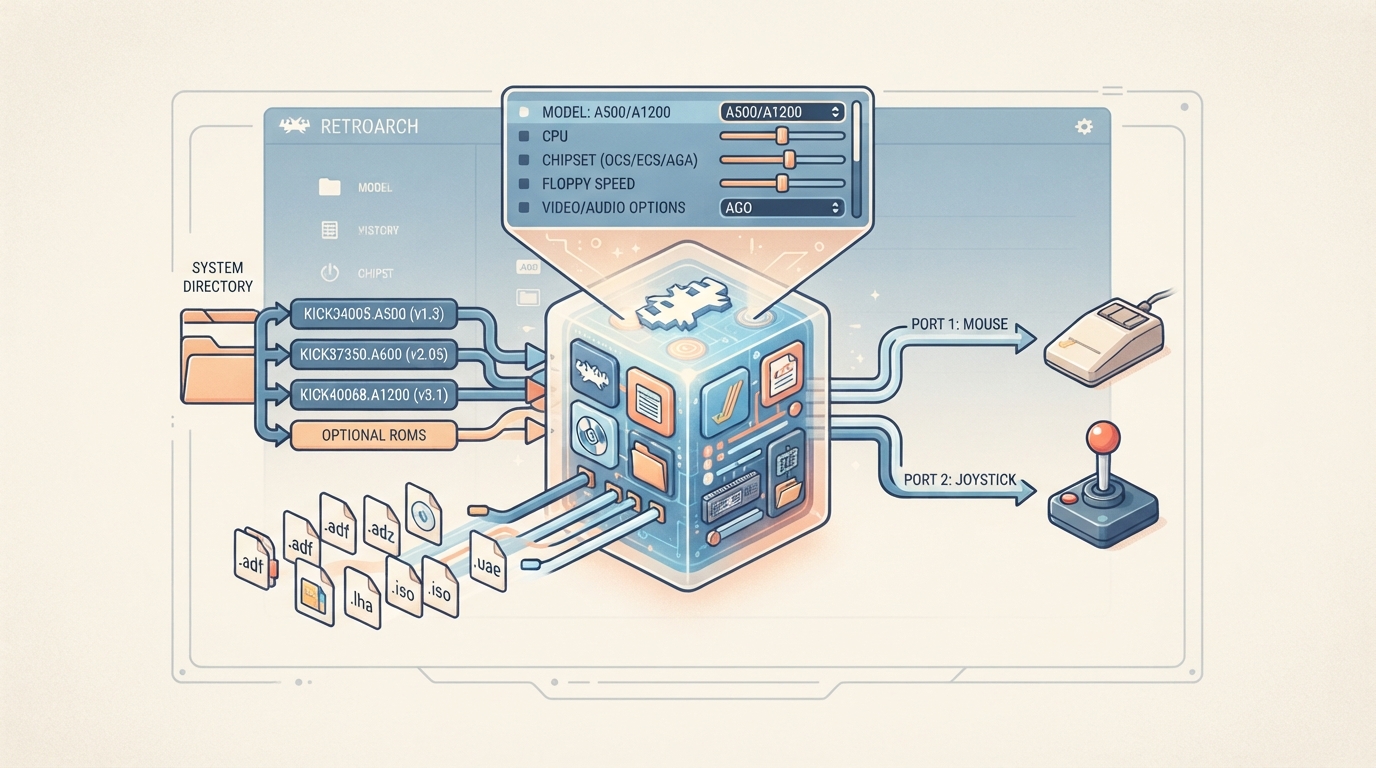
Amiberry is a lightweight, optimized Amiga emulator based on UAE, distributed as a libretro core for RetroArch. This guide summarizes the official documentation for the core: what firmware you need, which content files it loads, how the two controller ports are mapped, and what each documented core option does. All steps are source summaries drawn from that documentation and have not been hands-on tested.
Prerequisites
- A RetroArch installation that can load libretro cores.
- Appropriate Kickstart ROMs for the Amiga model you intend to emulate. The core requires appropriate Kickstart ROMs and cannot run without them.
- Firmware files placed in the frontend's system directory.
- A method for supplying content files, either from local files or through the supported formats listed below.
Required and optional Kickstart ROMs
Required or optional firmware files go in the frontend's system directory. The documentation lists three Kickstart ROMs as required and four as optional. The md5sum column in the source table is blank, so no checksums are available to quote here.
Supported content extensions
The Amiberry core can load content with the following file extensions: .adf, .adz, .dms, .fdi, .raw, .ipf, .hdf, .hdz, .lha, .lzh, .zip, .7z, .uae, .rp9, .m3u, .m3u8, .iso, .cue, .ccd, .nrg, .mds, and .chd. The associated RetroArch databases are Commodore - Amiga, Commodore - CD32, and Commodore - CDTV.
Setting up the core: source-backed steps
- Place the required Kickstart ROM files in the frontend's system directory. The three documented required files are kick34005.A500 (A500 Kickstart v1.3 r34.5), kick37350.A600 (A600 Kickstart v2.05 r37.350), and kick40068.A1200 (A1200 Kickstart v3.1 r40.68).
- Optionally, also place the documented optional files: kick33180.A500 (A500 Kickstart v1.2 r33.180), kick40068.A4000 (A4000 Kickstart v3.1 r40.68), kick40060.CD32 (CD32 Kickstart v3.1 r40.60), and ext40060.CD32 (CD32 Extended-ROM r40.60).
- Load Amiberry as the core in RetroArch and open your Amiga content. The core accepts the extensions listed above.
- Open the core options menu and confirm the Model setting matches the machine you are emulating. The default is A500 (512K Chip + 512K Slow, OCS, KS 1.3). Changing this requires a core restart.
- Set the Kickstart ROM option if you need a specific file instead of Automatic. Changing this also requires a core restart.
- Configure input with the Port 1 Device and Port 2 Device options. Port 1 defaults to Mouse and Port 2 defaults to Joystick.
- Adjust video and audio options as needed. Several of them, including Video Standard, Audio Rate, and Interpolation, require a core restart when changed.
Frontend features
The documentation lists States, Rewind, and Core Options as supported. The core's library name is 'Amiberry'.
Controllers
The core supports 2 ports. Each port can be set to one of the following device types: RetroPad, CD32 Pad, Joystick, Mouse, or None.
Core options at a glance
Core options are grouped by category. System options cover Model, Kickstart ROM, CPU Model, Chipset, Chipset (AGA), and Floppy Speed. Input options include Port 1 Device, Port 2 Device, Swap Ports, Joyport Order, Deadzone, Sensitivity, Analog Input, Joystick As Mouse, and Input Log File. Video options include Internal VSync, Video Standard, Crop Overscan, Status Line, Status Line Size, and On-Screen Keyboard. Audio options include Audio Rate, Interpolation, Sound Filter, Stereo Separation, and MIDI Output.
Documented limitations and scope
- The source documentation does not list md5sum values for the firmware files, so no checksums can be verified from this source.
- The documentation describes option behavior such as Crop Overscan having no effect in RTG/Workbench (Picasso96) modes and Floppy Speed offering a Turbo setting, but these descriptions are documentation statements rather than tested outcomes.
- No independent hands-on verification of any setting has been performed for this guide.
This guide intentionally stays within what the official documentation states. If you want authoritative detail on a specific option, such as the full list of Model presets or the MIDI output modes, consult the source links below.
Reference table · Scroll horizontally to see all columns.
| Filename | Description | Status |
|---|---|---|
| kick34005.A500 | A500 Kickstart v1.3 r34.5 | Required |
| kick37350.A600 | A600 Kickstart v2.05 r37.350 | Required |
| kick40068.A1200 | A1200 Kickstart v3.1 r40.68 | Required |
| kick33180.A500 | A500 Kickstart v1.2 r33.180 | Optional |
| kick40068.A4000 | A4000 Kickstart v3.1 r40.68 | Optional |
| kick40060.CD32 | CD32 Kickstart v3.1 r40.60 | Optional |
| ext40060.CD32 | CD32 Extended-ROM r40.60 | Optional |
Reference table · Scroll horizontally to see all columns.
| Category | Option | Default (documented) |
|---|---|---|
| System | Model | A500 (512K Chip + 512K Slow, OCS, KS 1.3) |
| System | Kickstart ROM | Automatic |
| System | CPU Model | Auto |
| System | Chipset | Auto |
| System | Chipset (AGA) | Auto |
| System | Floppy Speed | 1x (Normal) |
| Input | Port 1 Device | Mouse |
| Input | Port 2 Device | Joystick |
| Input | Swap Ports | disabled |
| Input | Joyport Order | Automatic |
| Input | Deadzone | 33% |
| Input | Sensitivity | 18 |
| Input | Analog Input | enabled |
| Input | Joystick As Mouse | disabled |
| Input | Input Log File | disabled |
| Video | Internal VSync | disabled |
| Video | Video Standard | Auto |
| Video | Crop Overscan | Disabled |
| Video | Status Line | Disabled |
| Video | Status Line Size | 1x |
| Video | On-Screen Keyboard | Disabled |
| Audio | Audio Rate | Auto |
| Audio | Interpolation | Auto |
| Audio | Sound Filter | Off |
| Audio | Stereo Separation | 7 (Amiga Default) |
| Audio | MIDI Output | Disabled |
Sources & references
Content responsibility: FrameTinker editorial desk. Source authors and software maintainers are credited separately below; this is not a claim of hands-on testing.
Published .
RetroArch: amiberry — official gaming software documentation https://raw.githubusercontent.com/libretro/docs/master/docs/library/amiberry.mdRetrieved Oct 12, 2026Something doesn’t match your setup?
Suggest a correction