

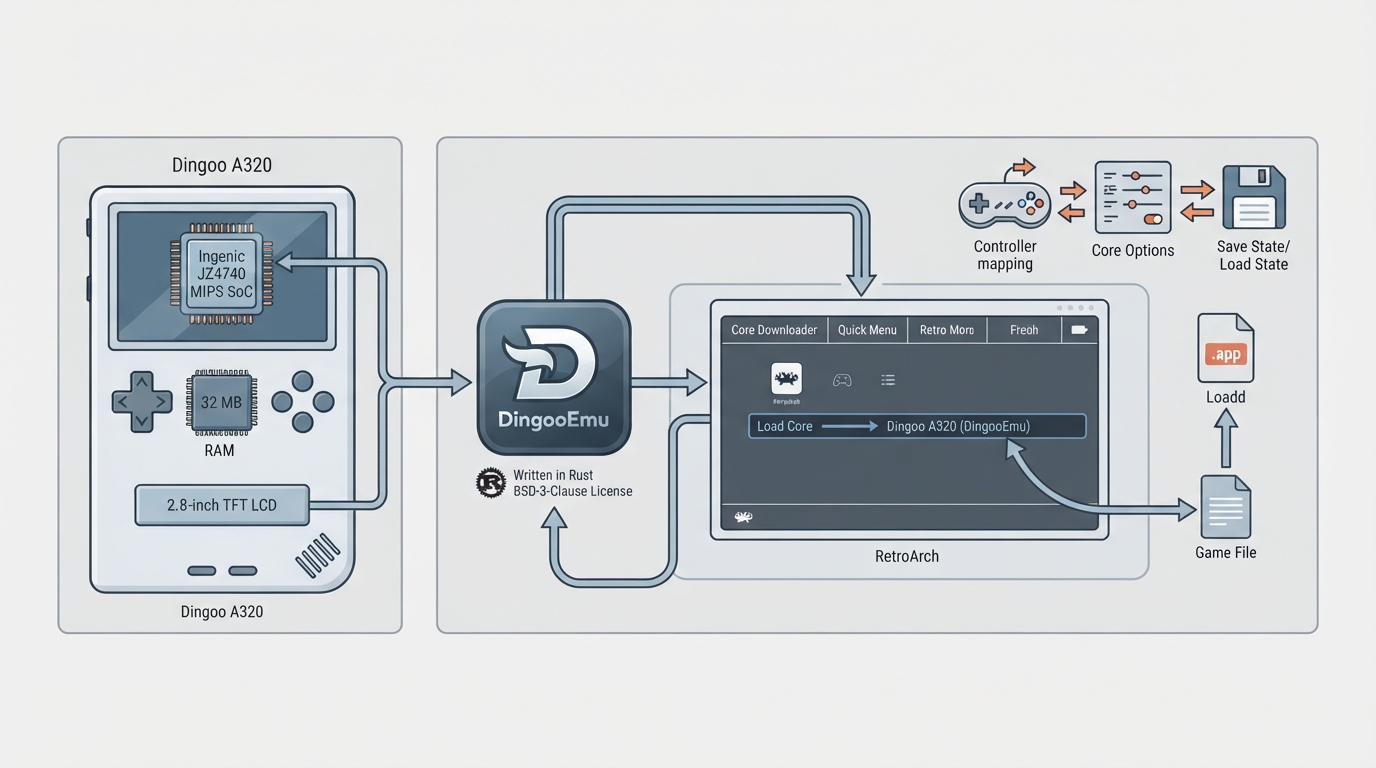
DingooEmu is a libretro core that emulates the Dingoo A320, a handheld game console from Dingoo Digital Technology. Its official RetroArch documentation page describes the emulated hardware, the content it loads, the settings it exposes and the features it does or does not support. This guide reorganizes that page into a practical setup walkthrough.
What the core emulates
The emulated target is the Dingoo A320, a handheld built around an Ingenic JZ4740 MIPS SoC running at 336-400 MHz, with 32 MB of RAM and a 2.8-inch 320×240 TFT LCD screen. The device is known for its open-source community firmware such as Dingux and OpenDingux and for its homebrew ecosystem. DingooEmu itself is written in Rust and provides a libretro core front-end.
Core identity details
- Author: Aloys
- License: BSD-3-Clause
- Library name shown in RetroArch: Dingoo A320 (DingooEmu)
- BIOS or firmware files: none required
Prerequisites
Because no BIOS or firmware files are required, the main prerequisite is content the core can load. It accepts files with the .app extension, and RetroArch associates it with the Dingoo A320 database. Obtain such content lawfully from your own sources; this guide does not cover downloading games.
Setting up the core in RetroArch
- 1. Install the DingooEmu core through RetroArch's core downloader so it registers under the library name "Dingoo A320 (DingooEmu)".
- 2. Load a .app content file and select the DingooEmu core if RetroArch prompts for a core choice.
- 3. Adjust core-specific settings from the core options menu (see the options below).
- 4. Remap buttons if the default layout does not match your controller, using RetroArch remapping or the Swap A/B Buttons option.
- 5. Use save states and saves as needed; both are supported by the core.
Video and audio output
The core outputs video in the XRGB8888 pixel format at 320×240 resolution, matching the native panel of the emulated handheld. Audio is output as stereo at 22050 Hz. Save states, cheats and core options are described as fully implemented in the documentation.
Input mapping
The default device type in the controls menu is RetroPad, listed as a gamepad. User 1 inputs are described as D-Pad Up, Down, Left and Right; A, B, X and Y; Start and Select; and L and R.
Core options
The core exposes six options: Audio Volume, Key Auto-Repeat Delay, Key Auto-Repeat Period, Swap A/B Buttons, CPU/HLE Debug Logging, and Unknown MIPS Instruction Policy. See the options table for their identifiers, purposes and defaults.
Known limitations
The documentation lists the following features as not supported: Rewind, Netplay, memory monitoring for achievements, native cheats, multi-mouse, rumble, sensors, camera, location, subsystem, softpatching, disk control, username, language, crop overscan and LEDs. Supported features include restart, saves, states, core options, RetroArch cheats, controls and remapping.
Where to find the project and report issues
The documentation links to the DingooEmu repository, the libretro core info file and the core issue tracker. Use the tracker for problems specific to the core.
Reference table · Scroll horizontally to see all columns.
| Option | Identifier | Purpose | Default |
|---|---|---|---|
| Audio Volume | dingooemu_volume | Set the audio volume level | 100% |
| Key Auto-Repeat Delay | dingooemu_repeat_delay | Delay before key auto-repeat starts (in frames) | 24 |
| Key Auto-Repeat Period | dingooemu_repeat_period | Interval between key auto-repeat events (in frames) | 6 |
| Swap A/B Buttons | dingooemu_swap_ab | Swap the A and B button mappings | disabled |
| CPU/HLE Debug Logging | dingooemu_debug_logging | Enable debug logging for CPU and HLE operations | disabled |
| Unknown MIPS Instruction Policy | dingooemu_unknown_instruction | Behavior when encountering unknown MIPS instructions | skip |
Sources & references
Content responsibility: FrameTinker editorial desk. Source authors and software maintainers are credited separately below; this is not a claim of hands-on testing.
Published .
RetroArch: dingooemu — official gaming software documentation https://raw.githubusercontent.com/libretro/docs/master/docs/library/dingooemu.mdRetrieved Oct 12, 2026Something doesn’t match your setup?
Suggest a correction