

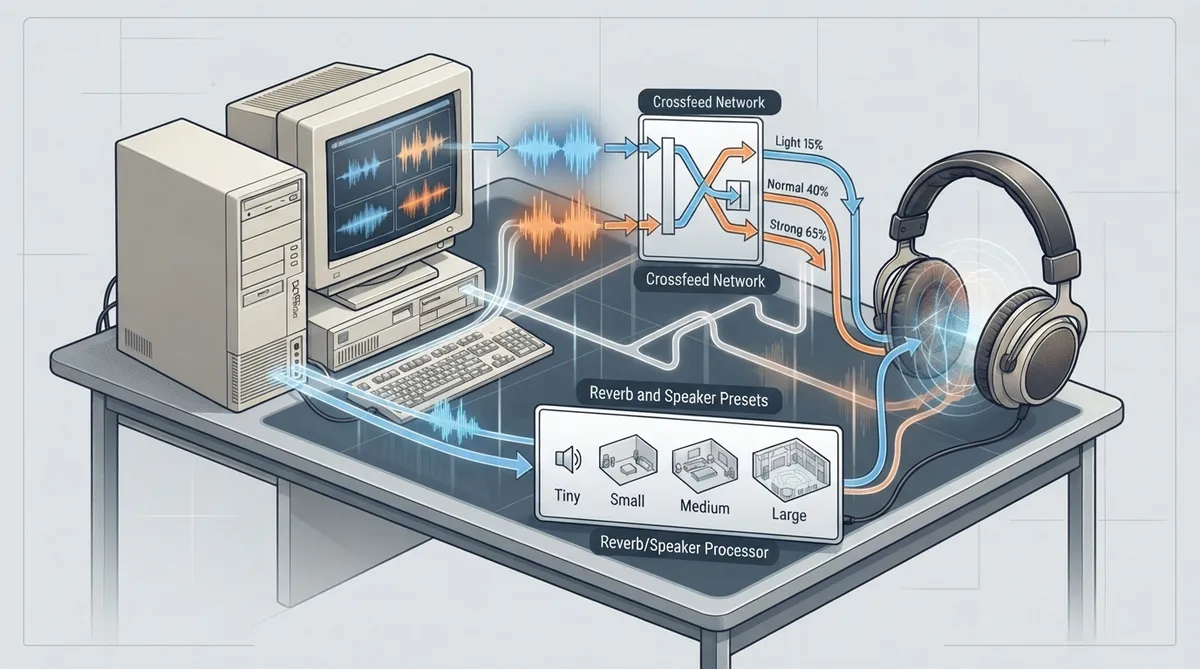
DOSBox Staging 0.83 documents two groups of mixer effects. Crossfeed blends a portion of one stereo channel into the other to tame hard-panned headphone listening. Reverb offers a set of room and speaker-simulation presets. This guide summarizes the documented options for each so you can tell which values exist and what each one is described as doing.
Why Crossfeed Exists
On headphones, audio where some sounds appear only in the left or right channel can be distracting and unpleasant. The documentation names Dual OPL and CMS (Game Blaster) soundtracks as the clearest example, because instruments there can be hard-panned fully to one side. Crossfeed addresses this by mixing part of the left channel's signal into the right channel and vice versa, which the manual describes as producing a more natural listening experience.
Documented Crossfeed Settings
- Crossfeed options described in the manual:
- - off: no crossfeed (the default).
- - light: light crossfeed at strength 15.
- - normal: normal crossfeed at strength 40.
- - strong: strong crossfeed at strength 65.
The three named strengths sit at fixed values, so the practical choice is how much channel blending you want. Light crossfeed (strength 15) is the most conservative of the three, normal (strength 40) sits in the middle, and strong (strength 65) blends the channels most heavily. Because the manual states these as fixed strengths, the presets are the way to select a documented crossfeed level rather than adjusting a free-form number.
Reverb and Speaker-Simulation Presets
Reverb is documented with an off default and an on toggle that enables the medium preset, plus a series of named presets ranging from small-speaker simulation to a large hall.
- Documented presets and their described purposes:
- - off: no reverb (the default).
- - on: enables the medium preset.
- - tiny: simulates a small integrated speaker in a room; designed for small-speaker audio systems such as PC Speaker, Tandy, PS/1 Audio and LPT DAC devices.
- - small: adds a subtle sense of space; suggested for games using a single synth channel, typically OPL, for both music and sound effects.
- - medium: a medium room preset described as working well with a wide variety of games.
- - large: a large hall preset recommended for games that use separate channels for music and digital audio.
Choosing a Preset by Game Audio Path
The manual's preset descriptions map onto how a game produces sound rather than onto personal taste. Games running on small-speaker systems (PC Speaker, Tandy, PS/1 Audio, LPT DAC) match the tiny preset, which simulates a small integrated speaker in a room. Games that route both music and effects through a single synth channel, typically OPL, match the small preset. When music and digital audio use separate channels, the large hall preset is the documented recommendation, and medium is described as a general fit for a wide variety of games.
For reverb, the on toggle is a shortcut to the medium preset rather than a separate effect level, so enabling reverb with on and choosing medium produce the same documented result.
How the Two Effects Relate
Crossfeed and reverb are documented as separate effects with their own settings and their own defaults, and both default to off. Crossfeed targets stereo separation on headphones, where hard-panned instruments are the problem, while reverb targets a sense of room or speaker space. Because the manual presents them as independent options, a setup can enable one, the other, or both.
Reference table · Scroll horizontally to see all columns.
| Crossfeed setting | Documented behavior |
|---|---|
| off | No crossfeed (default) |
| light | Light crossfeed, strength 15 |
| normal | Normal crossfeed, strength 40 |
| strong | Strong crossfeed, strength 65 |
Reference table · Scroll horizontally to see all columns.
| Reverb setting | Documented behavior |
|---|---|
| off | No reverb (default) |
| on | Enables the medium preset |
| tiny | Small integrated speaker in a room; for small-speaker systems (PC Speaker, Tandy, PS/1 Audio, LPT DAC) |
| small | Subtle sense of space; suggested for single synth channel games, typically OPL |
| medium | Medium room; described as working well with a wide variety of games |
| large | Large hall; recommended for games using separate channels for music and digital audio |
Sources & references
Content responsibility: FrameTinker editorial desk. Source authors and software maintainers are credited separately below; this is not a claim of hands-on testing.
Published .
DOSBox Staging: mixer effects — official gaming software documentation https://raw.githubusercontent.com/dosbox-staging/dosbox-staging/main/website/docs/0.83/manual/sound/mixer-effects.mdRetrieved Nov 1, 2026Something doesn’t match your setup?
Suggest a correction